63 Copyright © 2024 Cisco Systems, Inc. All rights reserved.D15519.02 | 2024 JANUARY | Cisco Room Kit EQX Installation Guide
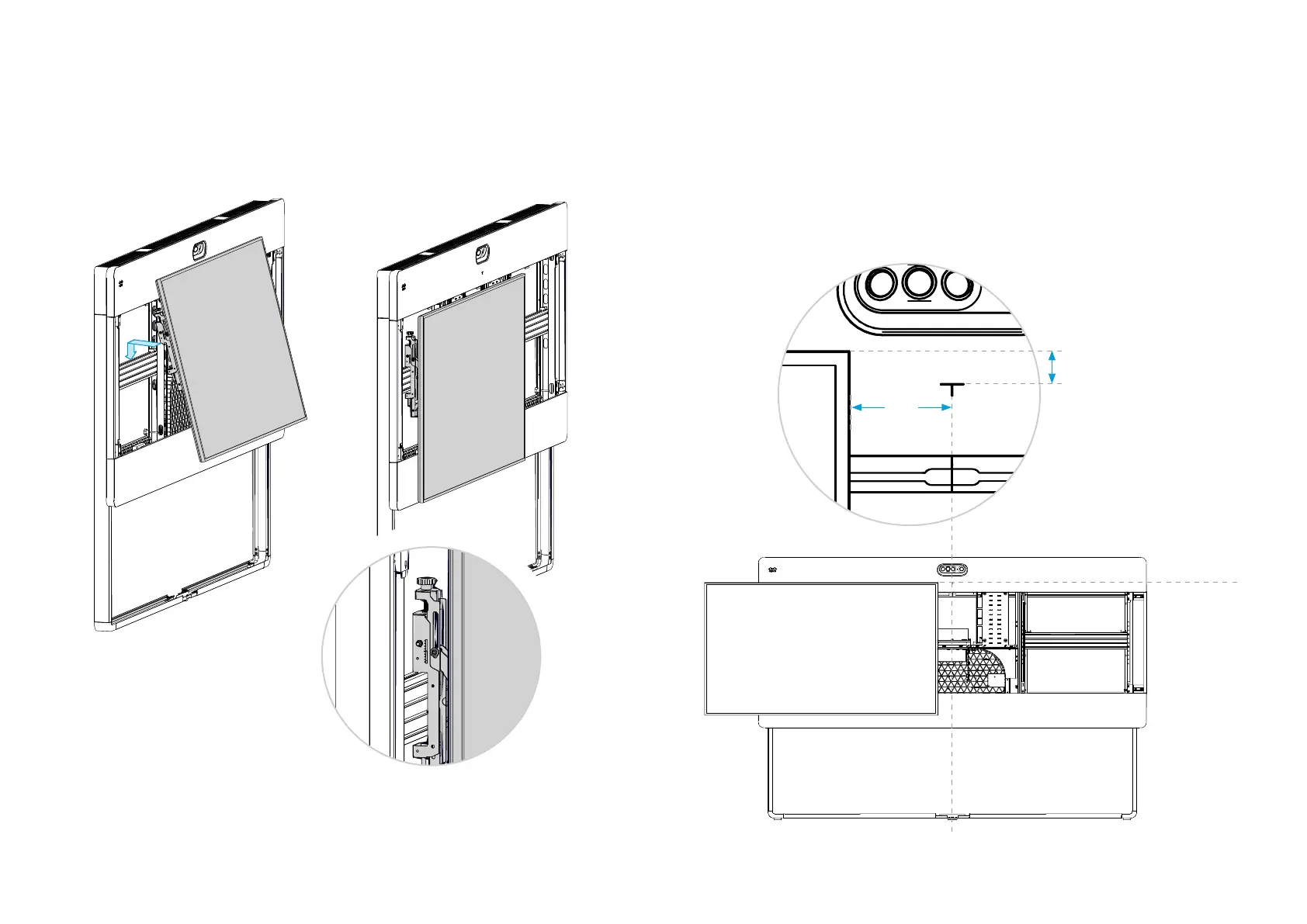
23 .1. Temporarily hang the screen on the VESA rail
1. Push both interface arms firmly, to put them in pop-out mode. They pop out quickly, so
mind your fingers!
2. Hang the screen onto the rail 50-70 mm (2-3 in.) to the side of the system center line. Make
sure the interface arms hooks into the groove as shown in the close-up.
The T-mark on the grille shows:
• The system center line
• The top of the screens
3. Push the screen gently, so that the screen stays popped in.
If it doesn’t lock in pop-in mode, use the lower depth adjustment wheels (see step 26.2) to
make more space between the screen and mounting structure. Then, try again.
4. Measure the distance B accurately; you need it in step 23.2.
5. Measure the distance A; and take note whether the screen is higher or lower than the
T-mark. You need this information in step 23.3.
B
A
System center line
Top of
screens when
mounting is
finished
The interface arms
hooks into the groove
on top of the rail.


 To Next Page