68 Copyright © 2024 Cisco Systems, Inc. All rights reserved.D15519.02 | 2024 JANUARY | Cisco Room Kit EQX Installation Guide
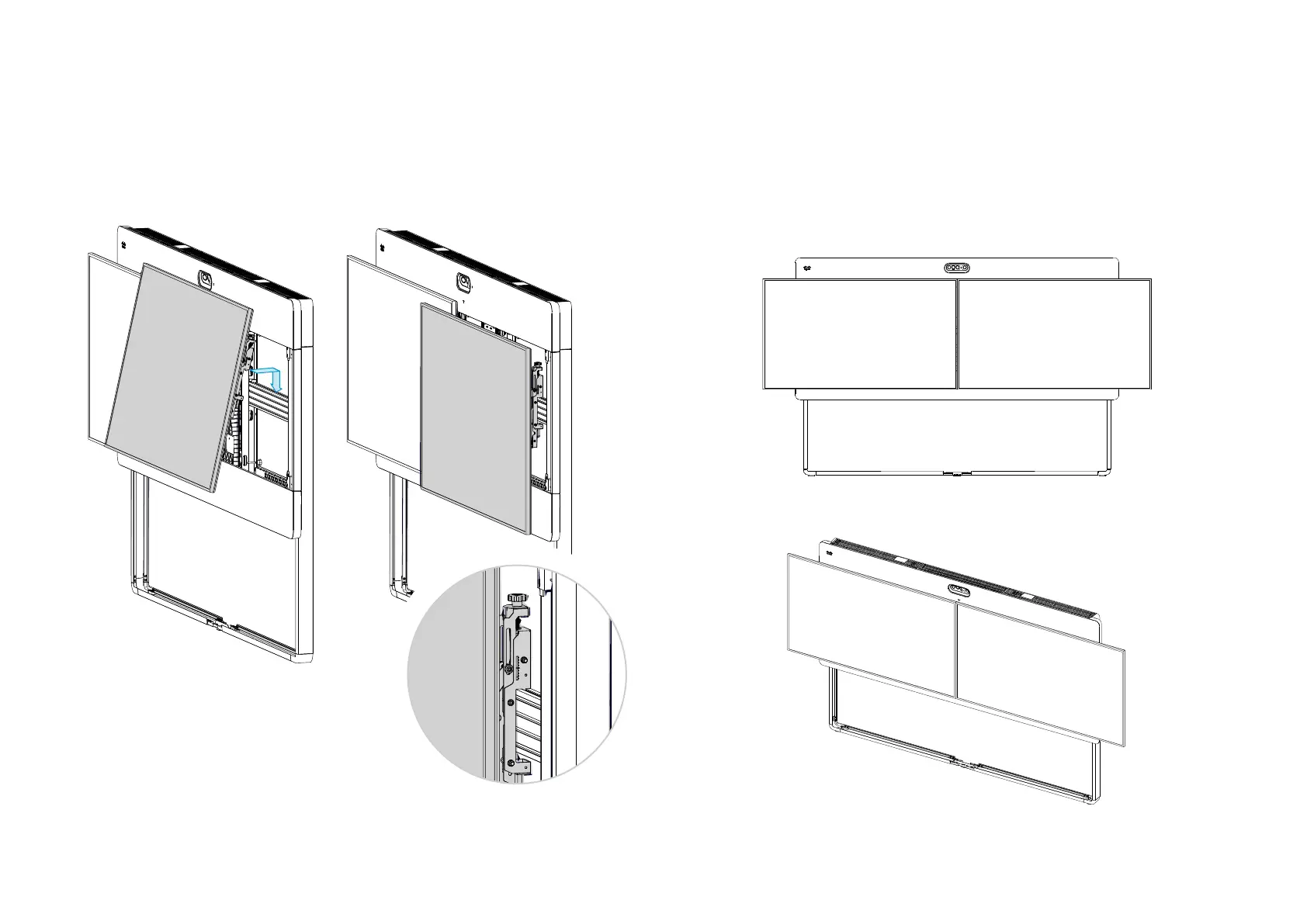
25.2. Hang the right screen on the VESA rail
1. Push both interface arms firmly, to put them in pop-out mode. They pop out quickly, so
mind your fingers!
2. Hang the right screen onto the VESA rail so that its left interface arm touches the screen
bracket stopper.
Make sure it hooks into the groove as shown in the close-up.
3. Push the screen gently, so that the screen stays popped in.
If it doesn’t lock in pop-in mode, use the lower depth adjustment wheels (see step 26.2) to
make more space between the screen and mounting structure. Then, try again.
Now, the upper left corner of the screen should match the T-mark on the grille. If it’s off
horizontally, move the screen bracket stopper until it matches (refer to step 23.2).
You will fine-adjust the height and depth of both screens in step 26.
The interface arms
hooks into the groove
on top of the rail.


 To Next Page