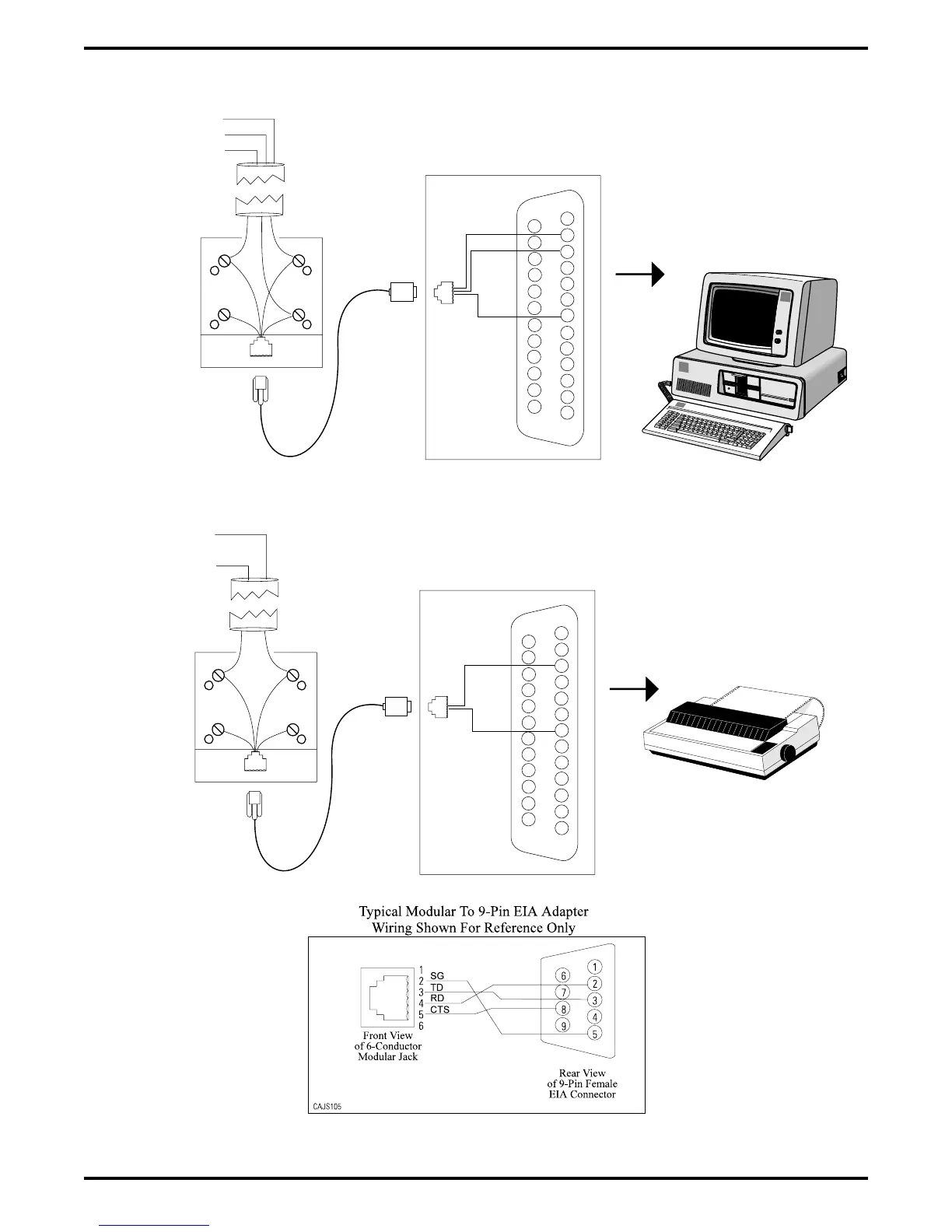
Figure 2–16: Connecting Data Devices Through Modular Connections
IBM
IBM
IBM
5
4
3
2
Front View
of Jack
6 5 4 3 2 1
TD
RD
SG
}
From RS232
Data Port A
Typical VDT
Interface
Typical
625A2
Modular
Jack
Industry Standard
Modular Line Cord
(4-conductor)
Typical modular to EIA adapter
wiring shown for reference only.
Video Display
Terminal
Typical
Data Printer
1
2
3
4
5
6
7
8
9
10
11
12
13
14
15
16
17
18
19
20
21
22
23
24
25
1
2
3
4
5
6
Front
View of
Jack
SG
RD
TD
5
4
3
2
Front View
of Jack
6 5 4 3 2 1
TD
SG
}
From RS232
Data Port B
Typical Data
Printer Interface
Typical
625A2
Modular
Jack
Industry Standard
Modular Line Cord
(4-conductor)
Typical modular to EIA adapter
wiring shown for reference only.
1
2
3
4
5
6
7
8
9
10
11
12
13
14
15
16
17
18
19
20
21
22
23
24
25
1
2
3
4
5
6
Front
View of
Jack
SG
RD
CAJS043C
IMI66–107 Digital Telephone System
Installing The DSU 2 – 35



 To Next Page