HEX
DUMP
Hex
dump
is
not
a feature that you will use for everyday printing.
In this mode, the
MPS
1200 prints the hexadecimal value
of
every
code it receives
as
well
as
the character,
or
the control code, each
value stands for.
And
the
MPS
1200 goes
one
step further by
actually printing the abbreviation
of
each
control
code.
Most
print-
ers
show
only a
period
for these
"hard-to-remember"
control
codes.
Hex
dump
is
a
very
powerful
program
debugging
feature.
When
your
program
doesn't
print
what
it's
supposed
to, hex
dump
shows
you
the exact codes the
MPS
1200
is
receiving.
The
codes the
MPS
1200 receives
mayor
may
not
be
what
you
intended, depending
on
what
translations
your
BASIC
and
your
computer
interface make.
Hex
dump
mode
is
turned
on
by holding
down
both
the FF and
LF
switches
on
the
control
panel while
you
turn
on
power
to the
printer.
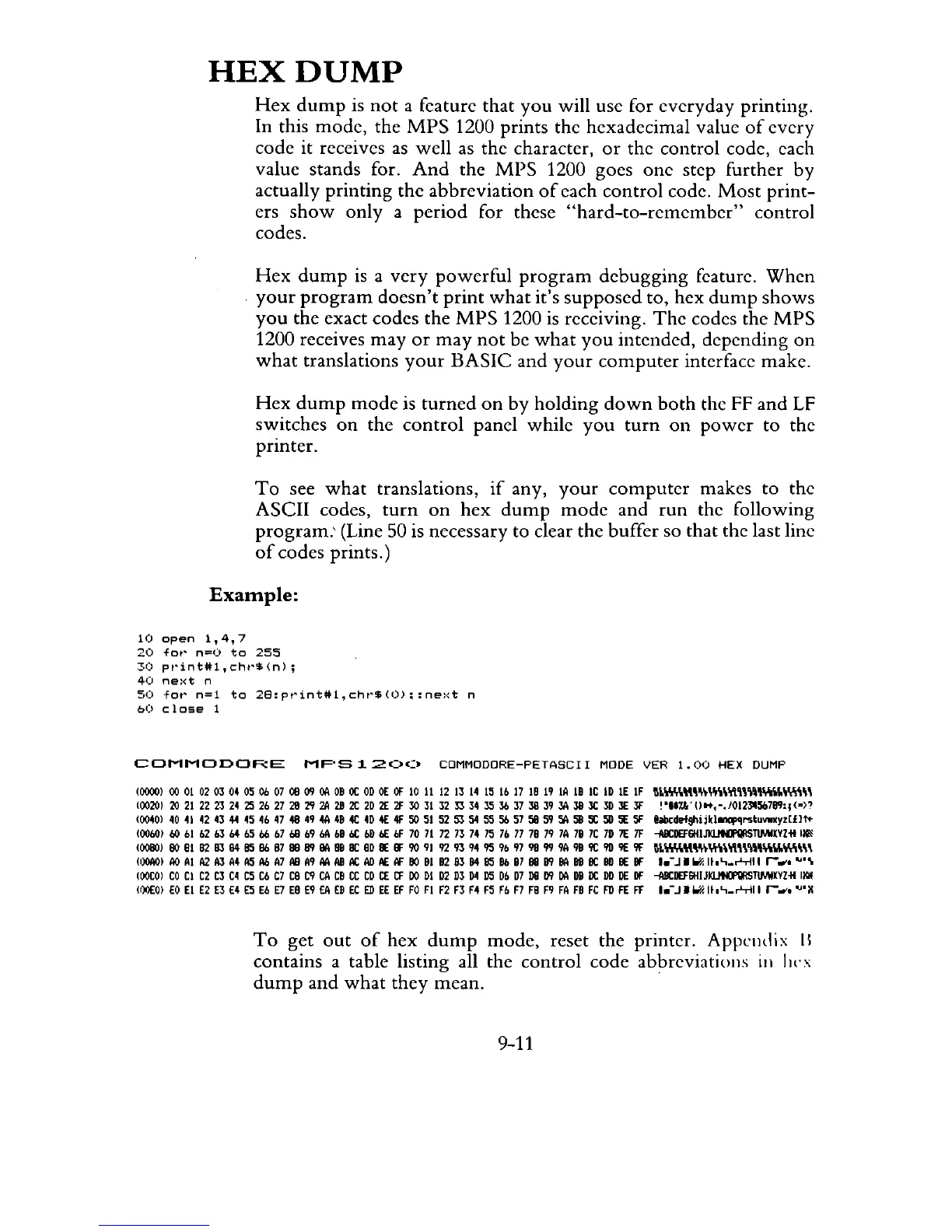
To
see
what
translations,
if
any,
your
computer
makes to the
ASCII codes,
turn
on
hex
dump
mode
and
run
the following
program.'
(Line 50 is necessary to clear the buffer so that the last line
of
codes prints.)
Example:
10
open
1,4,7
20
for
n=O
to
255
30
print#l,chr$(n);
40
next
n
50
for
n=l
to
28:print#1,chrS(O)=:next
n
60
close
1
COMMODORE
MF'S
1
20<:'
CDMMODORE-PETASCI
I MODE
VER
1.00
HEX
DUMP
10000)
00
01
02030405
06 07
08
(J9
OA
08
OC
OD
OE
OF
10
11
12 13
14
15
Ib
17 18 19
IA
18
IC
ID
IE
IF
~Lw.U'm~Wlt\\'I'I'IWoIo\yim
10020)
20
21222324
2S
2b
27 28
~
2A
28
2C
2D
2E
2F
JO
3132
II
34
JS
Jb
37
J8
39
JA
J8
JC
3D
JE
JF
'"
..
l1.,O".-.JOI2l11:iD7l1'1:I(->?
10040)
40
41
42 43
44
4S
4b
47
48
49
4A
48
4C
4D
4£
4f
SO
51
52
SJ
54
55
Sb
57 58 59
SA
58
SC
SO
5E
SF
bbcd~shijkl_qrslu\l1l'Yl[£)1<-
10060)
60
bl
b2
bJ
b4
b5
b6
b7
bB
b9
loA
b8
6C
bD
I£.
bF
70
71
72 73 74
75
7b
77
78
79
7A
78
7C
7D
7E
7F
-illlCDEF6HIJl<l..lNFllRSTlMIXYlillltl'
10080)
BO
81
B2
BJ
84
B5
86
87
BB
lI'I
lIA
BB
Be
8D
lIE
BF
90
91
92 93
94
9S
9b
97
98
99
9A
98
9C
9D
9E
9F
"\y'\''''''~~~\Yl.m''''''IoIow.m
100A0)
AD
Al
A2
AJ
A4
AS
A6 A7
All
A9
AA
All
At
AD
AE
AF
BO
81
B2
BJ
84
B5
86 87
BB
lI'I
SA
BB
Be
BD
lIE
BF
I.-j.
"""
II,"_~II
r-,."
""\
IOOCO)
CO
CI
C2 C3
C4
CS
Cb
C7
CB
C9
CA
C8
CC
CD
CE
CF
DO
DI
D2 D3
D4
D5
Db
D7
DB
D'1
DA
D8
DC
DD
DE
OF
-AllCDEF6HIJIILINI'IIlSTlMIXYlilllt\'
100E0)
EO
EI
E2
EJ
E4
ES
Eb
E7
E8 E9
EA
E8
EC
ED
EE
EF
FO
FI
F2 F3 F4 F5
Fb F7
FB
F9
FA
F8
FC
FD
FE
FF
1.-j."""II,"_~11
r-,.,,""X
To
get
out
of
hex
dump
mode,
reset the printer. Appendix
II
contains a table listing all the control code abbreviations
in
lIn;
dump
and
what
they
mean.
9-11



 To Next Page