Installing
the
Tractor-Feed
The
tractor-feed unit
is
used
with
continuous paper, labels
or
forms, and
is
quite easy to install.
It
uses
two
sprockets, which can
slide back and forth
to
adjust to paper width. These can be locked
into position
by
flipping the
locking
levers
on
the back
of
the
sprockets.
The
holes along the edges
on
each side
of
the paper fit
into
pins
on
these sprockets to feed the paper straight and evenly
through
the printer.
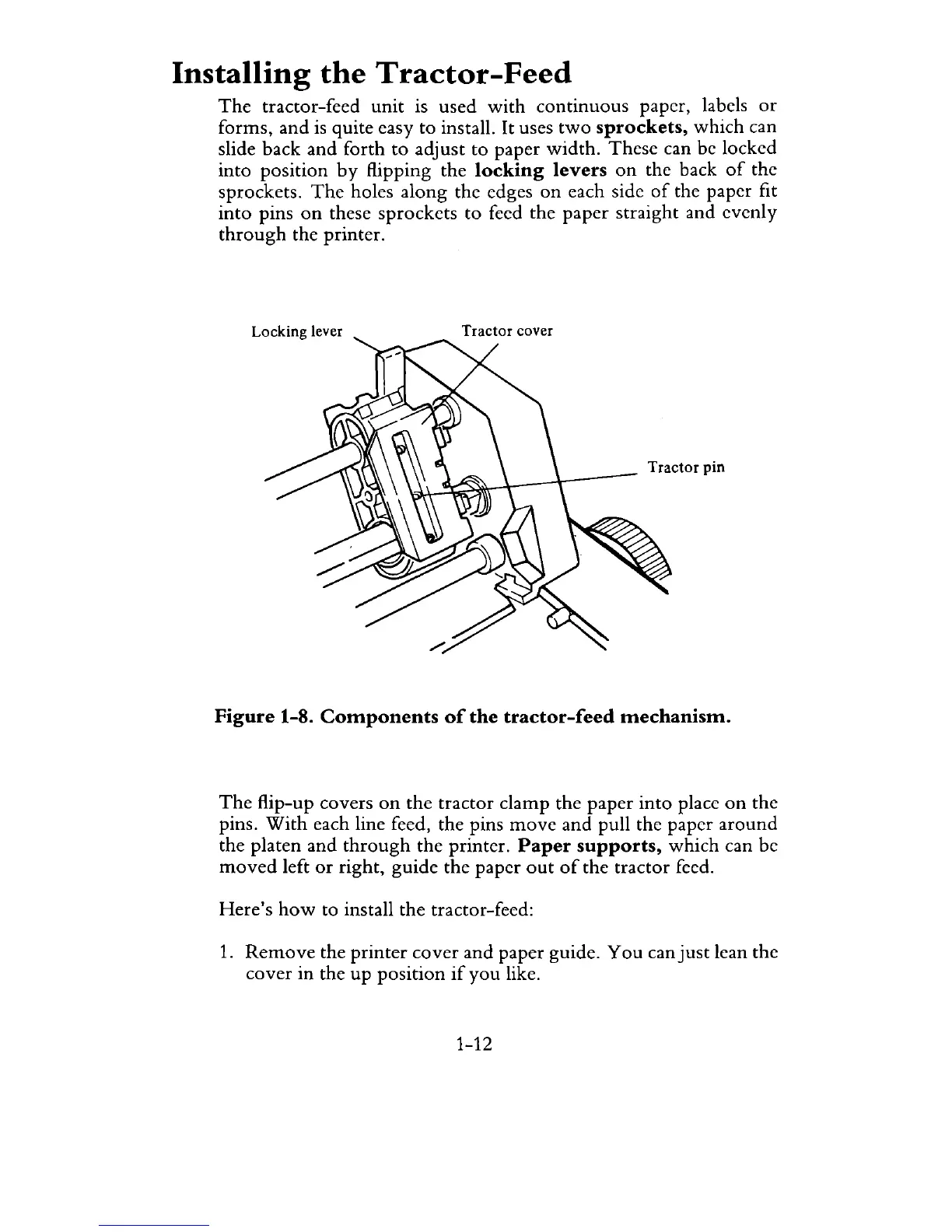
Locking lever
Tractor cover
Tractor pin
Figure
1-8.
Components
of
the
tractor-feed
mechanism.
The
flip-up covers
on
the tractor clamp the paper
into
place
on
the
pins.
With
each line feed, the pins
move
and pull the paper around
the platen and
through
the printer.
Paper
supports,
which can be
moved
left
or
right, guide the paper
out
of
the tractor feed.
Here's
how
to install the tractor-feed:
1.
Remove
the printer cover and paper guide. You can
just
lean the
cover in the
up
position
if
you like.
1-12



 To Next Page