EasyManua.ls Logo

Commodore MPS 1200 - Reverse Print

Commodore MPS 1200
250 pages
Print Icon
To Next Page IconTo Next Page
To Previous Page IconTo Previous Page
Loading...
Reverse
Print
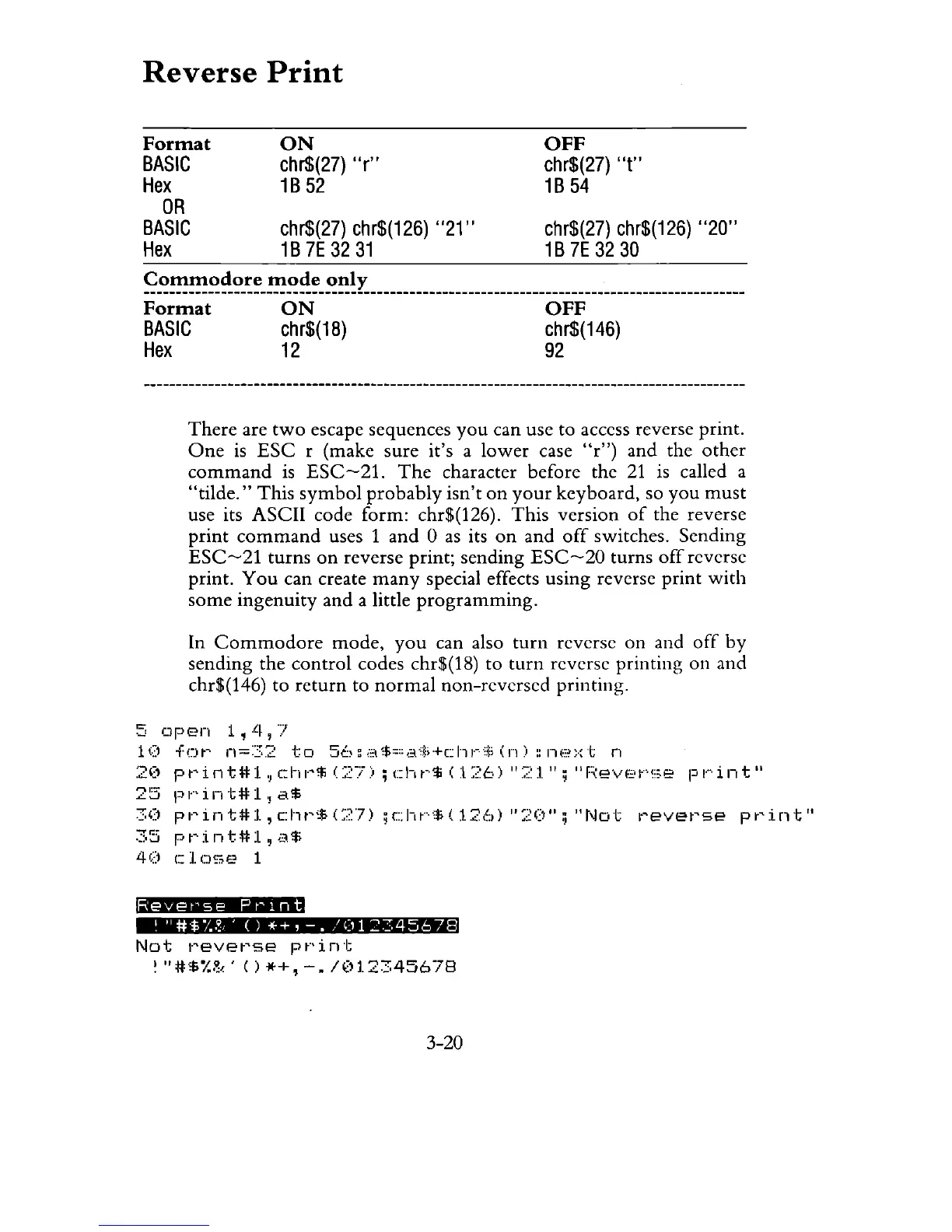
Format
BASIC
Hex
OR
BASIC
Hex
ON
chr$(27)
"r"
1B
52
chr$(27)
chr$(126)
"21"
1B
7E
32
31
OFF
chr$(27)
"t"
1B
54
chr$(27)
chr$(126)
"20"
1 B
7E
32 30
~~~~~~~_~~_~~~~_~~!L
________________________________________________________
_
Format
ON
OFF
BASIC
chr$(18)
chr$(146)
H9
12
92
There
are
two
escape sequences
you
can use to access reverse print.
One
is
ESC
r (make sure it's a
lower
case Ur") and the
other
command
is
ESC-21.
The
character before the
21
is called a
"tilde."
This
symbol
probably
isn't
on
your
keyboard, so
you
must
use its ASCII code form: chr$(126).
This
version
of
the reverse
print
command
uses 1 and 0
as
its
on
and
off
switches. Sending
ESC-21
turns
on
reverse print; sending
ESC-20
turns
off
reverse
print.
You
can create
many
special effects using reverse
print
with
some
ingenuity
and
a little
programming.
In
Commodore
mode,
you
can also
turn
reverse
on
and
off
by
sending the
control
codes chr$(18) to
turn
reverse printing
on
and
chr$(146) to
return
to
normal
non-reversed printing.
5
Dpen
1,4,7
10
for
n=32
to
56:a$=a$+chr$(n)~next
n
2('
pt'int#l.,
c:r',
1"$
(27)
;
cht··$
(1:,:6)
"::::-::1.";
"F(e\lE·t···!:;e
pl····int"
25
pr'int#l.!a$
30
pl·'int#l,c:ht'~~c::~7)
;c::ht····,td12,':d
":20";
"Not
t'evet'se
pt'int"
35
pt'int#:l,
;"'1$
40
c].
C)~;;e
1
Revet'se
P
t'
1 n t
,
"#
$
!.
,~,
' ( ) * + ,
-.
/
(1
1
::
-:;
4 5 6 7 8
Not
reverse
print
~
"#$I.~,'
()
*+,
-./(112345678
3-20

Related product manuals