EasyManua.ls Logo

Commodore MPS 1200 - Putting It All Together

Commodore MPS 1200
250 pages
Print Icon
To Next Page IconTo Next Page
To Previous Page IconTo Previous Page
Loading...
Why
two
numbers?
Consider
the
maximum
number
of
columns
that can be printed in a line. At 60 dots per inch, the MPS 1200 can
print
480 columns
of
dots in an 8-inch line.
And
at 240 dots per inch
the
MPS
1200 can
print
1,920 columns in a line!
But
the largest
number
BASIC
can send
is
255.
Obviously,
you need a
way
to
send larger numbers.
The
MPS
1200 solves this
problem
by
using the
two
numbers nl
and
n2 together to determine the
number
of
columns in a line.
The
first
number,
nl, indicates the
number
of
columns from 0 to 255.
The
second
number,
n2, indicates the
number
of
times 256
is
to be
added to the first
number.
With this scheme
you
can send any size
number
you
need.
You
can calculate
the
values
of
n1
and n2 for any
number
of
columns
you
need
by
dividing the
number
of
columns by 256.
The
quotient
will be n2 and the remainder will be
n1.
If
you
like,
you
can calculate
n1
and
n2
with
two
expressions:
N2
=
INT
(X/256)
N1
=
X-(256*N2)
where
x'is
the
number
of
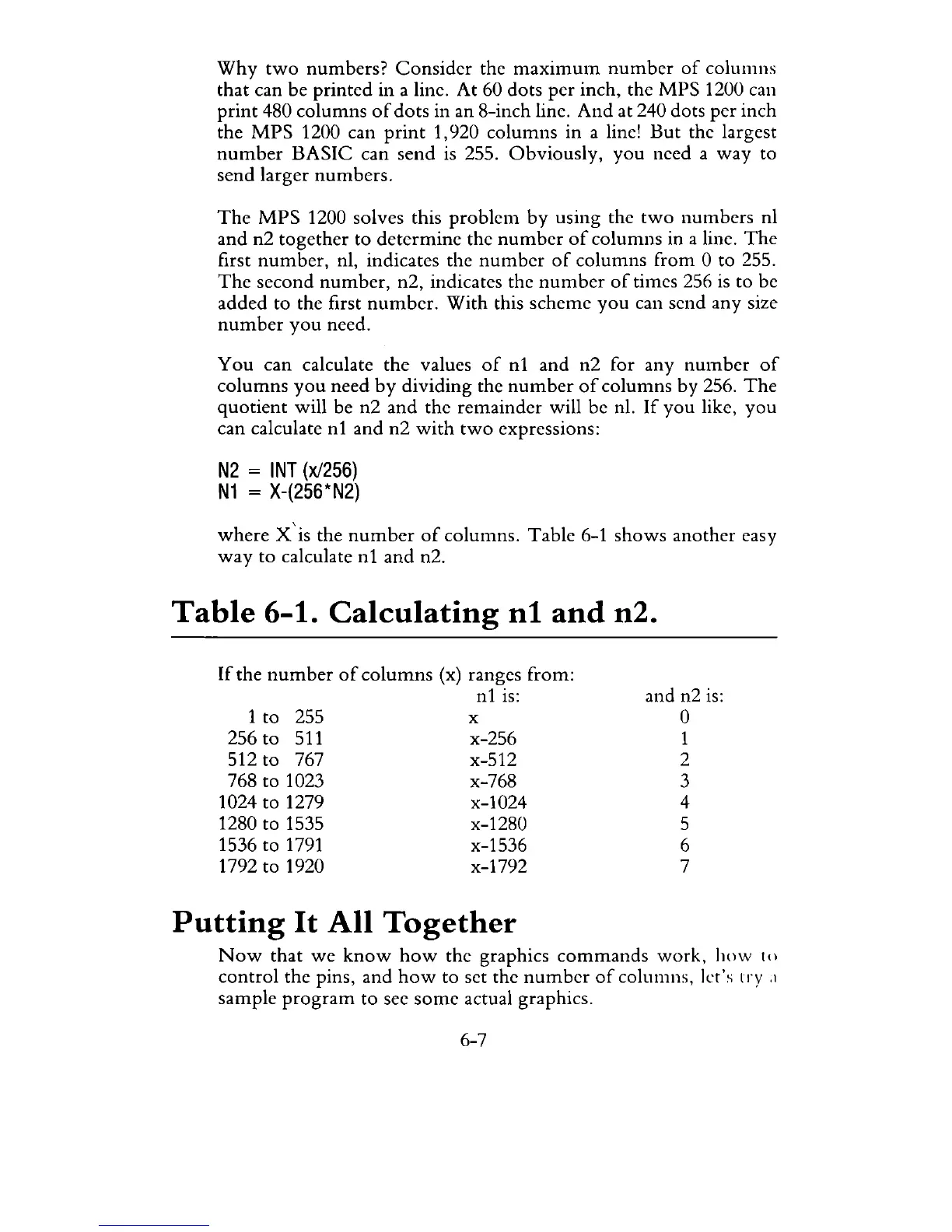
columns. Table 6-1 shows another easy
way
to calculate
n1
and n2.
Table
6-1.
Calculating
n1
and
n2.
If
the
number
of
columns
(x) ranges from:
n1
is:
1 to 255
256
to
511
512 to 767
768 to 1023
1024 to 1279
1280 to 1535
1536 to
1791
1792 to 1920
x
x-256
x-512
x-768
x-1024
x-1280
x-1536
x-1792
Putting
It
All
Together
and n2
is:
o
1
2
3
4
5
6
7
Now
that
we
know
how
the graphics
commands
work,
how
to
control
the pins, and
how
to set the
number
of
columns, let's
try
.1
sample
program
to see
some
actual graphics.
6-7

Related product manuals