EasyManua.ls Logo

Commodore MPS 1200 - Page 246

Commodore MPS 1200
250 pages
Print Icon
To Next Page IconTo Next Page
To Previous Page IconTo Previous Page
Loading...
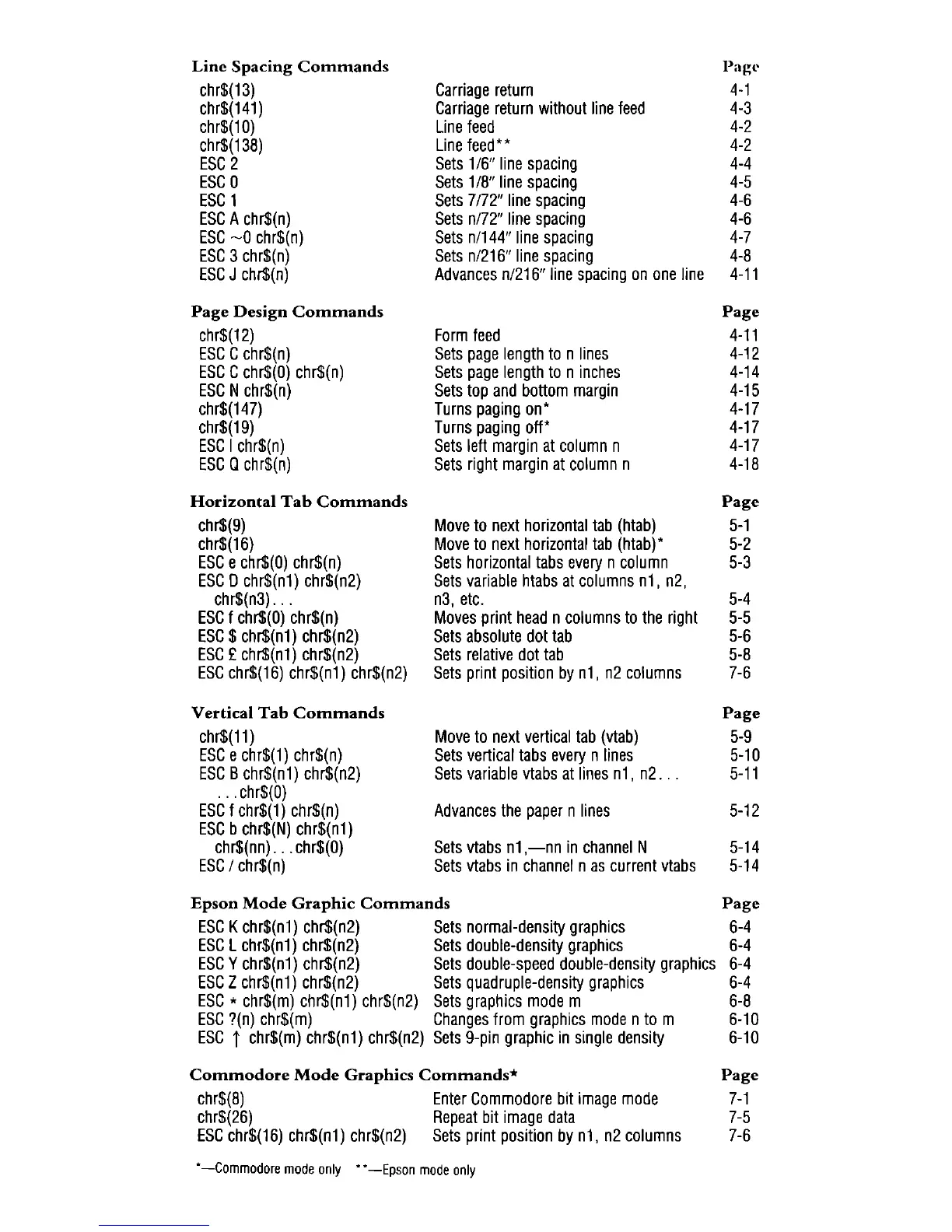
Line
Spacing
Commands
Pagl'
chr$(13)
Carriage
return
4-1
chr$(141)
Carriage
return
without
line
feed
4-3
chr$(10)
Line
feed
4-2
chr$(138)
Line
feed"
4-2
ESC
2
Sets
1/6"
line
spacing
4-4
ESC
0
Sets
1
18"
line
spacing
4-5
ESC
1
Sets
7/72"
line
spacing
4-6
ESC
A
chr$(n)
Sets
n/72"
line
spacing
4-6
ESC
~O
chr$(n)
Sets
n/144"
line
spacing
4-7
ESC
3
chr$(n)
Sets
n/216"
line
spacing
4-8
ESC
J
chr$(n)
Advances
n/216"
line
spacing
on
one
line
4-11
Page
Design
Commands
Page
chr$(12)
Form
feed
4-11
ESC
C
chr$(n)
Sets
page
length
to
n
lines
4-12
ESC
C
chr$(O)
chr$(n)
Sets
page
length
to
n
inches
4-14
ESC
N
chr$(n)
Sets
top
and
bottom
margin
4-15
chr$(147)
Turns
paging
on"
4-17
chr$(19)
Turns
paging
off'
4-17
ESC
I
chr$(n)
Sets
left
margin
at
column
n
4-17
ESC
a
chr$(n)
Sets
right
margin
at
column
n
4-18
Horizontal
Tab
Commands
Page
chr$(9)
Move
to
next
horizontal
tab
(htab)
5-1
chr$(16)
Move
to
next
horizontal
tab
(htab)"
5-2
ESC
e
chr$(O)
chr$(n)
Sets
horizontal
tabs
every
n
column
5-3
ESC
0
chr$(n1)
chr$(n2)
Sets
variable
htabs
at
columns
n1, n2,
chr$(n3)
...
n3,
etc.
5-4
ESC
f
chr$(O)
chr$(n)
Moves
print
head
n
columns
to
the
right
5-5
ESC
$
chr$(n1)
chr$(n2)
Sets
absolute
dot
tab
5-6
ESC
£
chr$(n1)
chr$(n2)
Sets
relative
dot
tab
5-8
ESC
chr$(16)
chr$(n1) chr$(n2)
Sets
print
position
by
n1,
n2
columns
7-6
Vertical
Tab
Commands
Page
chr$(11)
Move
to
next
vertical
tab
(vtab)
5-9
ESC
e
chr$(1)
chr$(n)
Sets
vertical
tabs
every
n
lines
5-10
ESC
B
chr$(n1)
chr$(n2)
Sets
variable
vtabs
at
lines
n1,
n2
...
5-11
. . .
chr$(O)
ESC
f
chr$(1)
chr$(n)
Advances
the
paper
n
lines
5-12
ESC
b
chr$(N)
chr$(n1)
chr$(nn)
...
chr$(O)
Sets
vtabs
n1
,-nn
in
channel
N
5-14
ESC
I
chr$(n)
Sets
vtabs
in
channel
n
as
current
vtabs
5-14
Epson
Mode
Graphic
Commands
Page
ESC
K
chr$(n1)
chr$(n2)
Sets
normal-density
graphics
6-4
ESC
L
chr$(n1)
chr$(n2)
Sets
double-density
graphics
6-4
ESC
Y
chr$(n1)
chr$(n2)
Sets
double-speed
double-density
graphics
6-4
ESC
Z
chr$(n1)
chr$(n2)
Sets
quadruple-density
graphics
6-4
ESC
*
chr$(m)
chr$(n1)
chr$(n2)
Sets
graphics
mode
m
6-8
ESC
?(n)
chr$(m)
Changes
from
graphics
mode
n
to
m
6-10
ESC
i
chr$(m)
chr$(n1)
chr$(n2)
Sets
9-pin
graphic
in
Single
density
6-10
Commodore
Mode
Graphics
Commands*
Page
chr$(8)
Enter
Commodore
bit
image
mode
7-1
chr$(26)
Repeat
bit
image
data
7-5
ESC
chr$(16)
chr$(n1)
chr$(n2)
Sets
print
position
by
n1,
n2
columns
7-6
-Commodore
mode
only
..
-Epson
mode
only