EasyManua.ls Logo

Commodore MPS 1200 - Page 25

Commodore MPS 1200
250 pages
Print Icon
To Next Page IconTo Next Page
To Previous Page IconTo Previous Page
Loading...
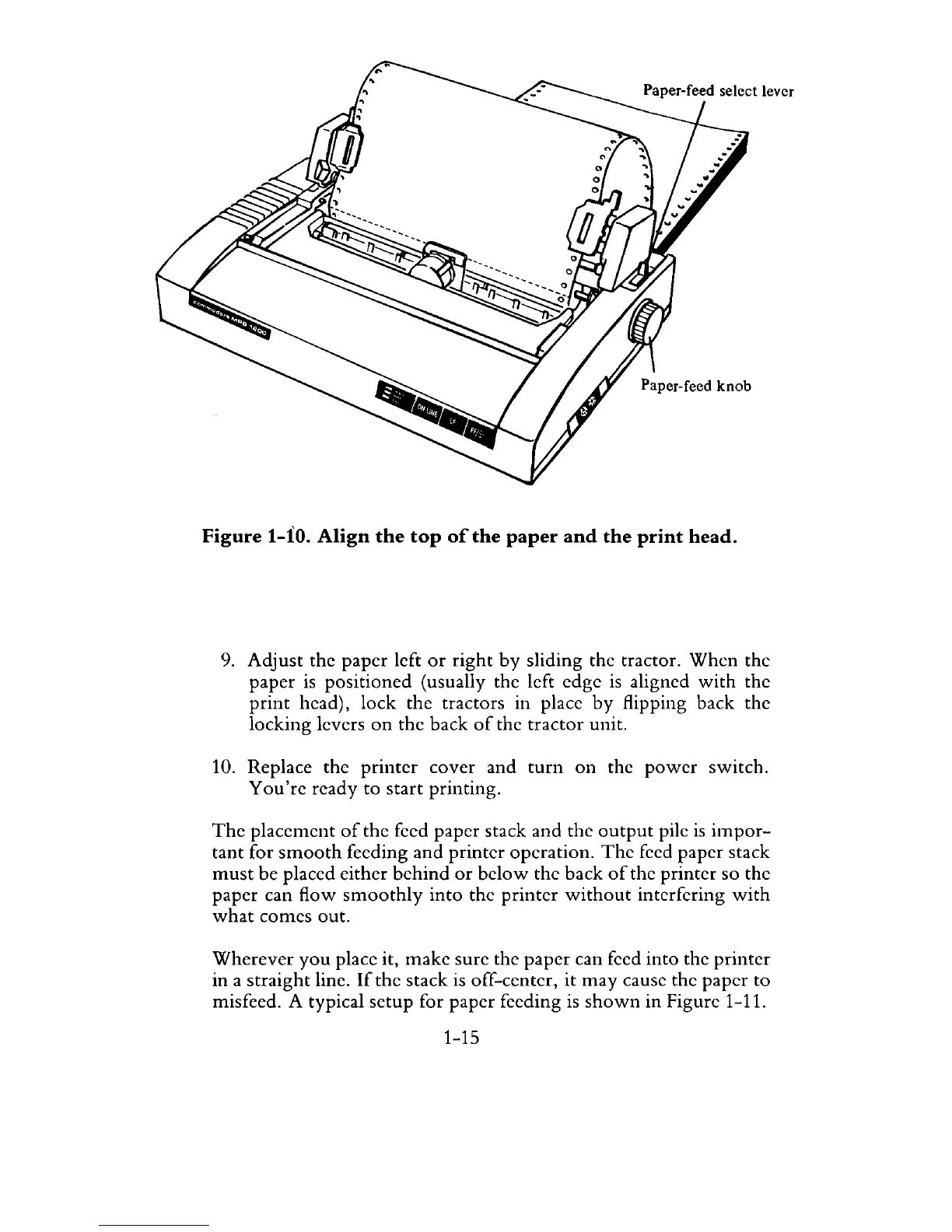
Figure 1-10.
Align
the
top
of
the
paper
and
the
print
head.
9. Adjust the paper left
or
right
by
sliding the tractor.
When
the
paper
is
positioned (usually the left edge
is
aligned
with
the
print
head), lock the tractors in place
by
flipping back the
locking levers
on
the back
of
the
tractor
unit.
10. Replace the
printer
cover and
turn
on
the
power
switch.
You're
ready to start printing.
The
placement
of
the feed paper stack and the
output
pile
is
impor-
tant for
smooth
feeding
and
printer operation.
The
feed paper stack
must
be placed either
behind
or
below
the back
of
the printer so the
paper can flow
smoothly
into the printer
without
interfering
with
what
comes out.
Wherever
you
place it, make sure the paper can feed into the
printer
in a straight line.
If
the stack is off-center,
it
may
cause the paper to
misfeed. A typical setup for paper feeding
is
shown
in Figure 1-11.
1-15

Related product manuals