DEEP LEARNING PLUS USER MANUAL
48
TCP
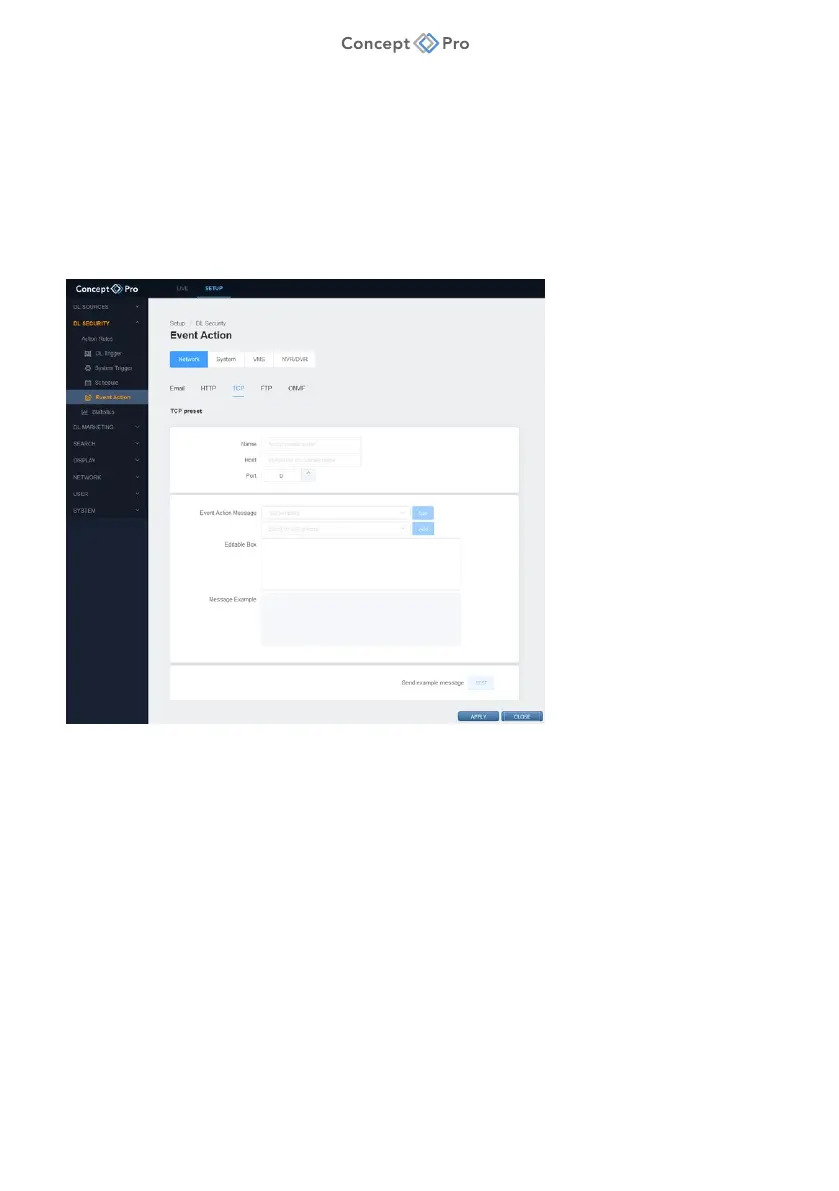
TCP event actions can transmit event information to other software platforms via TCP network
protocol.
To configure a TCP Event Action, please follow the steps below:
1. From the <SETUP> tab, navigate to <DL SECURITY> - <EVENT ACTION> menu.
2. Select the <NETWORK> - <TCP> tab.
3. Click the <ADD> button to create a new TCP Event Action.
4. Configure the TCP Event Action parameters as desired:
a. Name: Enter a custom TCP Event Action preset name.
b. Host: Enter the target address for TCP commands.
c. Port: Enter the target port number for TCP commands.
d. Event Action Message: Select to use a pre-existing event template or create a custom
template to contain only the information required. Templates include Sureview XML,
JSON, JSON (pretty), Simple Message, Basic Message, and Object List. Select any
additional information tokens from the drop-down menu and click <ADD> to add
upon an existing or custom template.
e. Editable Box: Move tokens around and make the template fit a desired format.
f. Message Example: Displays an example of the configured template.
g. Send Example Message: Click <TEST> to send a test TCP command to the
configured target address to confirm the connection is working.
5. When all parameters are configured, click <APPLY> to save the settings.



 To Next Page