DEEP LEARNING PLUS USER MANUAL
52
SYSTEM EVENT ACTIONS
System Event Actions are actions that transmit via DL PLUS rear panel I/O or occur within the
DL PLUS user interface.
DISARM
The DL PLUS product is in an armed state by default, but it can be configured to disarm by
HTTP command, Alarm Input event, or manual disarming via Live view. When the system is in
a disarmed state it will not trigger action rules and their corresponding event actions even if it
would normally do so if the system was armed.
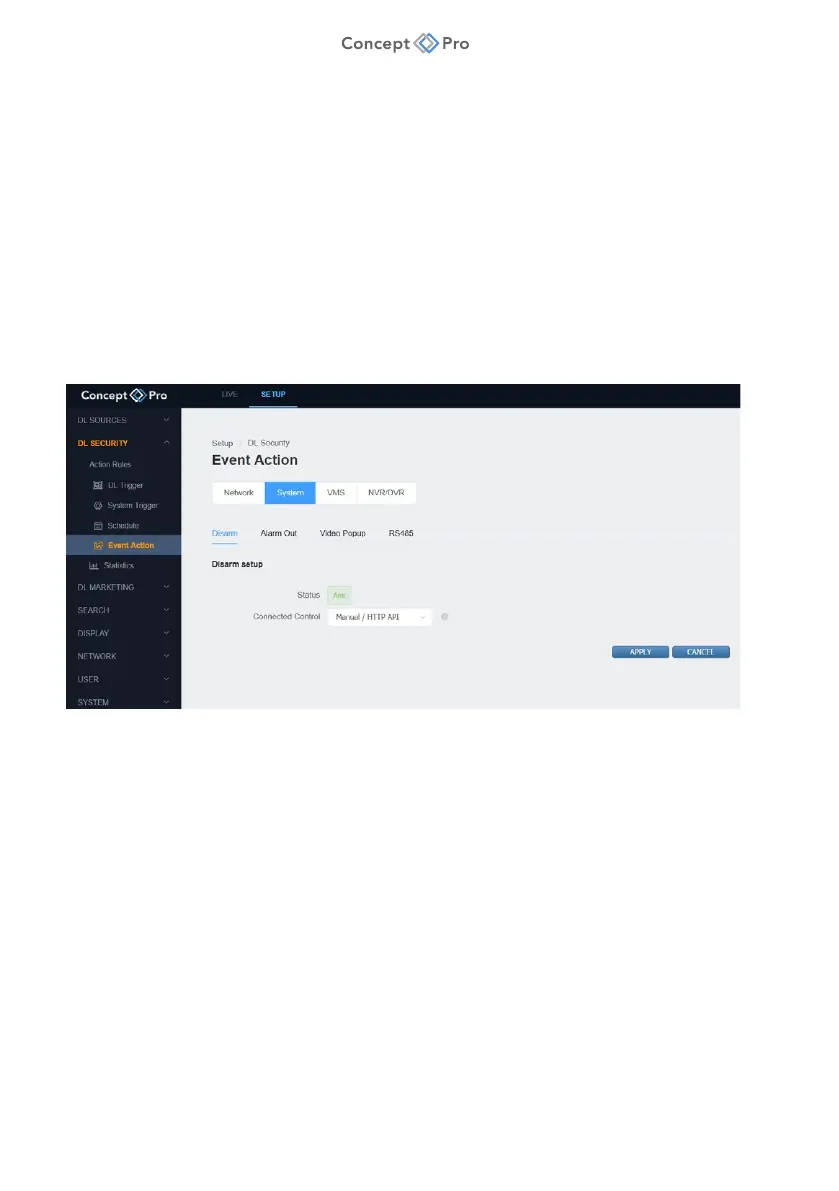
To configure a System Disarm Event Action, please follow the steps below:
1. From the <SETUP> tab, navigate to <DL SECURITY> - <EVENT ACTION> menu.
2. Select the <SYSTEM> - <DISARM> tab.
3. Review and configure the Disarm Setup parameters shown:
a. Status: Displays the current system status (Arm/Disarm).
b. Connected Control: Select the desired method for arming/disarming the system.
i. Manual/HTTP API: Select to arm/disarm via HTTP command. Click the
information icon for more information on the relevant HTTP command.
ii. Alarm Input: Select a DL PLUS alarm input to serve as the arm/disarm key switch.
When selected, triggering the designated alarm input will resulting in arming/
disarming the system.
4. When all parameters are configured, click <APPLY> to save the settings.



 To Next Page