⚫ icon switches to . You can define the period for the selected days simultaneously.
2) On the timeline, left click mouse and then drag to define a period.
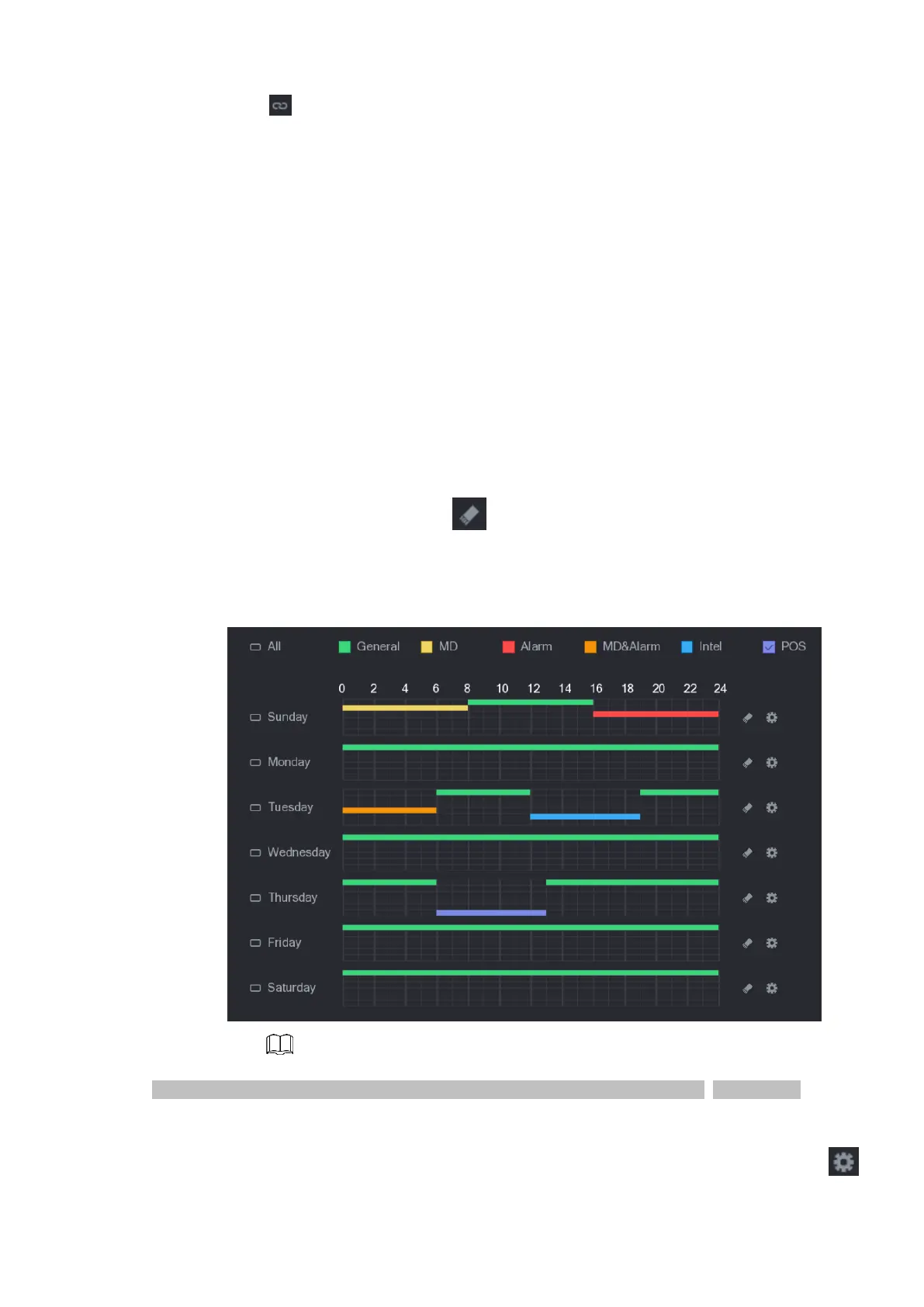
⚫ There are six periods in one day, the Device starts recoding the selected event type in the defined
period. In Figure 1 -37, the different color bars stand for different record types.
⚫ Green stands for general record.
⚫ Yellow stands for MD (motion detection) record.
⚫ Red stands for alarm record.
⚫ Blue stands form intelligent record.
⚫ Orange stands for MD& Alarm record.
⚫ Purple stands for POS record.
⚫ Once the time period overlaps, the record priority: MD&Alarm > Alarm > POS > Intelligent > MD
>General.
⚫ Select a record type and then click the of the corresponding date to clear the corresponding
period.
⚫ Figure 1-37
⚫ The MD record and alarm record function are both null if you enabled MD& Alarm function.
⚫ Define the period by editing.
1) Select a date and then click .
⚫ The Period interface is displayed. See Figure 1-38.



 To Next Page