© 2021 All rights reserved. Data subject to change without notice. 39
Rev. C | 2021.12 FCS - Installation Manual
Channel Status Bar Operation
The Channel Status Bar on the main display of the FCS shows a summary of the status
of the channels. If the channels are in different statuses, it will display the highest status
from left to right and indicate the number of items that have that status. Each bar and each
section of the bar will change colour depending on the severity of the status.
COLOUR TEXT LED INDICATORS* DESCRIPTION
Green OK, # of Channels All are Green
All channels are not detecting gas
at any alarm level, the air is safe
Yellow Low-Alarm Status 1 is Red At least one channel is in low alarm
Orange Mid-Alarm
Status 1 & 2 are
Red
At least one channel is in mid
alarm
Red Hi-Alarm
Status 1, 2 & 3 are
Red
At least one channel is in high
alarm
Red Fault Fault is Red
At least one channel is in Fault
condition
*exclusive of other possible states occurring at the same time
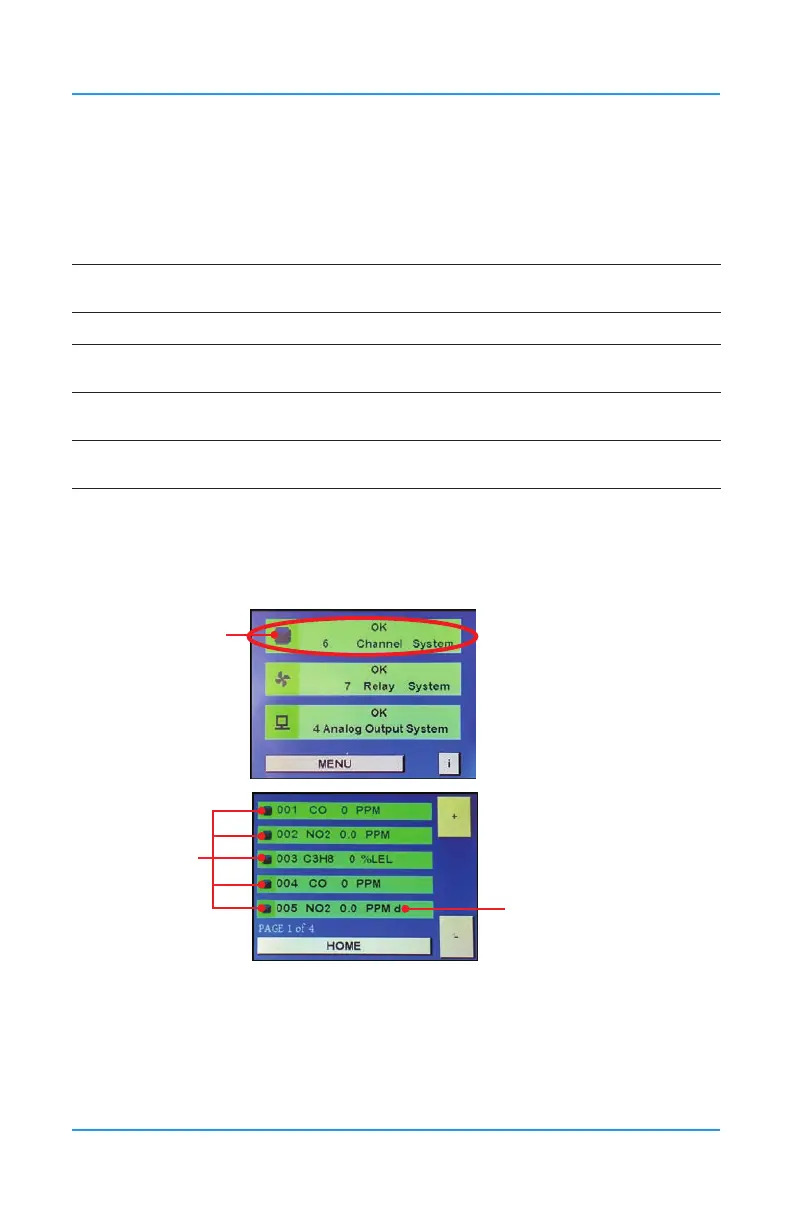
To view more details about the channels, press on the icon on the left side of the Channel
Status Bar.
Press the
icon here
Press the
icon here
“d” indicates channel
is disabled.
Use the + or - buttons to scroll to the channel you want to look at and press on icon on the
bar for the particular channel of interest.


 To Next Page