Chapter 5: CPU Operation and Memory 43
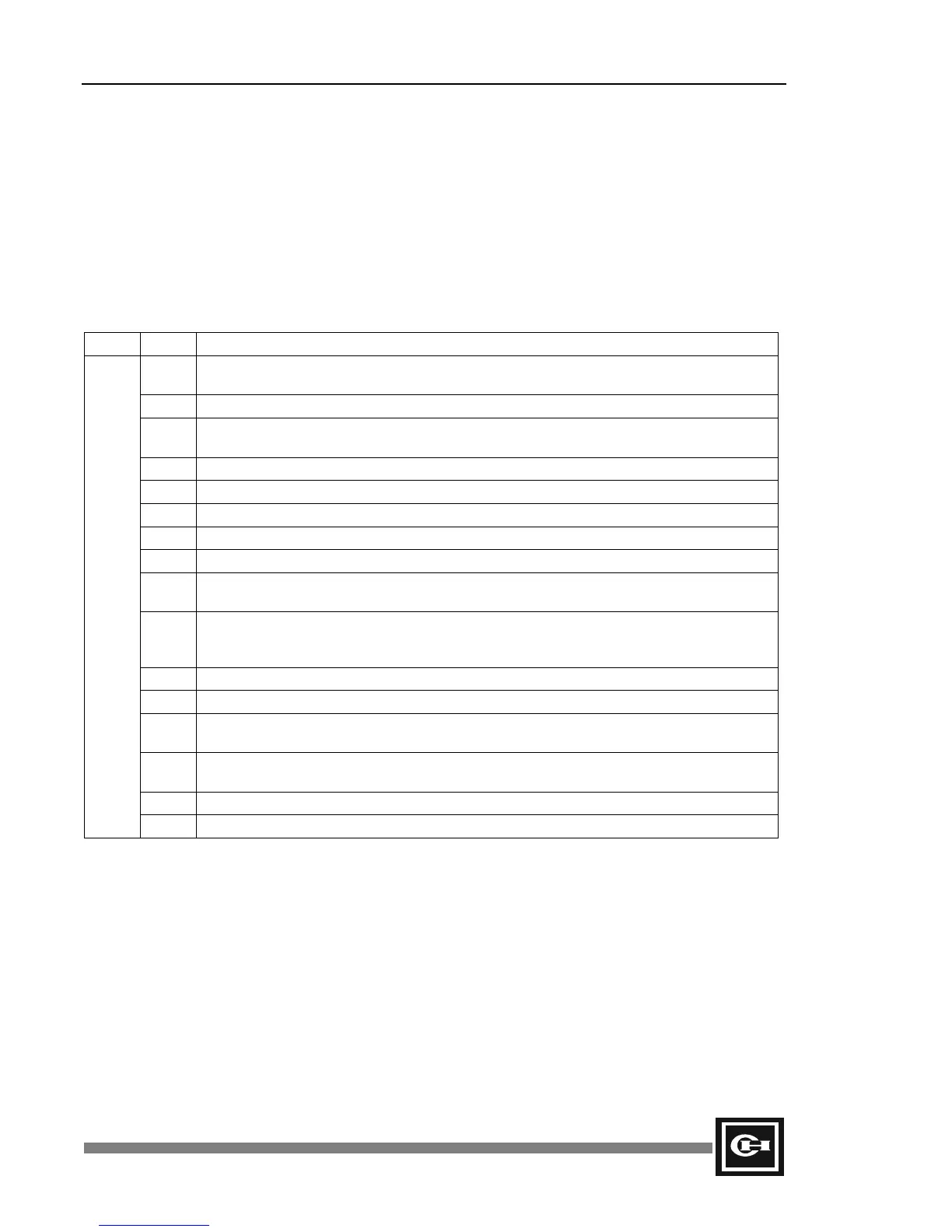
Syntax Check Data (16 bits of SR30)
Indicates the result of the automatic check on user program syntax when the programmer or GPC
executes a syntax check, and when operation mode is switched from the Stop state to the Run state. If
the value of SR30 is not zero, F0.4 turns On. The error lamp also turns On.
There are two error correction methods:
Method 1: Find the error in the CPU online mode, then correct the program.
Method 2: Use the syntax checking function, then correct the program.
Word Bit Detail
0 On if the I/O number range of bit process instruction is beyond the specified range or
designates an external contact/output module which is not installed.
1 On if the channel number of the timer or the counter exceeds 255 or is duplicated.
2 On if the bit or word number in the application program is beyond the specified range or if it
designates a module which is not installed.
3 Not used.
4 On if an undefined instruction exists.
5 On in the event of a user program memory error.
6 On in the event of miscellaneous errors.
7 On if the user program memory is destroyed.
8 On if an external I/O register address is improperly used within the program.
For example, OUT R0.1 is used in the program, and R0.1 is an input.
9 On if the label numbers of the JMP or CALL instructions exceed 63, the corresponding
instruction (LBL, SBR) does not exist, and/or the corresponding LBL/SBR instructions exist
prior to JMP/CALL instructions.
10 On if the label number of the LBL instruction exceeds 63 and/or is duplicated.
11 On if the JMPS/JMP instructions are mistakenly combined and/or used.
12
On if the FOR/NEXT instructions are mistakenly combined and/or used more than five
times. (Loop)
13
On if SBR/RET instructions are not combined and/or used and/or the SBR instructions
overlap or exceed 63.
14 Not used.
SR30
15 On if no END instruction exists.
Artisan Technology Group - Quality Instrumentation ... Guaranteed | (888) 88-SOURCE | www.artisantg.com


 To Next Page