Appendix C: D50PGM10 Pocket Editor 197
Edit Program
The D50PGM10 pocket editor provides the user the ability to insert, delete, or change an instruction in
the D50 PLC. Each of the three procedures is illustrated on the following pages.
Insert Instruction
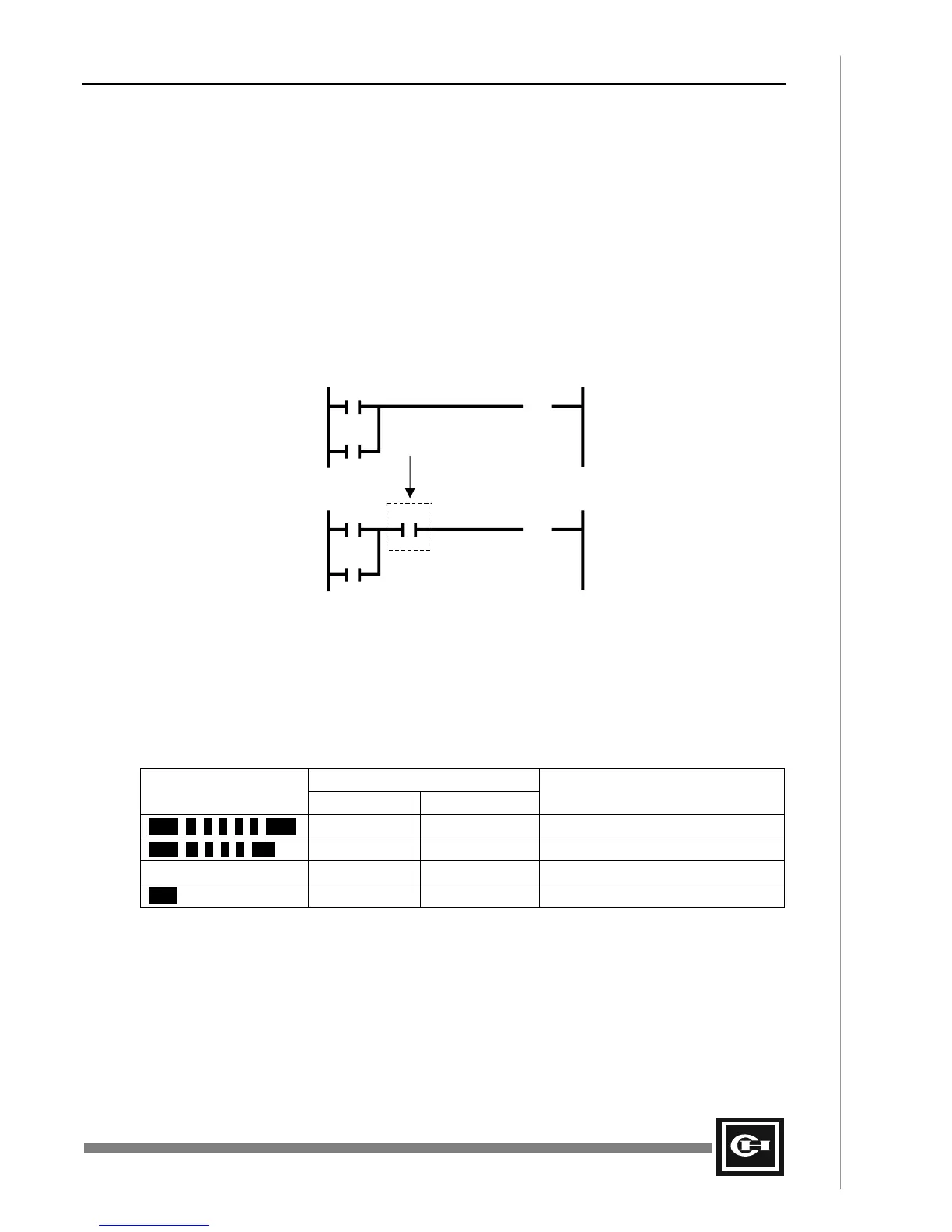
In the example below, one contact is inserted in the rung of ladder, as shown.
• Function: Insert a new step into the D50 PLC program
• PLC Mode: STOP
Ladder Program
Mnemonic Program
STR R0.1 STR R0.1
OR R15.3 OR R15.3
OUT R15.3 AND M1.8
OUT R15.3
Operating Procedure
Display
Key Sequence LED 5-Digit Display Remarks
OUT R 1 5 0 3 SCH OUT R 01503 Search for instruction to add after
AND M 1 0 8 INS AND M 108 Insert the new instruction
OUT R 01503 Next instruction will be displayed
PRE AND M 00108 Verify instruction was added
R0.1 R15.3
(OUT)
R15.3
R0.1 R15.3
(OUT)
M1.8
R15.3
Artisan Technology Group - Quality Instrumentation ... Guaranteed | (888) 88-SOURCE | www.artisantg.com


 To Next Page