17/40
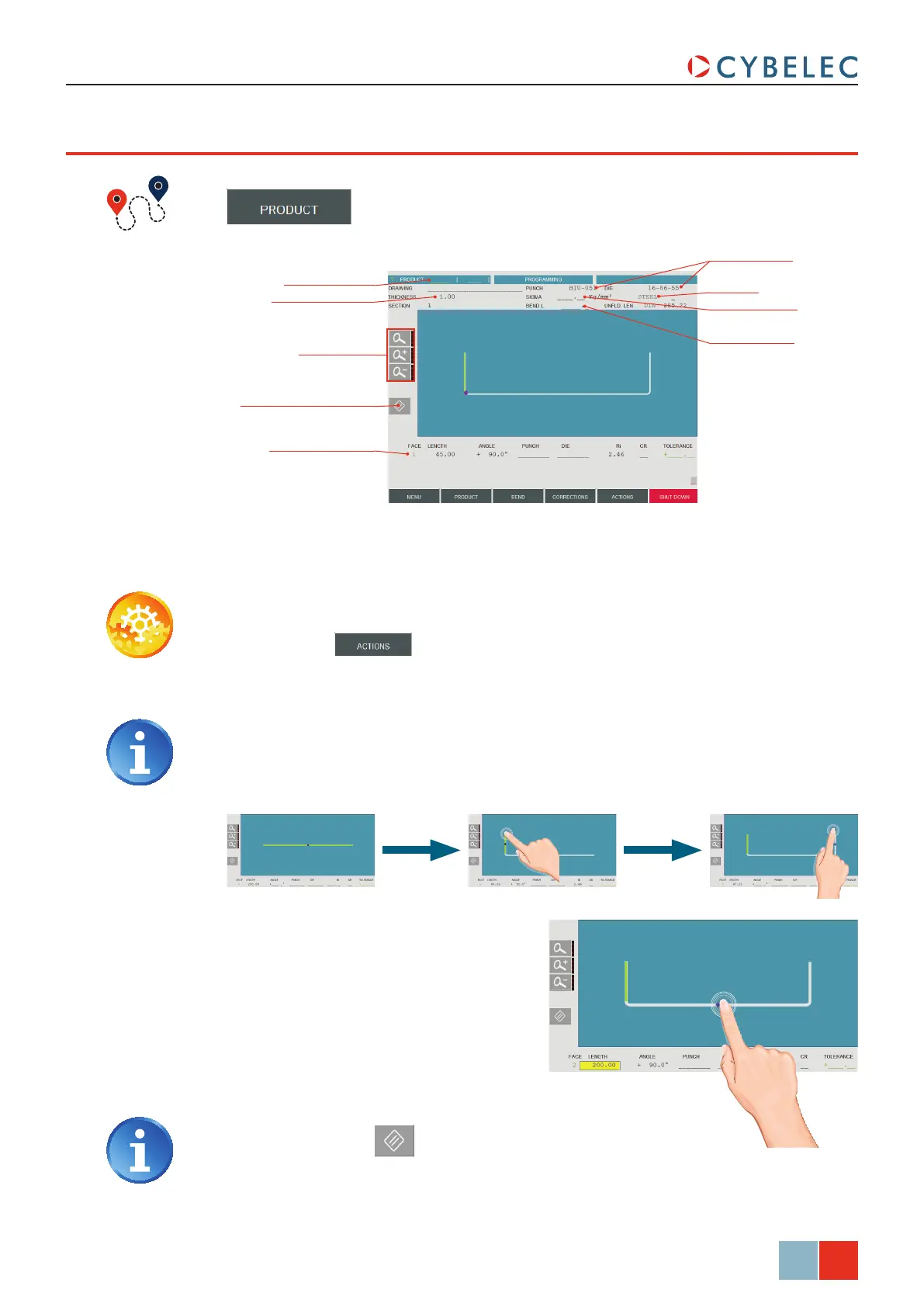
Zoom buttons
Product number
Delete selected segment
Material thickness
Selected bend data
Material
Material Sigma
Bending length
Tools selection
ModEva Pac User Manual
April
2016
V2.3
Touchprofile proGraMMinG
→ TouchProfile
In this mode, the operator can very intuitively draw a profile directly on the screen.
Setting inStructionS:
1. Touch the button and select neW Product in the list.
2. First select the material, enter its thickness and Sigma, enter the bending length, and
select the tools to be used for the part by touching their respective fields.
3. Draw the profile of section 1 (see
Creating a Part Program, page 16) by
touching the screen where you want
to add a segment.
4. Touch on the middle of a segment
or on an angle to modify its value.
A purple dot indicates the selected
segment, and its value is highlighted in
the bend information line.
5. Proceed in the same manner to adjust
all segments and angles.
Touching this icon allows erasing
the selected segment.
Selecting tools directly from the TouchProfile page places them automatically in
the middle of the machine. To change their position, see Tooling Management,
page 12.



 To Next Page