68 EZ-USB Development Kit User Guide, Doc. # 001-66390 Rev. *D
EZ-USB Development Kit Firmware Examples
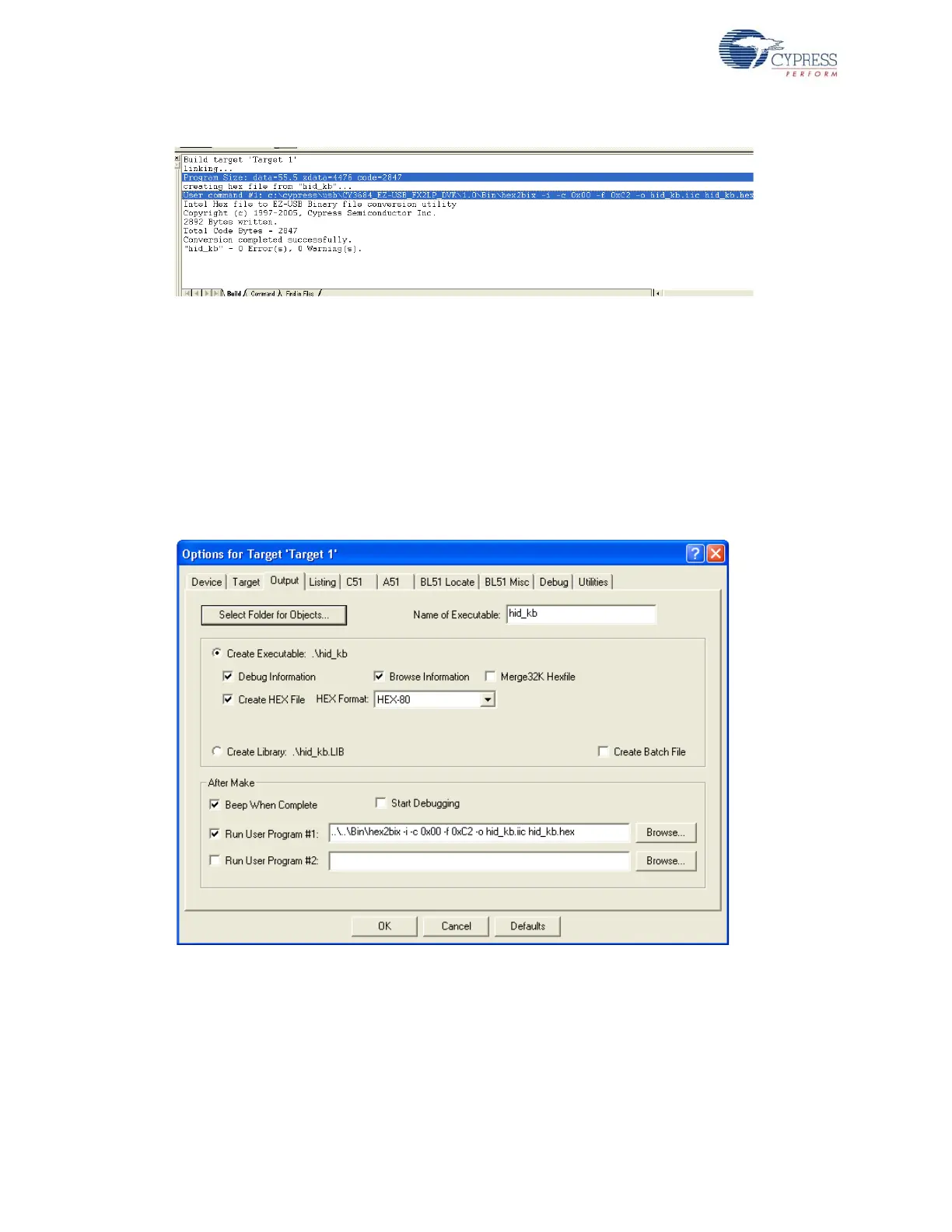
Figure 8-2. Build Window Snapshot of hid_kb Project
Note Observe that the total Code bytes of the hid_kb project is less than the 4-k code limit of Keil
uVision2 IDE provided along with the kit.
■ Firmware for EZ-USB RAM memory: The output of the Build Target is hid_kb.hex. It is the rel-
evant file for downloading to EZ-USB RAM memory.
■ Firmware for external I2C EEPROM: To generate EEPROM compatible firmware image, the
Keil IDE invokes the hex2bix.exe utility to convert the output file hid_kb.hex into hid_kb.iic.
Right-click on Target1 in the Project Window and select Options for Target 'Target1'. This will
pop-up the Keil settings for this project. Select the Output tab and observe at the bottom of the
IDE, the hex2bix utility is invoked as shown in Figure 8-3.
Figure 8-3. hid_kb Project Output Image Settings
Under Run User program#1 section observe the hex2bix utility is invoked in the following manner:
..\..\Bin\hex2bix -i -c 0x00 -f 0xC2 -o hid_kb.iic hid_kb.hex
Refer to the application note, “Using the hex2bix Conversion Utility - AN45197, to know more
details on the hex2bix utility.



 To Next Page