68D-Link DSL-245GE User Manual
Section 4 - Conguration
Application
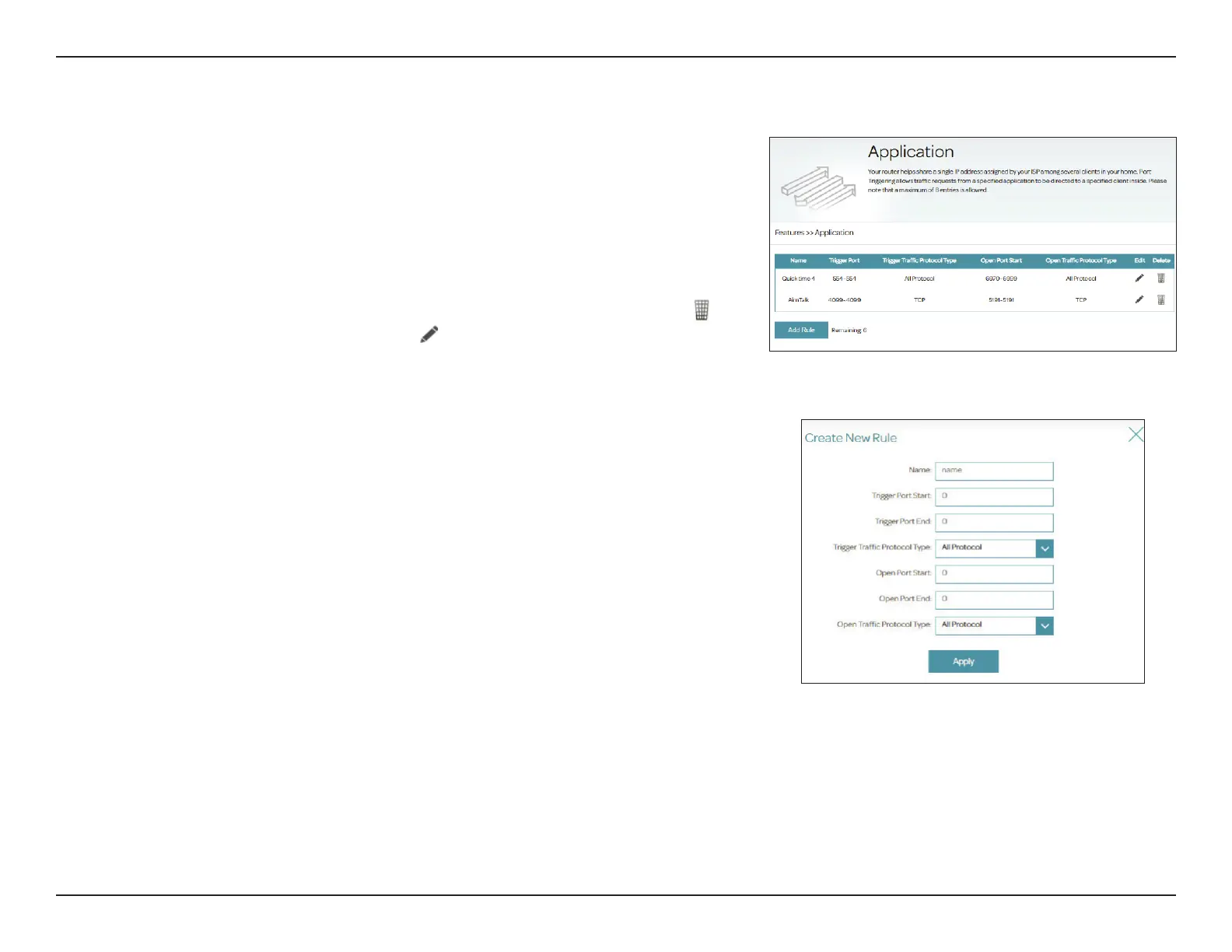
Port triggering allows ports to be opened for inbound trac when
outbound trac is detected on specied ports . This is used for facilitating
communication between applications and servers behind a NAT rewall. To
access this page, go to Features > Application.
The currently dened Application rules are displayed in the table. Some
commonly used Applications are pre-congured by default. You may create
up to 8 application rules. If you wish to remove an application rule, click
. If
you wish to edit an application rule, click
in the Edit column. If you wish to
create a new application rule, click the Add Rule button.
Create New Rule
Name: Enter a name for this application.
Trigger Port Start: Enter the starting port range for the trac that will be forwarded.
Trigger Port End: Enter the ending port range for the trac that will be forwarded.
Trigger Trac
Protocol Type:
Select the protocol to trigger this rule: TCP, UDP, or All Protocol.
Open Port Start: Enter the starting port to open once triggered.
Open Port End: Enter the ending port to open once triggered.
Open Trac
Protocol Type:
Select the protocol to trigger this rule: TCP, UDP, or All Protocol.
Click Apply when you are done. A maximum of 8 rules can be dened.



 To Next Page