DXS-3350SR Gigabit Layer 3 Switch
RADIUS Server
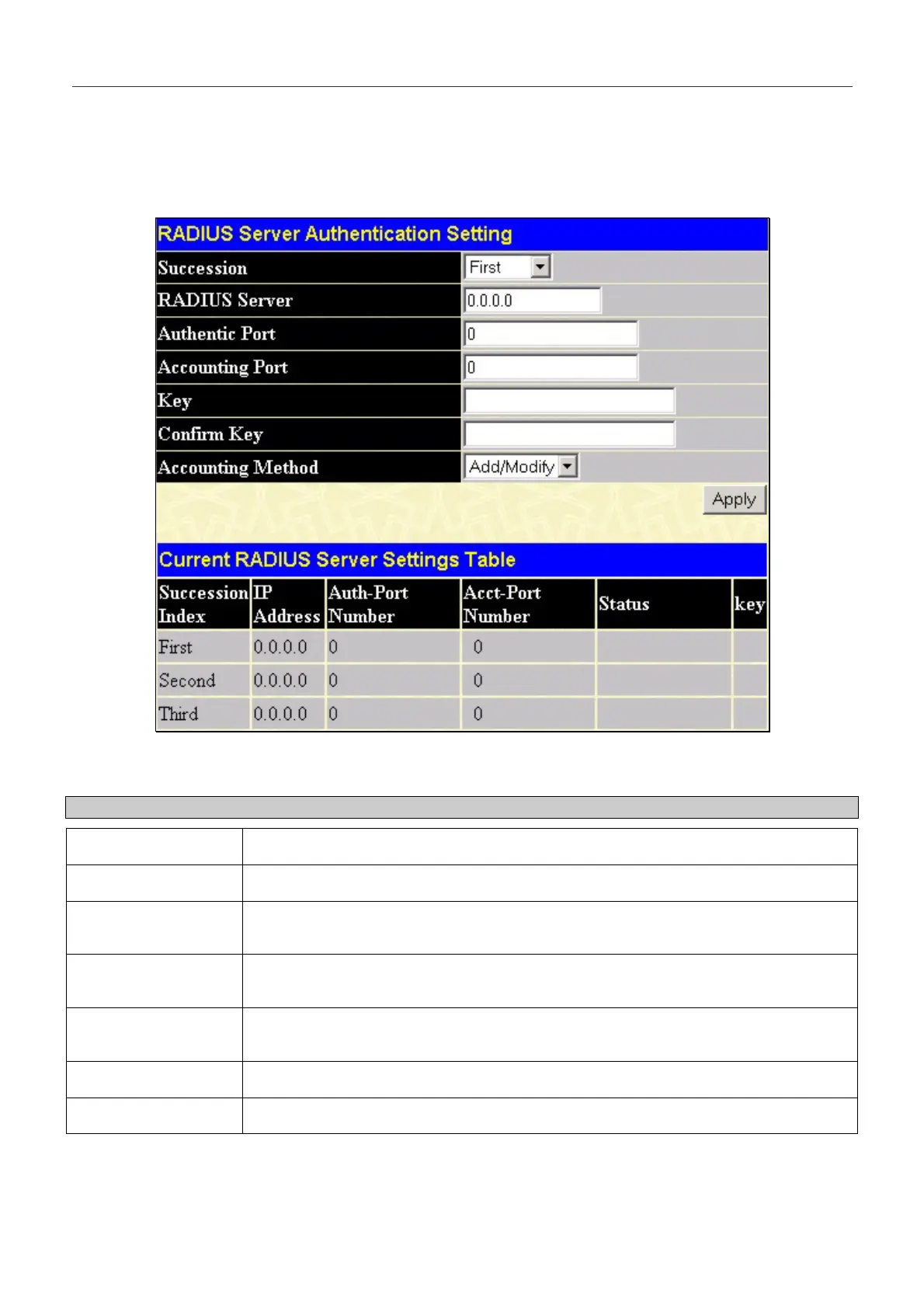
Use the RADIUS Server menu to configure RADIUS server settings for 802.1x authentication .
Open Port Access Entity > RADIUS Server > Authentic Radius Server to open the RADIUS Server Authentication
Setting menu and table shown below:
Figure 6- 77. RADIUS Server Authentication Setting menu and Current RADIUS Server Settings Table
This window displays the following information:
Parameter Description
Succession
RADIUS server settings index.
Radius Server
Type in the IP address of the RADIUS server.
Authentic Port
This is the UDP port on the RADIUS server that will be used to authenticate users. The
default is 1812.
Accounting Port
This is the UDP port on the RADIUS server that will be used to log authentication events.
The default is 1813.
Key
Type the shared-secret key used by the RADIUS server and the Switch. Up to 32
characters can be used.
Confirm Key
Retype the Key information from the Key field above.
Status
This drop-down menu allows you to select Valid or Invalid.
127


 To Next Page