DXS-3350SR Gigabit Layer 3 Switch
Device Status
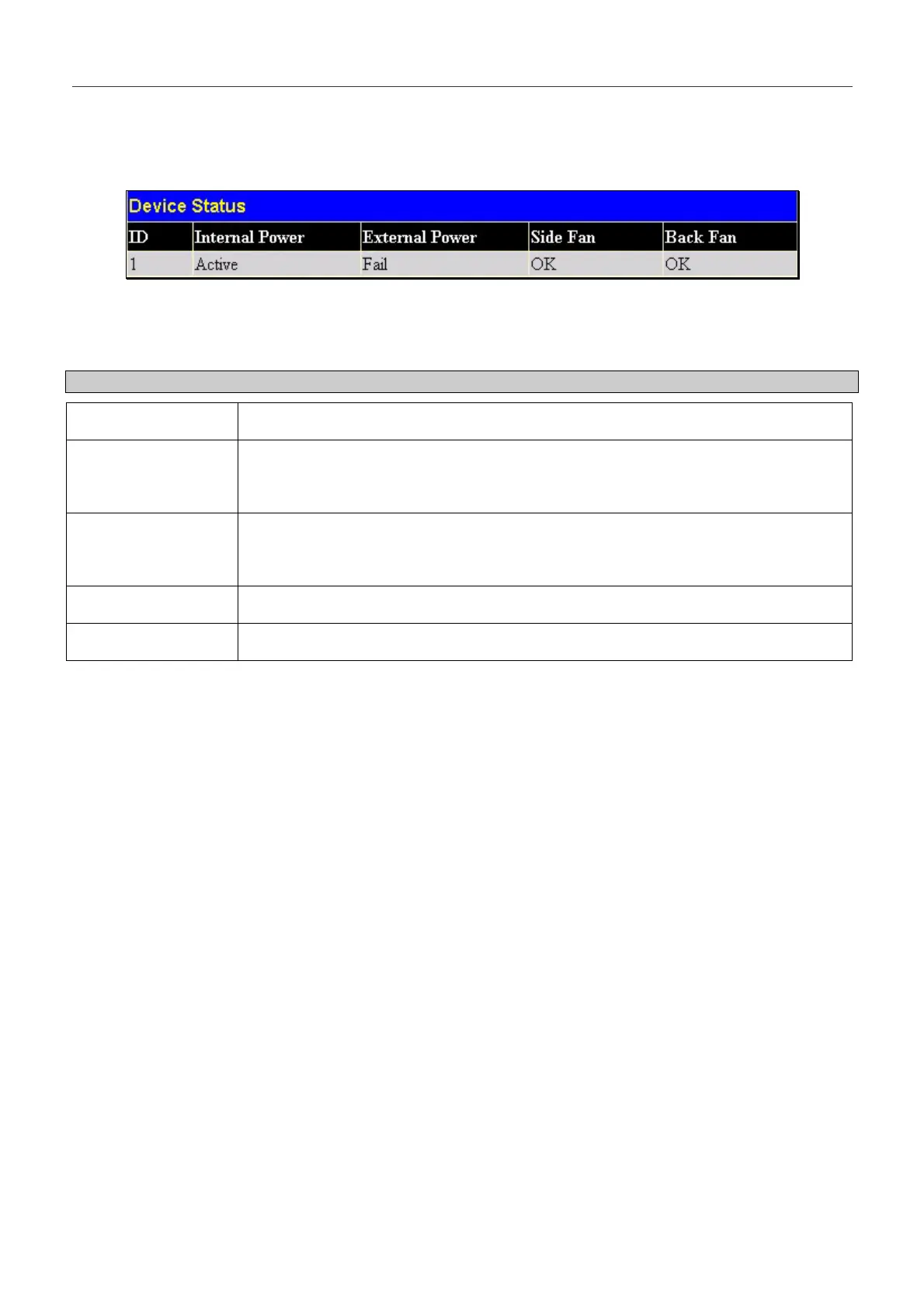
The Device Status window can be found in the Monitoring menu by clicking the Device Status link. This window shows
the status of the physical attributes of the Switch, including power sources and fans.
Figure 8- 17. Device Status window
The following fields may be viewed in this window:
Parameter Description
ID
The Box ID of the Switch in the switch stack.
Internal Power
A read-only field denoting the current status of the internal power supply. Active will
suggest the mechanism is functioning correctly while Fail will show the mechanism is
not functioning correctly.
External Power
A read-only field denoting the current status of the external power supply. Active will
suggest the mechanism is functioning correctly while Fail will show the mechanism is
not functioning correctly.
Side Fan
A read-only field denoting if the side fan of the Switch is functioning properly.
Back Fan
A read-only field denoting if the back fan of the Switch is functioning properly.
227


 To Next Page