DXS-3350SR Gigabit Layer 3 Switch
Port Bandwidth Settings
The bandwidth control settings are used to place a ceiling on the transmitting and receiving data rates for any selected port.
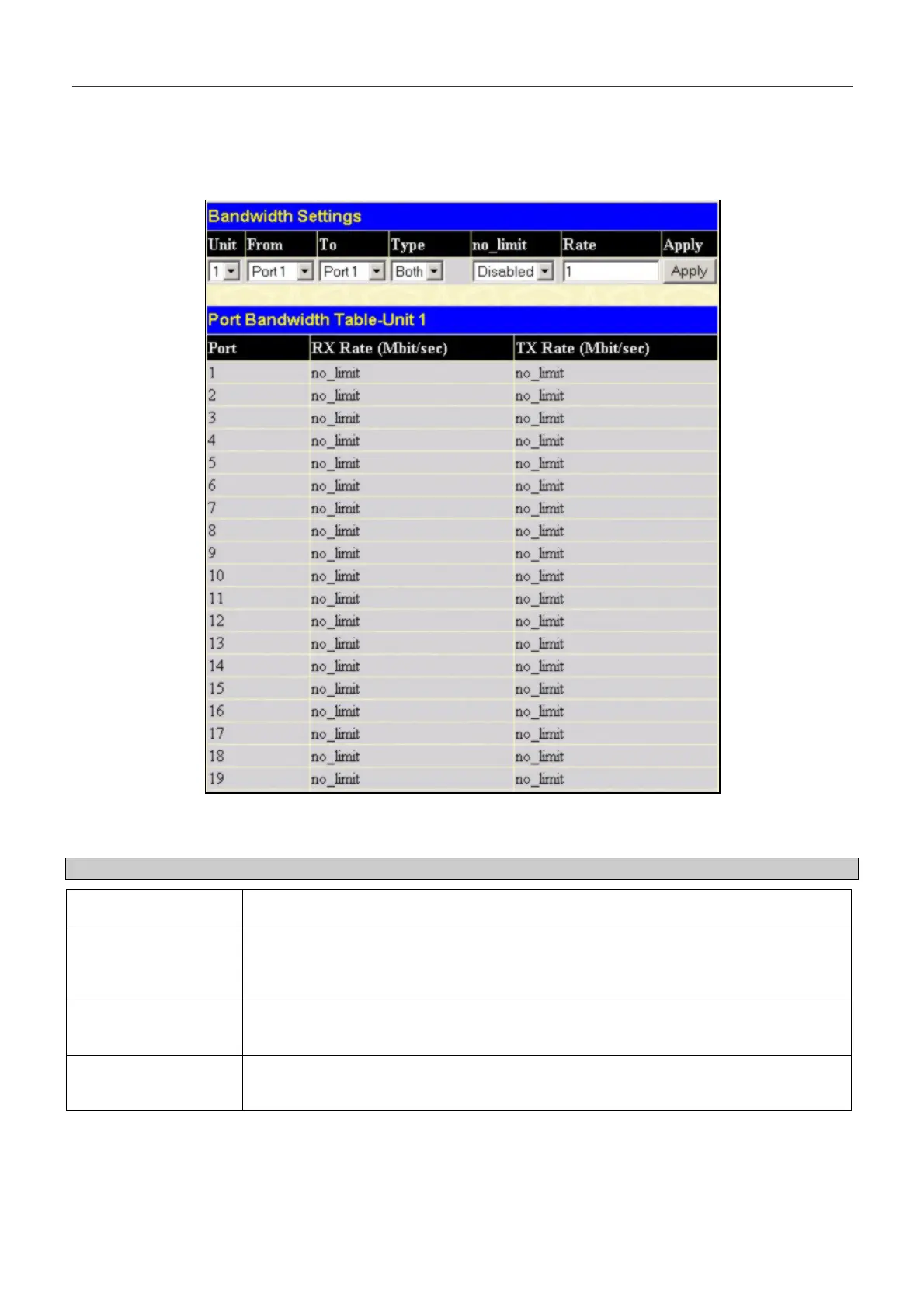
In the Configuration folder, click Port Bandwidth, to view the screen shown below.
Figure 6- 42. Bandwidth Settings and Port Bandwidth Table
The following parameters can be set or are displayed:
Parameter Description
From/To
A consecutive group of ports may be configured starting with the selected port.
Type
This drop-down menu allows you to select between RX (receive,) TX (transmit,) and
Both. This setting will determine whether the bandwidth ceiling is applied to receiving,
transmitting, or both receiving and transmitting packets.
no_limit
This drop-down menu allows you to specify that the selected port will have no
bandwidth limit. Enabled disables the limit.
Rate
This field allows you to enter the data rate, in Mbit/s, that will be the limit for the
selected port.
Click Apply to set the bandwidth control for the selected ports. Results of configured Bandwidth Settings will be displayed
in the Port Bandwidth Table.
90


 To Next Page