DXS-3350SR Gigabit Layer 3 Switch
Port Access Control
The following section describes the 802.1X Status on the Switch. To view the Authenticator State, click Monitoring >
Port Access Control > Authenticator State.
Authenticator State
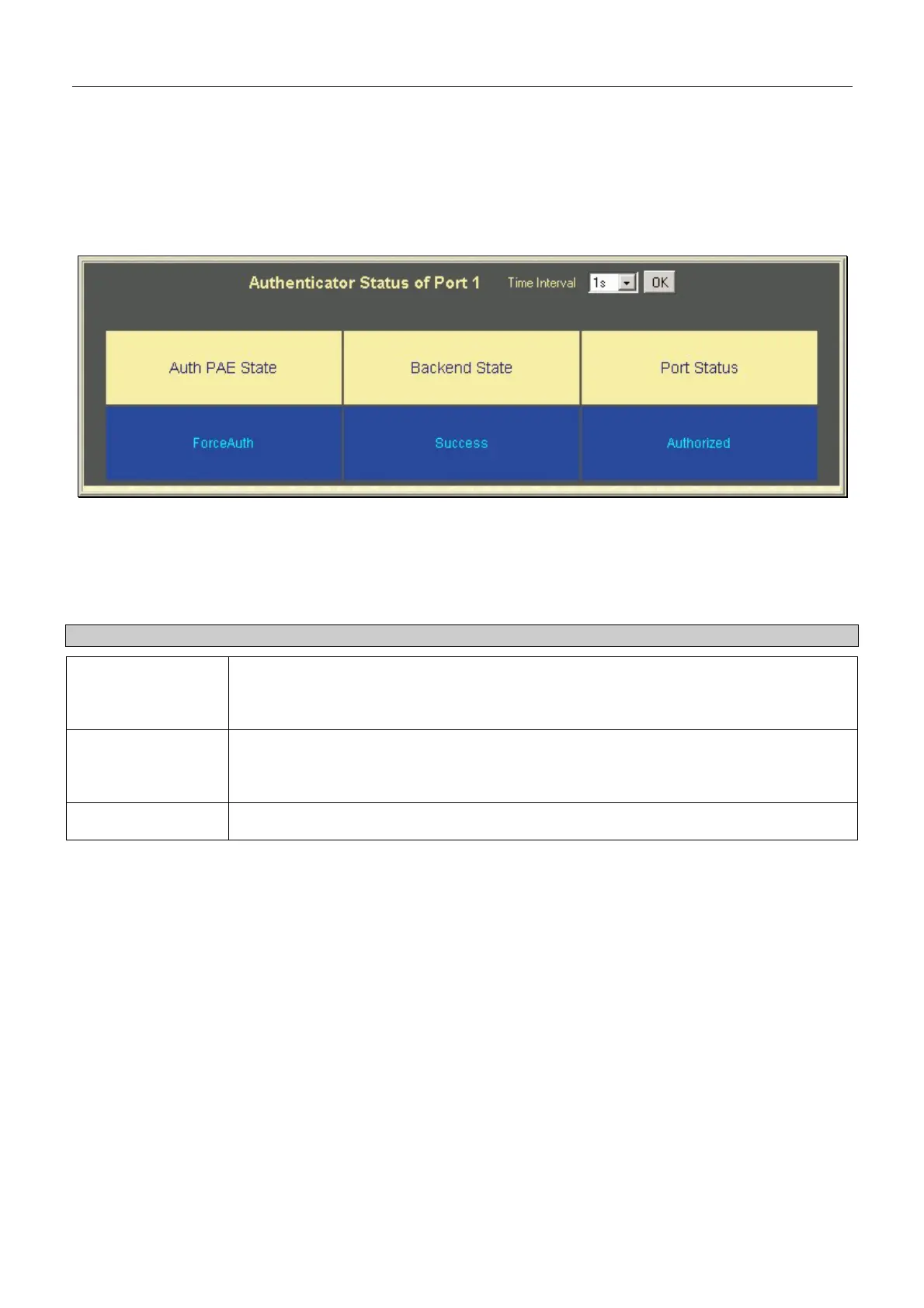
Figure 8- 24. Authenticator Status window
This window displays the Authenticator Status for an individual port. To select a port, click a port on the front panel
display shown at the top of the screen. A polling interval between 1 and 60 seconds can be set using the drop-down menu at
the top of the window and clicking OK.
The information on this window is described as follows:
Parameter Description
Auth PAE State The Authenticator PAE State value can be: Initialize, Disconnected, Connecting,
Authenticating, Authenticated, Aborting, Held, Force_Auth, Force_Unauth, or N/A. N/A
(Not Available) indicates that the port's authenticator capability is disabled.
Backend State The Backend Authentication State can be Request, Response, Success, Fail, Timeout,
Idle, Initialize, or N/A. N/A (Not Available) indicates that the port's authenticator capability
is disabled.
Port Status Controlled Port Status can be Authorized, Unauthorized, or N/A.
234


 To Next Page