DXS-3350SR Gigabit Layer 3 Switch
DHCP/BOOTP Relay
The BOOTP hops count limit allows the maximum number of hops (routers) that the BOOTP messages can be relayed
through to be set. If a packet’s hop count is more than the hop count limit, the packet is dropped. The range is between 1 and
16 hops, with a default value of 4. The relay time threshold sets the minimum time (in seconds) that the Switch will wait
before forwarding a BOOTREQUEST packet. If the value in the seconds field of the packet is less than the relay time
threshold, the packet will be dropped. The range is between 0 and 65,535 seconds, with a default value of 0 seconds.
DHCP/BOOTP Relay Information
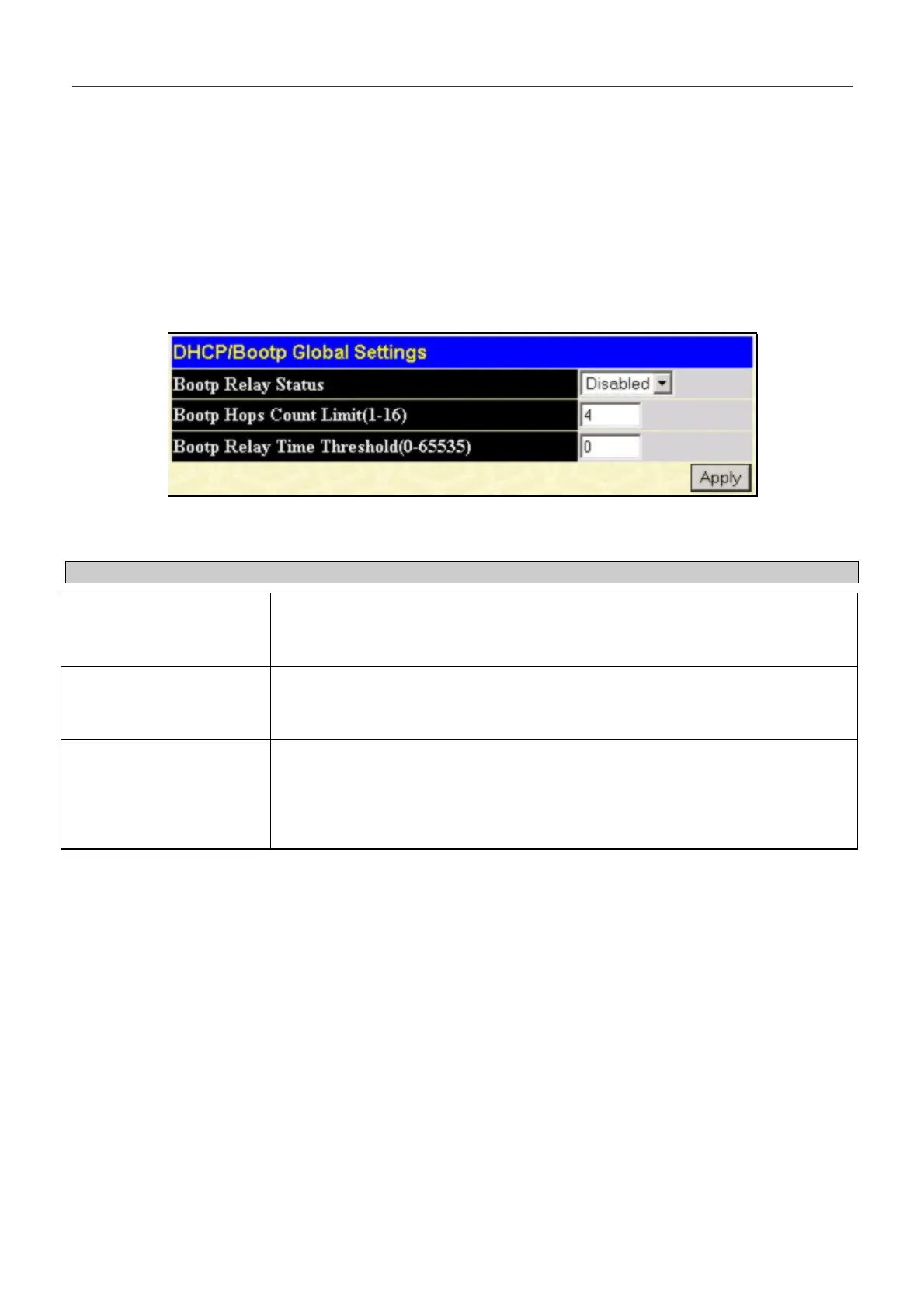
To enable and configure BOOTP or DHCP on the Switch, click on the DHCP/BOOTP Relay folder from the
Configuration folder and then click on the DHCP/BOOTP Relay Information link:
Figure 6- 102. BOOTP/DHCP Global Settings menu
The following fields can be set:
Parameter Description
BOOTP Relay Status
<Disabled>
This field can be toggled between Enabled and Disabled using the pull-down
menu. It is used to enable or disable the BOOTP/DHCP Relay service on the
Switch. The default is Disabled
BOOTP Hops Count Limit
(1-16) [4 ]
This field allows an entry between 1 and 16 to define the maximum number of
router hops BOOTP messages can be forwarded across. The default hop count is
4.
BOOTP Relay Time
Threshold (0-65535) [0 ]
Allows an entry between 0 and 65535 seconds, and defines the maximum time
limit for routing a DHCP/BOOTP packet. If a value of 0 is entered, the Switch will
not process the value in the seconds field of the BOOTP or DHCP packet. If a non-
zero value is entered, the Switch will use that value, along with the hop count to
determine whether to forward a given BOOTP or DHCP packet.
166


 To Next Page