DXS-3350SR Gigabit Layer 3 Switch
SSH User Authentication
The following windows are used to configure parameters for users attempting to access the Switch through SSH. To access
the following window, click Security Management > Secure Shell > SSH User Authentication.
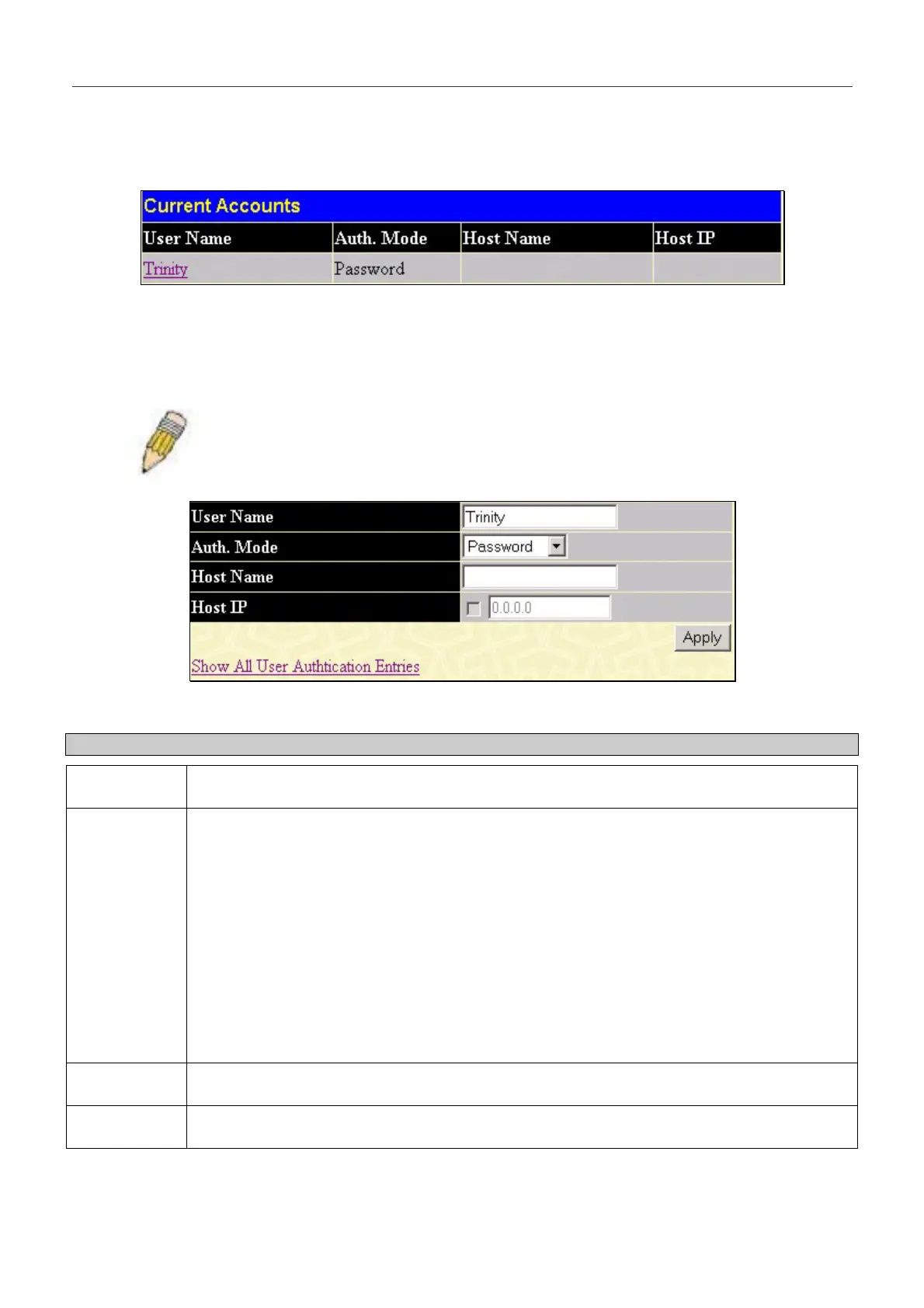
Figure 7- 24. Current Accounts window
In the example screen above, the User Account “Trinity” has been previously set using the User Accounts window in the
Security Management folder. A User Account MUST be set in order to set the parameters for the SSH user. To configure
the parameters for a SSH user, click on the hyperlinked User Name in the Current Accounts window, which will reveal
the following window to configure.
NOTE: To set the SSH User Authentication parameters on the Switch, a User Account
must be previously configured. For more information on configuring local User Accounts
on the Switch, see the User Accounts section of this manual located in this section.
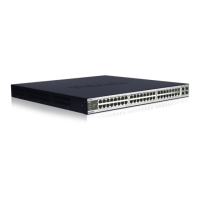
Figure 7- 25. SSH User Window
The user may set the following parameters:
Parameter Description
User Name
Enter a User Name of no more than 15 characters to identify the SSH user. This User Name
must be a previously configured user account on the Switch.
Auth. Mode
The administrator may choose one of the following to set the authorization for users attempting
to access the Switch.
Host Based – This parameter should be chosen if the administrator wishes to use a remote
SSH server for authentication purposes. Choosing this parameter requires the user to input the
following information to identify the SSH user.
Host Name – Enter an alphanumeric string of no more than 31 characters to identify the
remote SSH user.
Host IP – Enter the corresponding IP address of the SSH user.
Password – This parameter should be chosen if the administrator wishes to use an
administrator-defined password for authentication. Upon entry of this parameter, the Switch will
prompt the administrator for a password, and then to re-type the password for confirmation.
Public Key – This parameter should be chosen if the administrator wishes to use the publickey
on a SSH server for authentication.
Host Name
Enter an alphanumeric string of no more than 31 characters to identify the remote SSH user.
This parameter is only used in conjunction with the Host Based choice in the Auth. Mode field.
Host IP
Enter the corresponding IP address of the SSH user. This parameter is only used in
conjunction with the Host Based choice in the Auth. Mode field.
Click Apply to implement changes made.
201


 To Next Page