1-3
1.3.2 Check items during operation
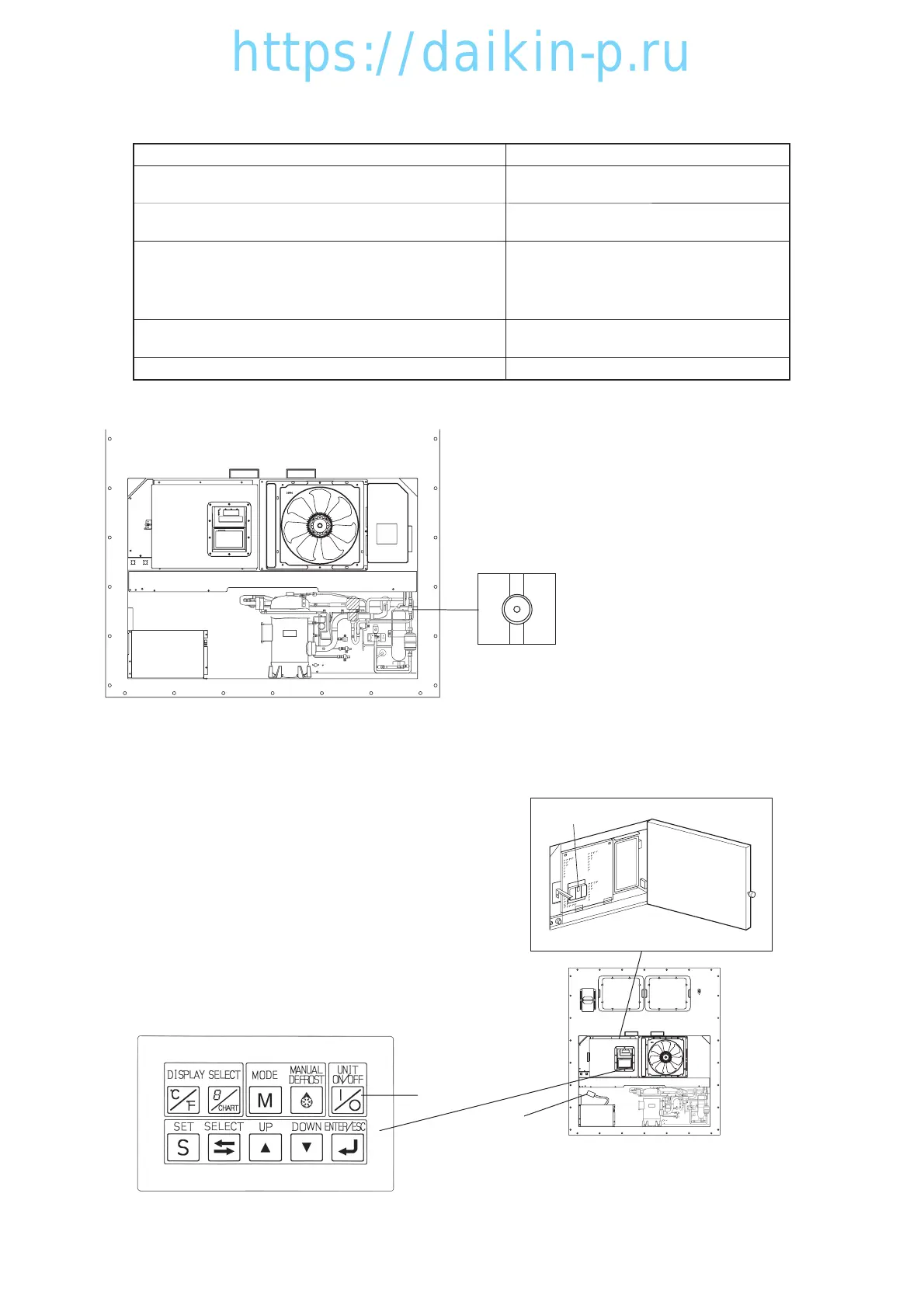
1. Check the compressor, fan, pipes, etc. for abnormal
noise and vibration.
2.
Check the refrigerant for shortage.
Check the excessive charge.
3. Check the refrigerant for moisture inclusion.
[When the moisture indicator is exposed to gas
refrigerant during prolonged stop periods, it may turn
yellow. This is not abnormal.]
4. Check if the recorder is working according to the inside
temperature.
Method of check
Visual and sound check
Visual check by using the moisture indicator
For the details, refer to clause 4.2.15.
Visual
The moisture indicator colour;
Green: normal
Yellow: abnormal.
Visual
5. Check operating conditions using the control panel.
Visual
Check items(precautions)
q
e
w
1.3.3 Procedure after operation
(1) Turn off the UNIT ON/OFF key e, and turn off
the circuit breaker w.
(2) Close the control box cover.
Ensure that the one-touch lever is firmly closed.
(3) Stow the power cable.
Disconnect the power plug q, and stow the
power cable directing the plug opening
downward to prevent sea water or rain water
from collecting in the power plug.
Liquid moisture indicator
01LXE10E100以降(1-4)E.qx08.8.285:49PMページ1-3



 To Next Page