3-41
3.7.2
INSTALLATION OF SOFTWARE OF LATEST VERSION (VERSION UPGRADE)
●Items required
1. Personal computer (with Windows 2000 or Windows XP installed)
2. Communication cable
3. Tool for software version upgrade (fdt_4_00_2.exe)
4. Software for controller DECOSⅢe (25**.mot)
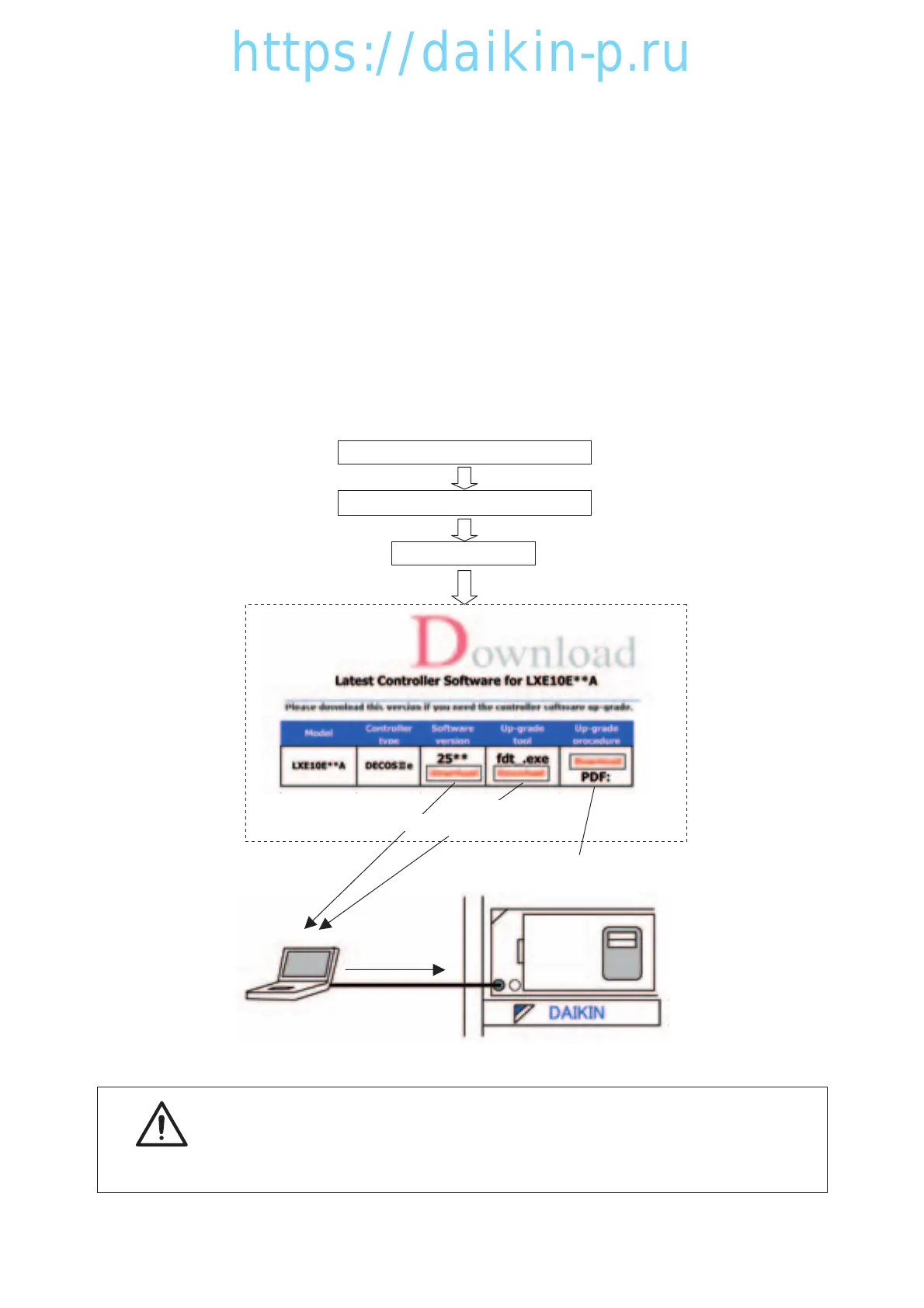
After the replacement with the spare parts controller, the software needs to be upgraded. Download the
software of the latest version and the tool for version upgrade (only once) from the DAIKIN HOME PAGE
by following the procedure shown below.
Note: The unit is operated by using the software already installed in the controller. However, ensure that
the software is upgraded to implement optimal operation.
CONTAINER REFRIGERANTION UNIT
DOWNLOAD
--- Enter the ID number and the password.
Version upgrade manual
Upload
'http//www.daikin.com/service
Download
Download
(Only once)
Never turn the power OFF or disconnect the battery connector while
the software version upgrade is in progress. Otherwise, the
software version upgrade will fail.
In such a case, retry the software version upgrade.
CAUTION
03LXE10E100以降(33-41)E.qx08.8.2210:31AMページ3-41



 To Next Page