Tally Dascom 1330
14
3.4 Switching To Cut Sheet From Fanfold
1. When the printer is offline (see Chapter 4), press the【Load/Eject】key to clear the fanfold
out of the Platen to allow cut sheet operation.
2. Follow the below procedures to change to cut sheet operation from tractor mode:
If the printer is online, press the【Load/Eject】key to feed the fanfold to its tear-off
position. Tear off the page.
Press the【Online】key once to set the printer offline. Press the【Load/Eject】key to
withdraw the fanfold out of the Platen.
Slide the Paper Feed Lever to the position. Then follow the procedures in Section
3.2 for cut sheet operation.
The printer will signal an alarm if you change the Paper Feed Lever position while
paper still remains in the printer.
3.5 Switching To Fanfold From Cut Sheet
To re-load the parked continuous form:
1. Clear the cut sheet from the Sheet Feeder by pressing Exit key.
2. Slide the Paper Feed Lever to the position.
3. Set the printer to offline. Press the【Load/Eject 】key to re-load the parked fanfold.
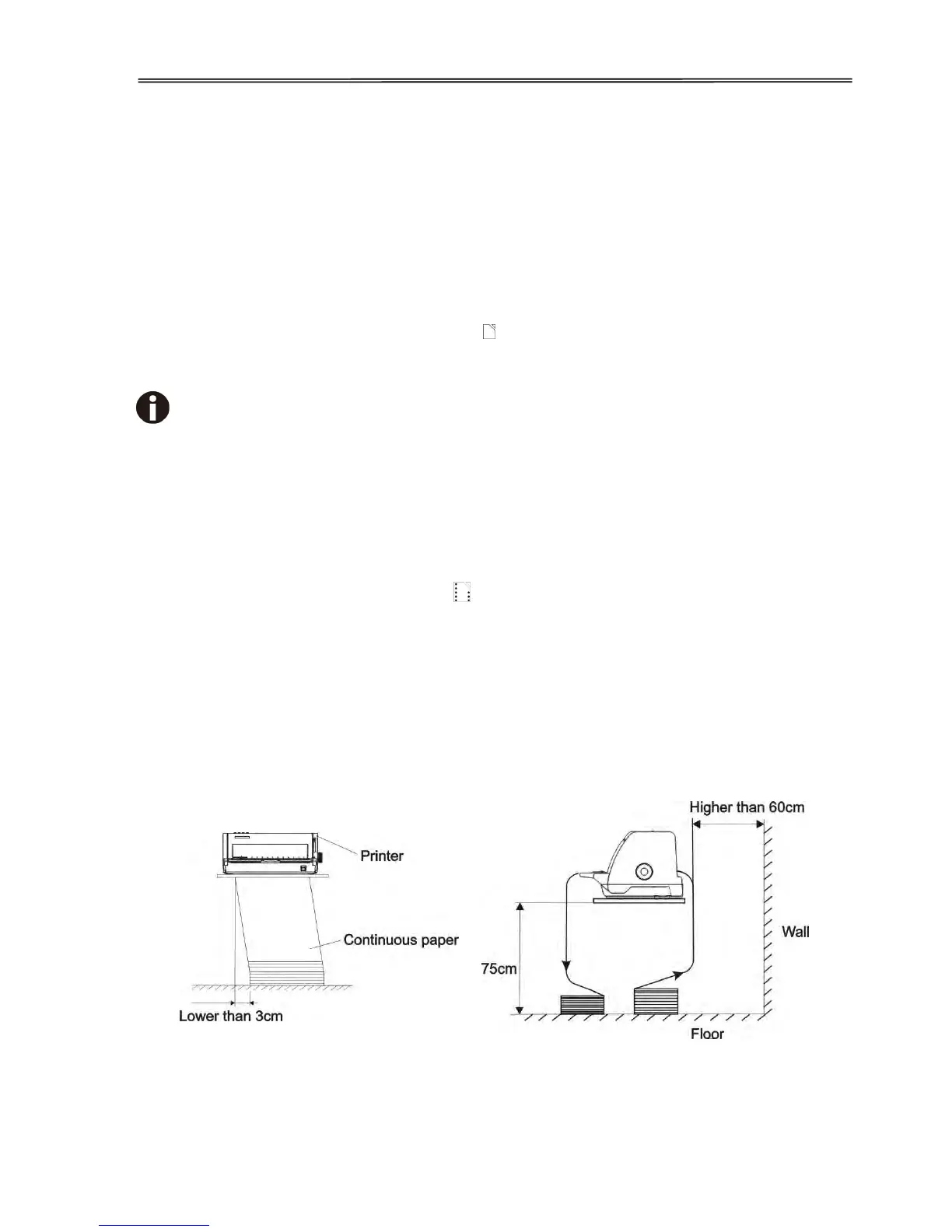
3.6 Setting Fanfold Relative To Printer
1. It is recommended to place the printer 75 cm above the floor.
2. Keep the stack of fanfold less than 3 cm side ways off from the printer.



 To Next Page