24 Installation (for qualified installers only)
© Travis Industries 4150126 100-01418
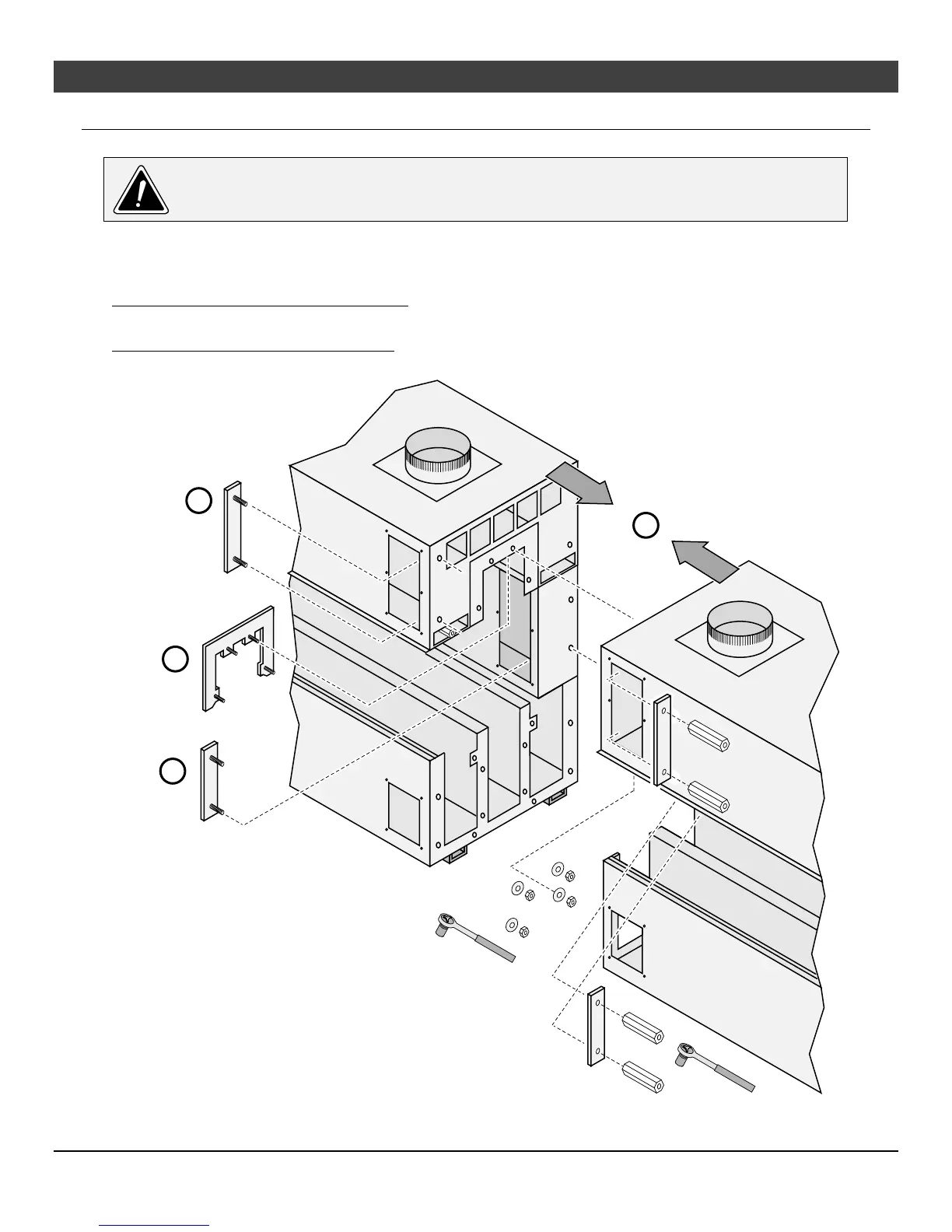
Install Upper Titan Lock Braces (do not fully tighten)
Do not tighten the Titan braces until the glass opening is adjusted (see 26 for details).
With the fireplace slid together (“a”), insert the upper outer brace into place (see “b” below). Hand-tighten
the coupler nuts onto the brace. Insert the upper inner brace into place (see “c” below). Place washers
over the studs then hand-tighten the nuts to secure the brace in place.
See-Through, Pier, & Island Configurations Insert the second upper outer brace into place from the
opposite side (same as “b” below, but from opposite side). Hand-tighten the coupler nuts onto the brace.
Single-Sided, Bay, & Side Configurations The upper outer brace for the back side is installed from inside
the firebox (see “d” below). Hand-tighten the coupler nuts onto the brace.
a
b
c
d
Larger
Bracket
Smaller
Bracket
7/16"
Socket
3/4"
Socket



 To Next Page