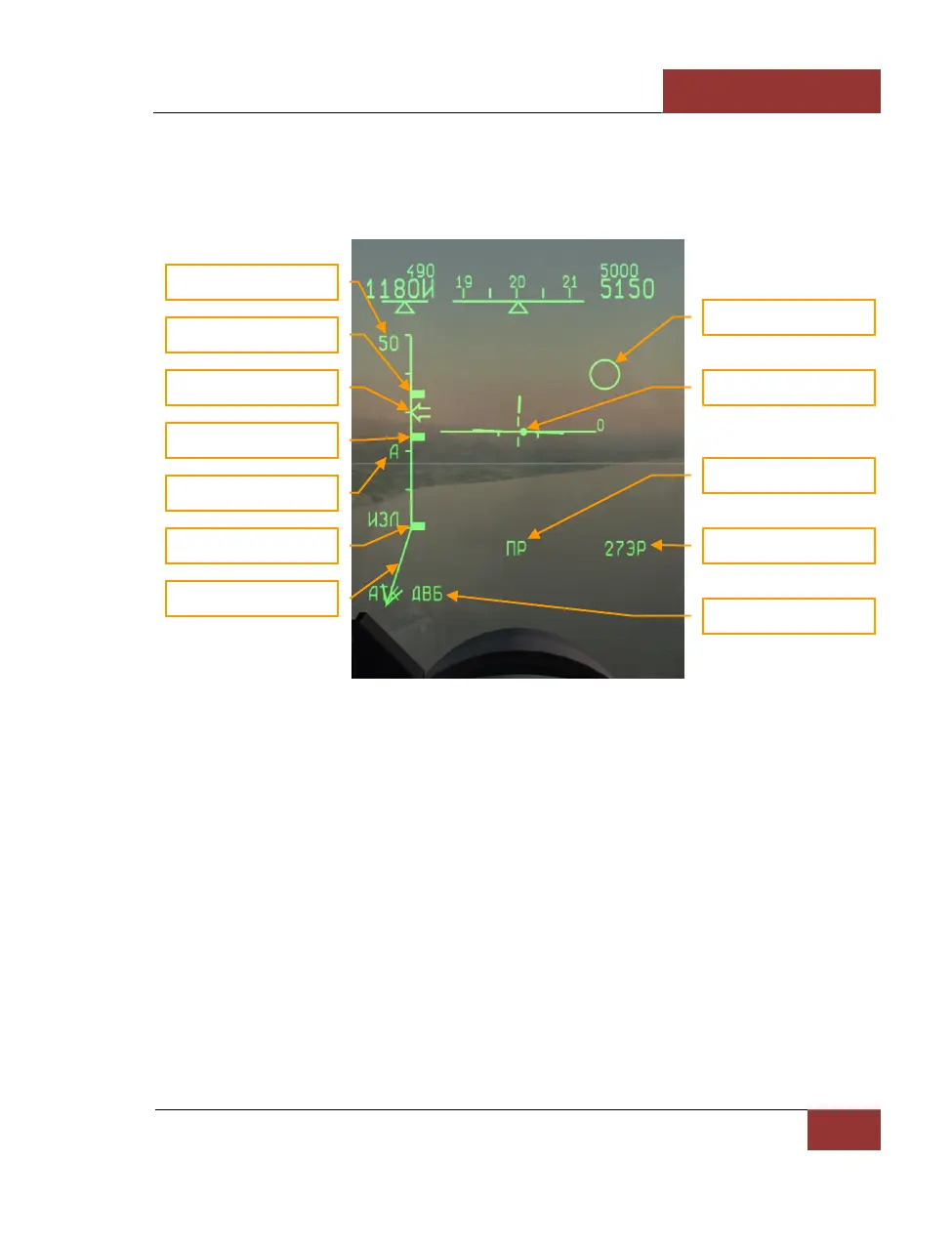
"Атака – РНП" (ATTACK – STT) MODE
After locking up the target in either mode, SCAN or TWS, the radar automatically switches to Single
Target Track (STT) mode. It stops tracking all other targets and additional information is indicated at
the HUD in the following form:
Figure 51: "АТК ДВБ" (STT BVR) MODE
• Rmax – maximum permitted launch range vs. non-maneuvering target.
• Rtr - maximum permitted launch range vs. maneuvering target.
• Rmin – minimum permitted launch range.
• The attack symbol indicates an active radar lock. After missile launch, the attack symbol
flashes at a frequency of 2 Hz.
• Aspect angle shows target velocity vector in the plane turned in the HUD vertical plane.
• "АТК ДВБ" (STT BVR) mode is displayed in the HUD left lower corner.
• The arrow indicating current range to target moves along the range scale.
• A round dot indicates the radar antenna position relative to the fighter boresight.
• The target circle is superposed over the target in the HUD.



 To Next Page