EasyManua.ls Logo

Dell Precision R5500 - Page 83

Dell Precision R5500
104 pages
Print Icon
To Next Page IconTo Next Page
To Previous Page IconTo Previous Page
Loading...
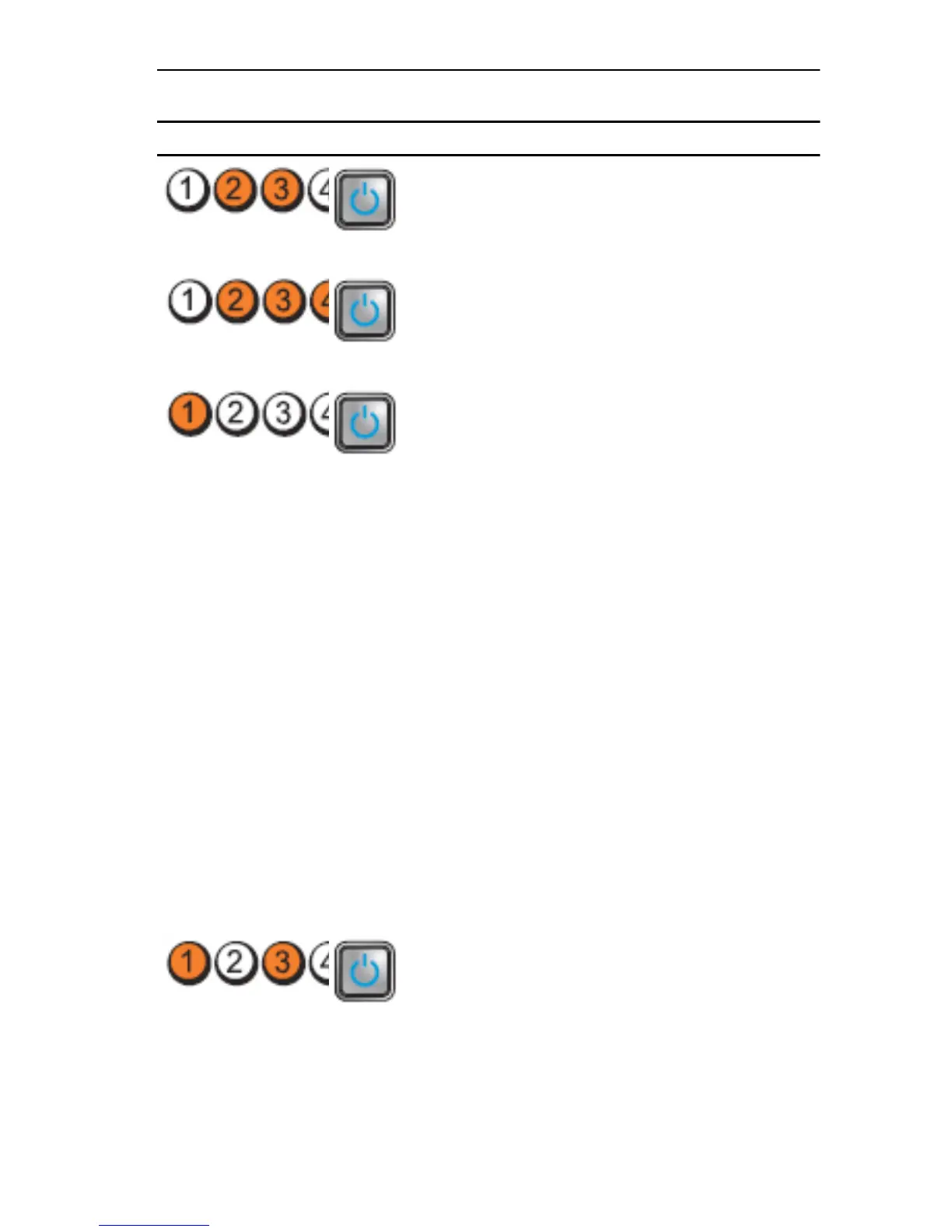
Light Pattern
Problem Description Troubleshooting
Steps
Diagnostic LEDs Power Button LED
A possible floppy
drive or hard drive
failure has
occurred.
Re-seat all power
and data cables.
A possible USB
failure has occurred
Re-install all USB
devices and check
all cable
connections.
No memory modules
are detected.
If two or more
memory
modules are
installed,
remove the
modules, then
reinstall one
module and
restart the
computer. If the
computer starts
normally,
continue to
install additional
memory
modules (one at
a time) until you
have identified a
faulty module or
reinstalled all
modules without
error.
If available,
install working
memory of the
same type into
your computer.
Memory modules
are detected, but a
memory
configuration or
compatibility error
has occurred.
Ensure that no
special
requirements
for memory
module/
connector
placement exist.
Ensure that the
memory you are
83

Table of Contents

Other manuals for Dell Precision R5500

Related product manuals