2-12
Modulon DPH Series
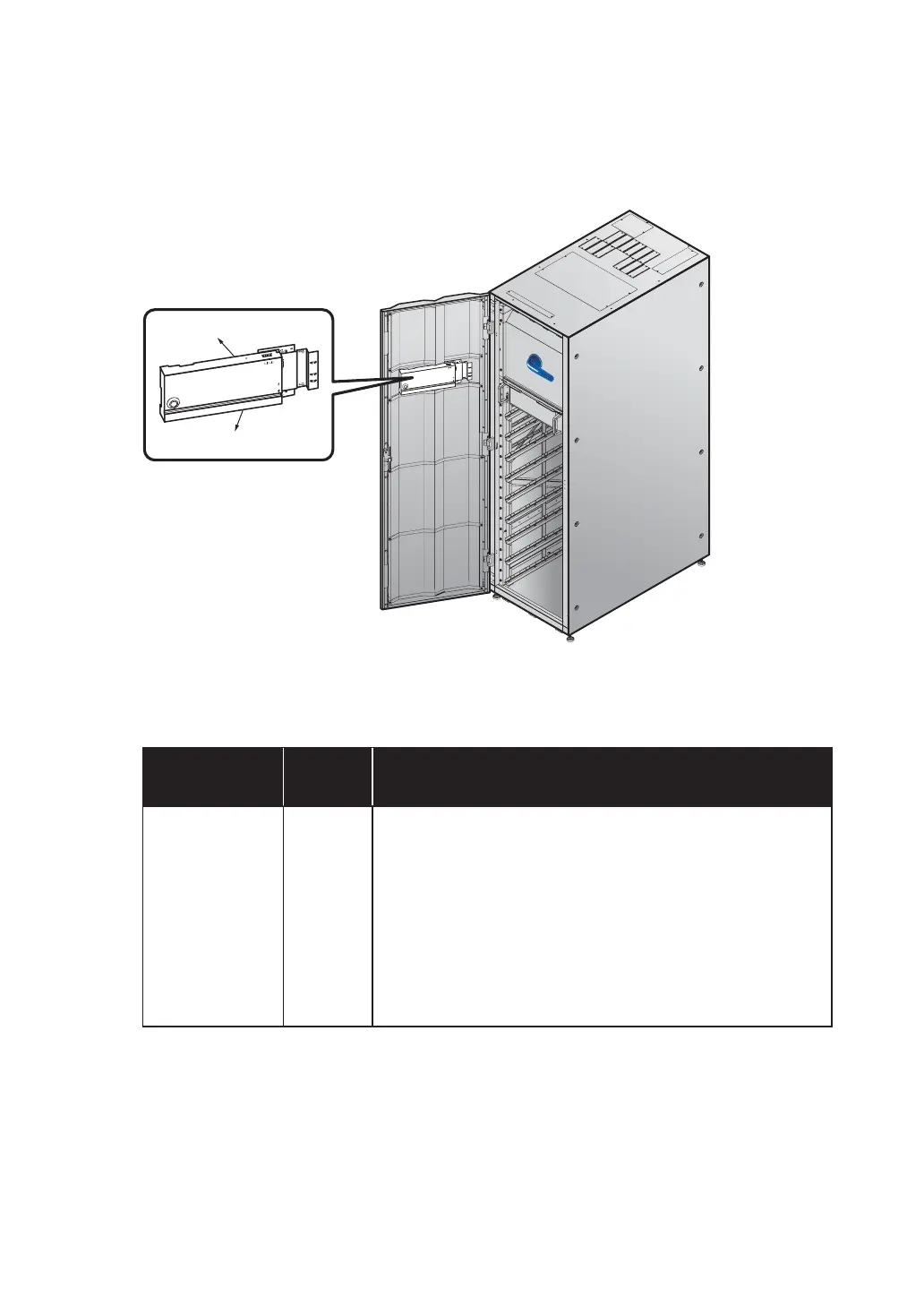
Open the UPS front door and find the buzzers at the rear of the UPS front door. Please see
Figure 2-12.
M
O
DBU
S
BM
S
RES
ET
G
N
D
B
A
G
N
D
B
A
DISPLAY
EMS
ICONSOLE
ON I
BYPASS SWITCH
MODB
US
BMS
R
E
SE
T
G
N
D
B
A
G
N
D
B
A
DISPLAY
EMS
ICONSOLE
Buzzer
Buzzer
(UPS Front View with Door Open)
(Figure 2-12: Buzzers Location)
Please refer to the table below for the status of the tri-color LED indicator and buzzers.
Table 2-1: Tri-color LED Indicator & Buzzers
Tri-color LED
Indicator
Status Meaning
Green ON
1. The UPS is running in online mode and the text ‘On-
Line’ appears in the upper right corner of the screen.
2. The UPS is running in ECO mode and the text ‘ECO’
appears in the upper right corner of the screen.
3. The UPS is running in frequency conversion mode and
the text ‘Frequency Conversion’ appears in the upper
right corner of the screen.
4. The UPS is running in green mode and the text ‘Green’
appears in the upper right corner of the screen.




 To Next Page