ineo 367/287/227 2-11
2.3 About this machine
2
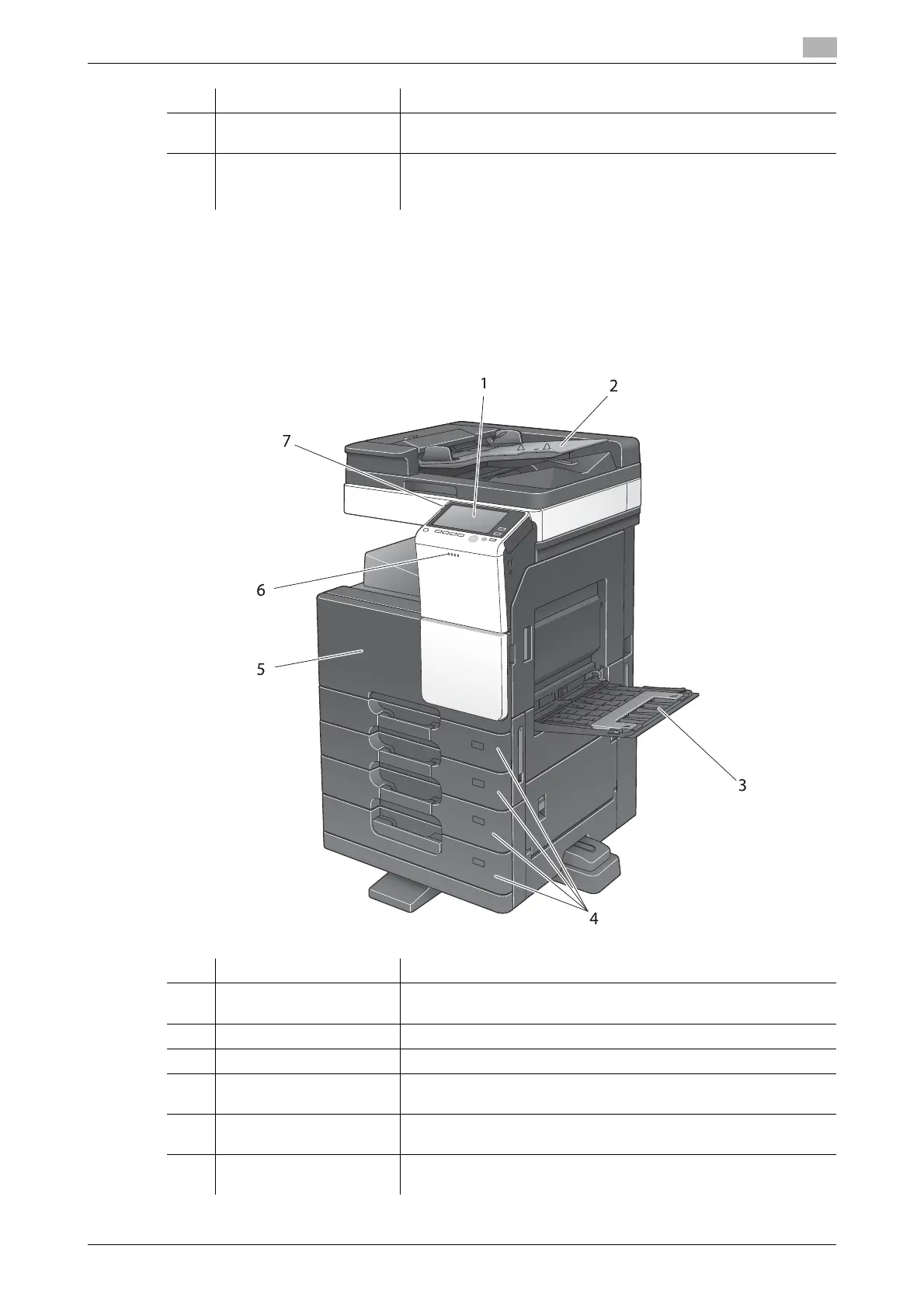
2.3.2 Name of parts (MFP)
Front
The illustration shows the main unit that contains the optional Reverse Automatic Document Feeder
DF-628 and Paper Feed Cabinet PC-213.
18 Mount Kit MK-735 Required to use the machine unit that has Authentication Unit
AU-201S built in to it.
19 Hard Disk HD-522 Used to increase the hard disk storage capacity to add functions.
The hard disk is installed as the standard in North America and Eu-
rope.
No. Name Description
No. Name Description
1 Control Panel Use the Touch Panel or buttons on this panel to operate this ma-
chine.
2 Original Tray Load the original.
3 Bypass Tray Used to load custom-size paper or special paper.
4 Paper Tray Used to load standard-size paper. The number of trays varies de-
pending on the installed Paper Feed Cabinet.
5 Front Door Open this door to replace consumables or to maintenance this ma-
chine.
6 Data Indicator Flashes blue while this machine is receiving a job. If a job is current-
ly spooled, this indicator lamp lights up blue.











 To Next Page