devolo dLAN® 200 AVpro Project Manual
15
Warning! The low-pass filter supplied in delivery (standard accessory: Part
No. 69723) should be connected to the output on the dLAN unit at all
times to filter out ripples are hence prevent interference in the frequency
range for radio and TV.
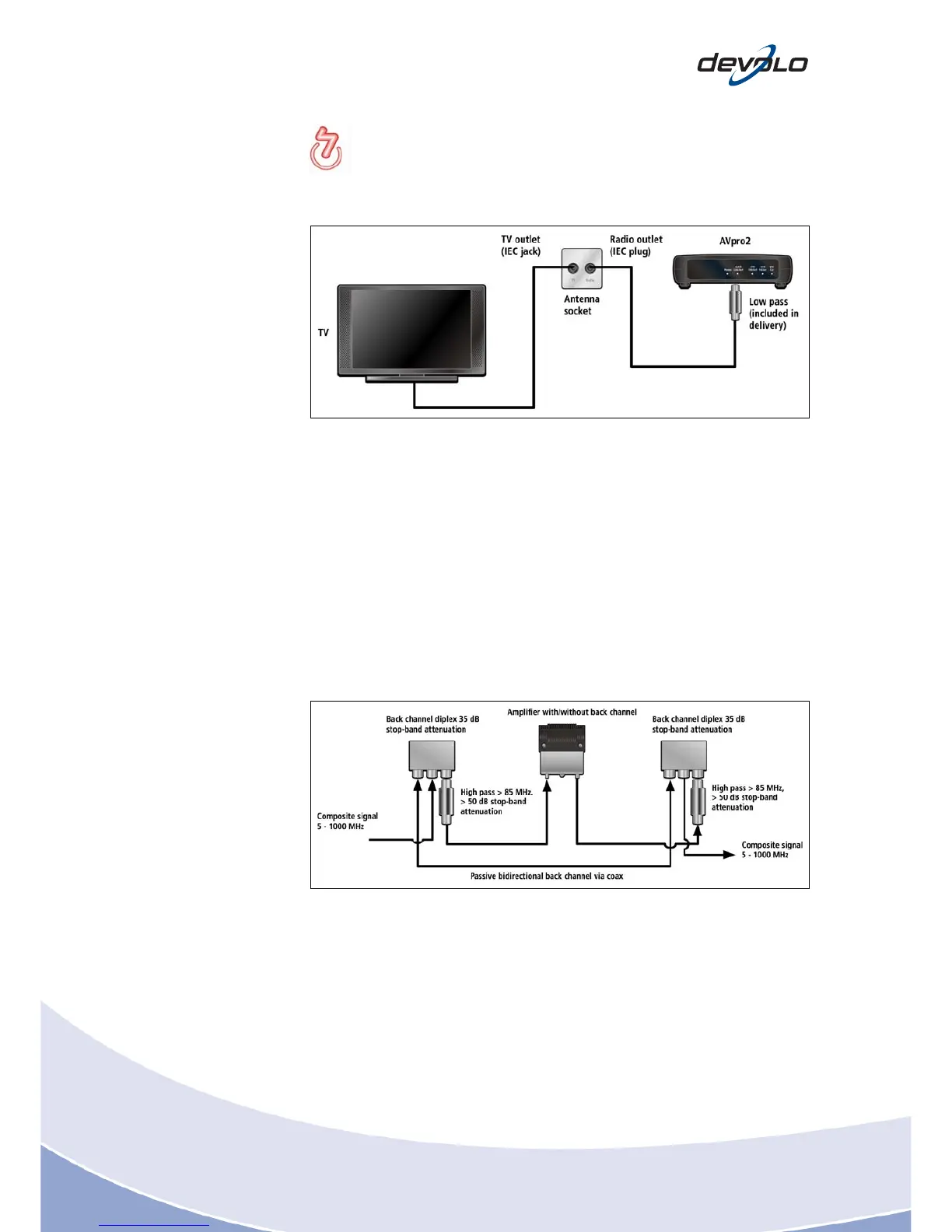
Fig. 3-11: Tapping the Ethernet signal on the antenna socket
3.5.3 Bypassing amplifiers (passive bypass)
The bypass circuit (passive return path, bypass) bridges an amplifier. Make sure that
there is enough sufficient stop-band attenuation on the diplex filters (e.g. Comega,
Tratec) here. Frequently, they only have 35dB stop-band attenuation. This is why a
high-pass filter (> 50 dB stop-band attenuation) needs to be fitted in the direction of
amplifier's output and input.
Deploying diplex filters is favourable to the data connection's attenuation budget.
For TV, a pass-through attenuation of approx. 2 x 0.5 dB (diplex) + 2 x 0.8 dB (high-
pass) should be taken into account.
Fig. 3-12: Bypassing an amplifier with a passive bypass














 To Next Page