devolo dLAN® 200 AVpro Project Manual
49
7.2.2 Streaming server/client
Before you can stream from a server to a client, you need a streamable file. To keep
the use of CPU resources low for your computers, the files should be *.mpg or *.ts
files wherever possible. Streaming in SD (Standard Definition, max. PAL resolution of
768 x 576 pixels) should not cause problems for normal computers. However,
streaming HDTV files is more complex and requires two powerful computers. The
bandwidth available is often not a problem in many cases when streaming high-
resolution video or audio data, but the client PC, which is not powerful enough to
decode HD material at sufficient speed and display it correctly.
You can generate *.ts files directly with VLC, by reading them out of a
video DVD and saving them in the appropriate format.
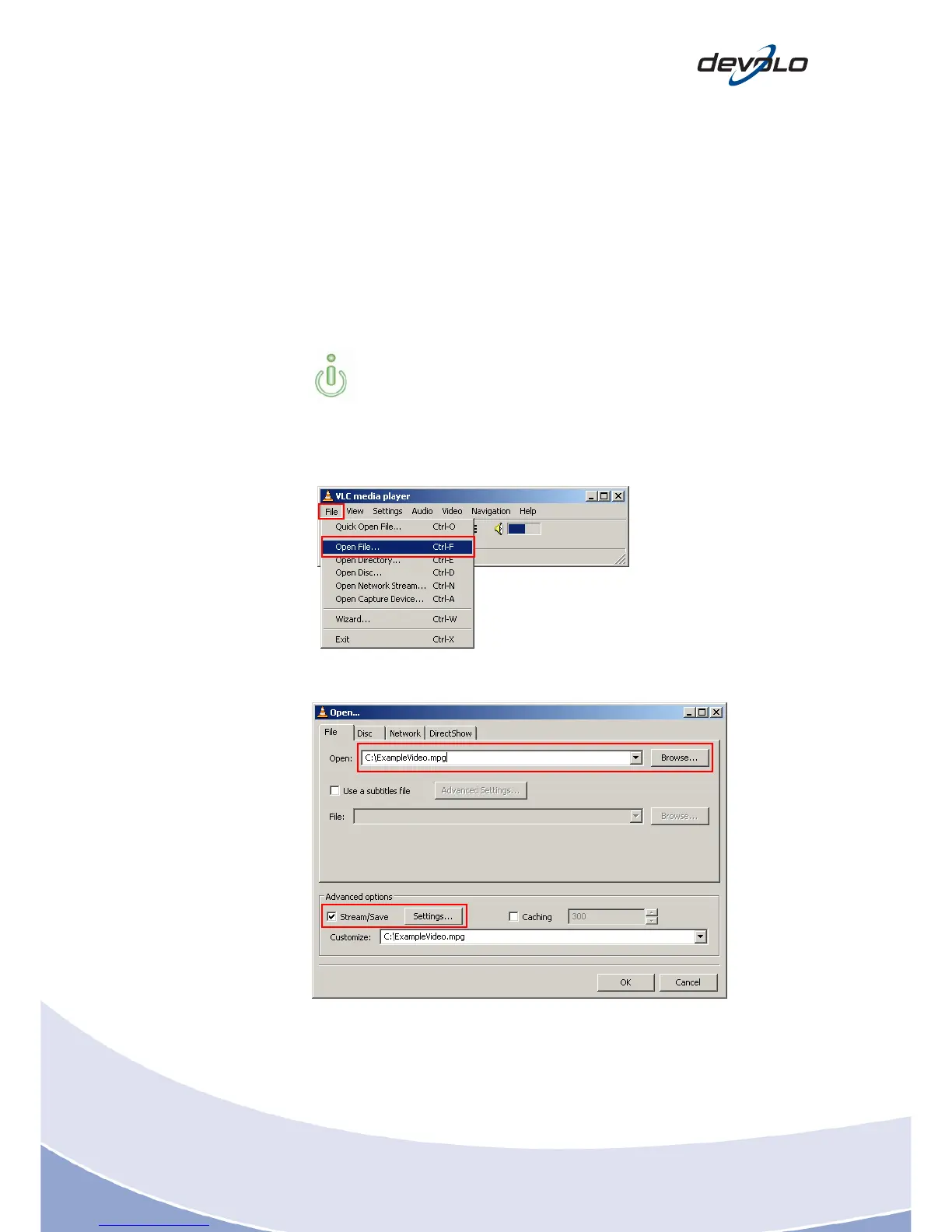
7.2.3 Setting up the streaming server
Foll
owing the step-by-step instructions below to setup a streaming server:
1. File > Open File…
2. Click Browse… to select a video and specify that the video should be
streamed under Advanced options.
3. Click on Advanced options > Settings…














 To Next Page