18 REFERENCE & INSTALLATION MANUAL
Figure 5-3: Delayed 24-hr. Fire Zone
5.2.8 Standard 24Hr Fire Zone
SECTIONS [101] TO [148]: FIRST DIGIT = A
For information on how to connect smoke detectors to the control
panel, refer to Fire Circuits in section 3.15. When a zone is
programmed as a Fire zone, the zone becomes normally open and
requires an EOL resistor. The zone will not function as normally
closed. Whenever a Standard 24Hr Fire Zone is triggered, whether
it is armed or disarmed, the control panel can:
• send the appropriate Zone Alarm report code (see section
9.2.5) to the central station.
• send a Fire Loop Trouble Report (see section 9.2.11) to the
Central Station if a tamper/wiring fault occurs on a Fire Zone.
A “Zone Fault Trouble” will also appear in the keypad's
Trouble Display.
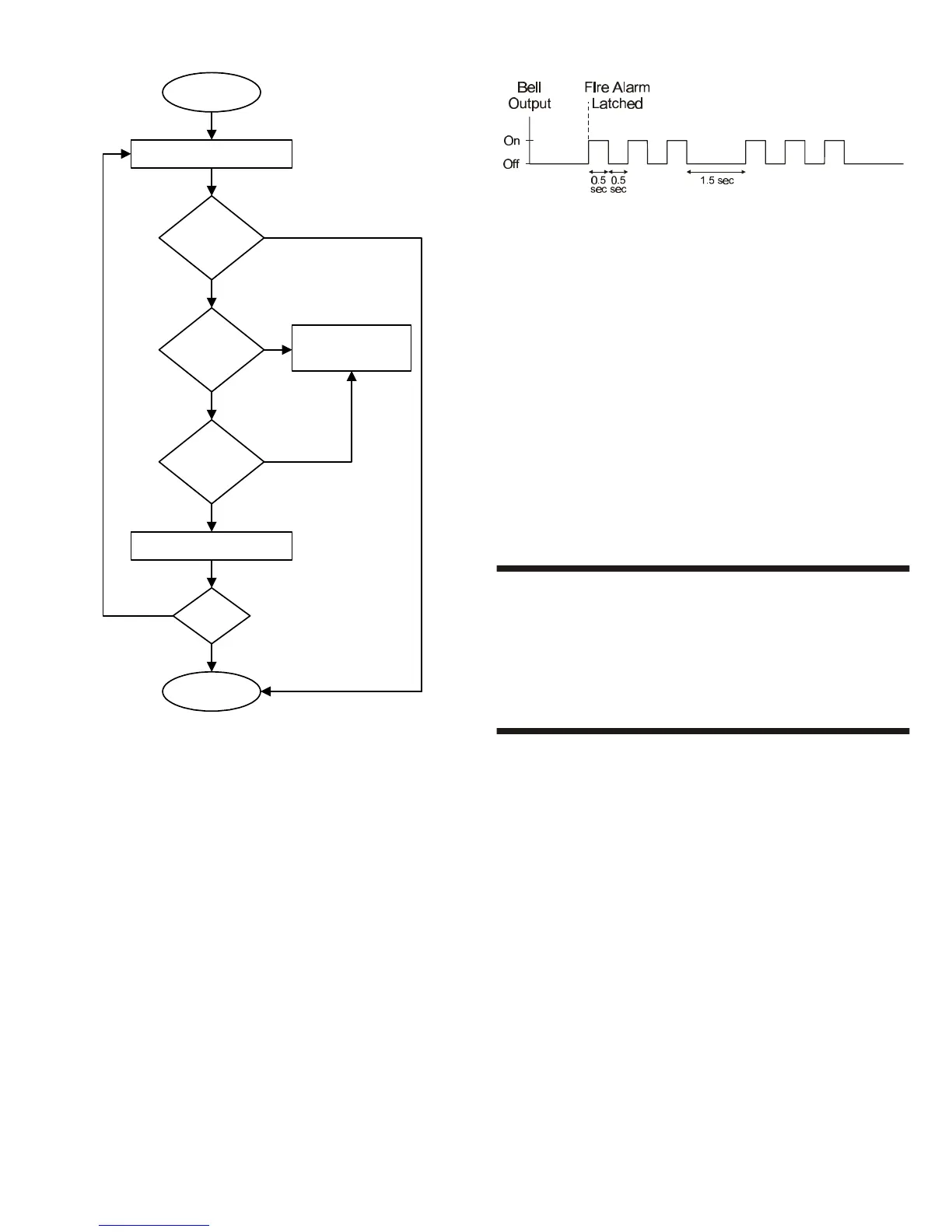
• generate a Fire alarm, which is always audible, regardless of
other settings. Fire alarms will generate an intermittent bell/
siren output signal as demonstrated in Figure 5-4.
Figure 5-4: Bell/Siren Output During Fire Alarm
5.2.9 Stay Delay Zone
SECTIONS [101] TO [148]: FIRST DIGIT = B TO E
When a Stay Delay zone is armed using the Regular or Force
arming methods, the control panel will process the zone as an
Instant zone (see section 5.2.4). When a Stay Delay zone is armed
using the Stay or Instant arming methods and the zone is triggered,
the control panel will not generate an alarm until the programmed
Stay Delay has elapsed. A zone can be defined with one of four
Stay Delays. Each Stay Delay is associated with an Entry Delay
Timer. To program the Entry Delay Timer, key in the desired 3-digit
delay value (000 to 255 seconds) into the corresponding section:
Stay Delay 1 = Entry Delay 1 Timer in section [230]
Stay Delay 2 = Entry Delay 2 Timer in section [231]
Stay Delay 3 = Entry Delay 3 Timer in section [232]
Stay Delay 4 = Entry Delay 4 Timer in section [233]
Please note that the Entry Delay Timers are the same timers used
for Entry Delay zones.
5.3 ZONE PARTITION ASSIGNMENT
SECTIONS [101] TO [148]: SECOND DIGIT = 1 TO 4
The control panel provides the option of partitioning the security
system into two, three, or four completely independent systems.
Therefore, each zone must be assigned to one partition as
described in Figure 5-1 on page 16. For more information on
Partitioning, refer to section 13.5.
5.4 ZONE OPTIONS
Each zone can be programmed with one or more of the options
described below. Program the zone options as described in Figure
5-1 on page 16.
5.4.1 Auto Zone Shutdown
SECTIONS [101] TO [148]: OPTION [1]
When option [1] is disabled and an armed zone is breached, the
control panel generates an alarm: it may send an alarm report (see
section 9.11), activate the bell output, etc.. If the same zone re-
opens during the same alarm, another alarm report may be sent,
the bell output may re-activate and so on. When option [1] is
enabled on a zone, the control panel will stop generating an alarm
when the Auto Zone Shutdown Limit is reached during one armed
period. The control panel will ignore zones with the Auto Zone
Shutdown option that have surpassed the programmed limit. To
program the Auto Zone Shutdown Limit, key in the desired 3-digit
counter (000 to 015) into section [217]. Entering 000 disables this
feature. The Auto Zone Shutdown Limit resets every time the
system is armed.
Delayed Fire Zone
Triggered
Activate bell/siren output & delay
report transmission for 30 seconds.
Yes
Yes
Any key on
keypad pressed
within 30
seconds?
Bell/siren silenced. Delay report
transmission an additional 90 sec.
Problem
corrected?
Latch alarm and transmit
report code as described
in the section "Standard
24Hr. Fire Zone".
END
Alarm Disabled
No
Has a 2nd
Delayed Fire
Zone opened in
30 sec.?
No
Yes
Yes
No
Has the zone
closed within
30 seconds?
Yes
No



 To Next Page