DIGIPLEX CONTROL PANEL 43
14 ACCESS CODES
The Digiplex control panel supports 95 User Access Codes, 1
System Master Code, and 1 Installer Code.
14.1 INSTALLER CODE
SECTION [800]
(Default: 000000) The Installer Code is used to enter the control
panel's programming mode, which allows you to program all the
features, options and commands of the control panel and any
modules connected to the bus. The Installer Code can program
the User Code Options and the Partition Assignment, but
cannot program the personal identification numbers. The
Installer Code is six digits in length where each digit can be any
value from 0 to 9.
To change the Installer Code:
1) Press and hold [0]
2) Enter [INSTALLER CODE]
3) Key in [800]
4) Enter new 6-digit [INSTALLER CODE]
14.2 ACCESS CODE LENGTH
SECTION [504]: OPTIONS [2] AND [3]
Access codes can be between 1 and 6 digits in length. When
programming access codes with less than 6 digits, press the
[ENTER] key. When you change the User Access Code Length from
4 digits to 6 digits, the control panel will automatically add the last 2
digits by using the first 2 digits. For example, if your Access Code
is 1234 and you switch to 6 digits the code will become 123412.
When you change the Access Code Length from 6 digits to 4 digits,
the control panel will automatically remove the last 2 digits.
[2] [3] Option
Off Off 4-digit Access Codes
Off On 6-digit Access Codes
On Off Same as On/On
On On Flexible Access Codes
14.3 SYSTEM MASTER CODE
(Default: 123456) With the System Master Code a user can use
any of the available arming methods with access to all partitions
and can program all User Access Codes, User Options, Partition
Assignments, and Access Control Options.
Each digit in the System Master Code can be any value from 0 to 9.
The length of the System Master Code is determined by the
Access Code Length feature (see section 14.2). The System
Master Code cannot be set to less than 4 digits in length.
14.3.1 System Master Code Reset
SECTION [950]
To reset the System Master Code to its default (123456):
• Set the RESET jumper to on by placing a jumper on the reset
pins of the control panel
• Use the Installer Code to enter section [950]
Do not remove the power from the control panel.
14.4 PROGRAMMING ACCESS CODES
SECTIONS [801] TO [896]
In section [801] the installer can program the System Master Code
with an Access Control Card’s serial number and change the
Access Card’s arming method (see Access Control User Options 5
to 7 in the Digiplex Access Control Reference & Installation
Manual).
In sections [802] to [896], the Installer Code can program the User
Code Options, Partition Assignment, and Access Control Options,
but cannot program the user code for the System Master Code or
the User Access Codes. To program the User Access Codes, refer
the users to the appropriate User Manual: LCD Keypad User’s
Manual, LED Keypads User’s Manual, or Access Control User’s
Manual.
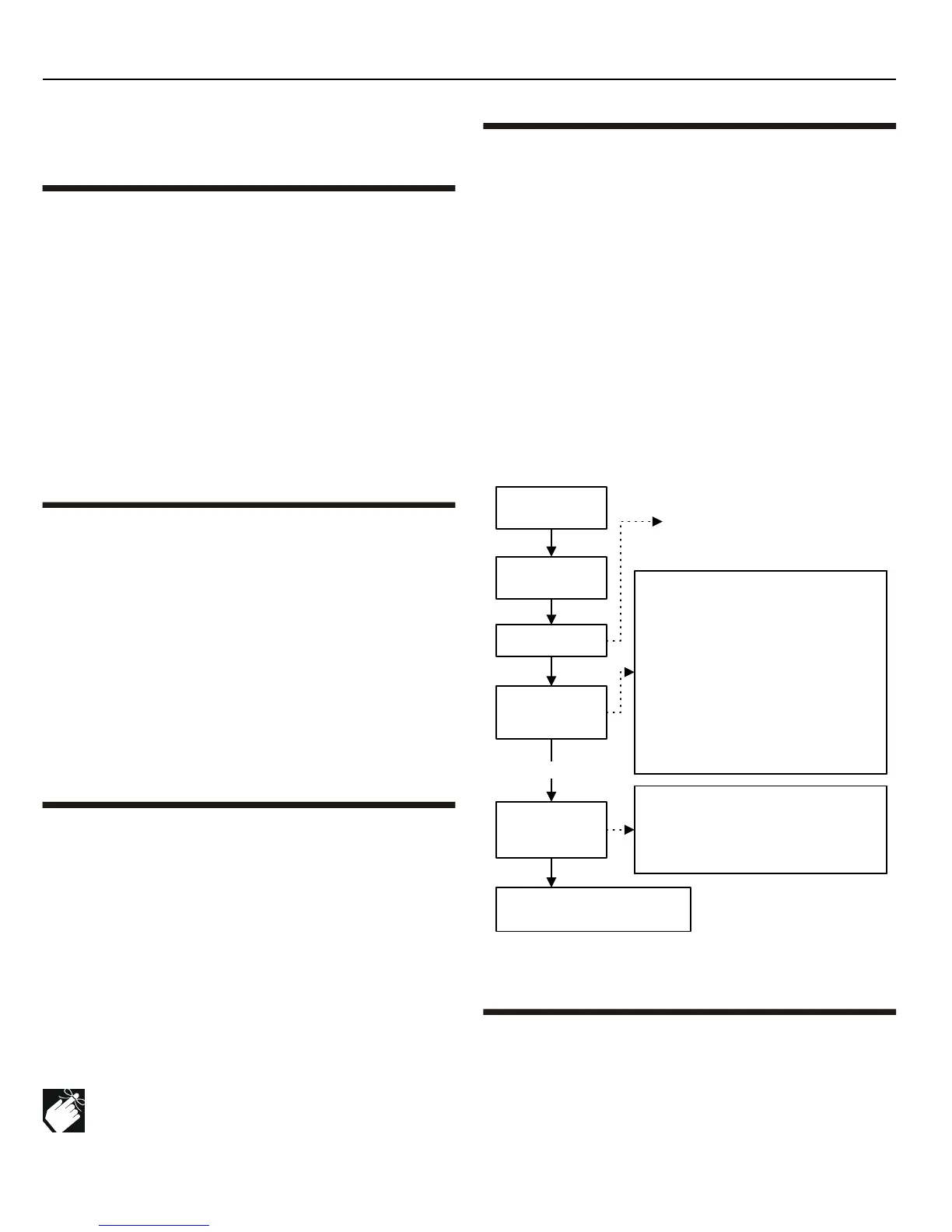
Figure 14-1: Programming User Access Codes
14.5 USER OPTIONS
The User Options define how each User Access Code can arm or
disarm the system. Regardless of these settings, all users can
Regular Arm (see section 16.1) their assigned partitions and all
users, except those with the Arm Only option (see section 14.5.4),
can disarm an assigned partition. Select one or more of the options
described in the following sub-sections for each User Access Code
as shown in Figure 14-1 on page 43. The System Master Code or a
User Options
Feature Select
Programming
Key in
[SECTION]
User Code Options
[1] [2] Feature
off off Master Feature Disabled
off on Master Feature Disabled
on off User can program access codes
on on User can program access
codes, options & assignment
[3]
Duress
[6]
Stay & Instant
[4]
Bypass
[7]
Force
[5]
Arm only
[8]
Main Menu Access
*Note: all users can regular arm.
User Code Partition Assignment
[1]
User Code Has Access to Partition 1
[2]
User Code Has Access to Partition 2
[3]
User Code Has Access to Partition 3
[4]
User Code Has Access to Partition 4
User Partition
Assignment
Feature Select
Programming
Key in the
[INSTALLER CODE]
Where sections
[802]
to
[896]
represent User Access Codes
002 to 096.
Using the method described below, the Installer can program the User
Code Options and User Code Partition Assignment, but cannot
program the Personal Identification Numbers.
Press and hold
the
[0]
key
Press the
[p]
key
Press
[ENTER]
or the
[p]
key to
save and go to the next section.



 To Next Page