DIGIPLEX CONTROL PANEL 35
11 PROGRAMMABLE OUTPUTS
A PGM is a programmable output that toggles to its opposite state
(i.e. a normally open PGM will close) when a specific event has
occurred in the system.
For example, a PGM can be used to reset smoke detectors,
activate strobe lights, open/close garage doors and much more.
When a PGM closes, the control panel supplies a ground to the
PGM activating any device or relay connected to it. When a PGM
opens, the circuit opens from ground therefore not providing any
power to devices connected to it. The control panel provides a
maximum of 100mA to PGM1 and 50mA to PGMs 2, 3 and 4.
PGM1 to PGM4 are normally open outputs and PGM5 is a
normally open or normally closed 5A relay. For information on how
to connect a relay to a PGM, please refer to section 3.9.
11.1 PGM ACTIVATION EVENT
SECTIONS [400], [402], [404], [406], AND [408]
The PGM Activation Event will activate the selected PGM when a
specific event or events occur in the system. The control panel can
set separate activation events for each PGM.
For example, the control panel can be programmed to activate
PGM2 whenever the system is Force Armed.
To program a PGM activation event:
1) Enter the section that represents the desired PGM.
PGM1 = [400] PGM4 = [406]
PGM2 = [402] PGM5 = [408]
PGM3 = [404]
2) Enter the first digit (see PGM Programming Table on page37)
where each digit from 0 to F represents a specific group of
events.
3) Enter the second digit, which can be any digit from 0 to F
depending on the first digit.
4) After entering the second digit, use the Feature Select method
(enable/disable options [1] to [8]) to select up to eight specific
events as detailed in the PGM Programming Table.
For details on the available activation events please refer to the
PGM Programming Table on page37. Below you will find brief
details on just a few of the available activation events:
Smoke Reset: Deactivates the PGM for a period of 4 seconds
every time the [CLEAR] and [ENTER] keys are pressed
simultaneously and held for 2 seconds. Please refer to section
3.15.3 for instructions on connecting the PGM in order to perform a
smoke detector reset. Program First Digit = [4], Second Digit = [1],
then [5] on.
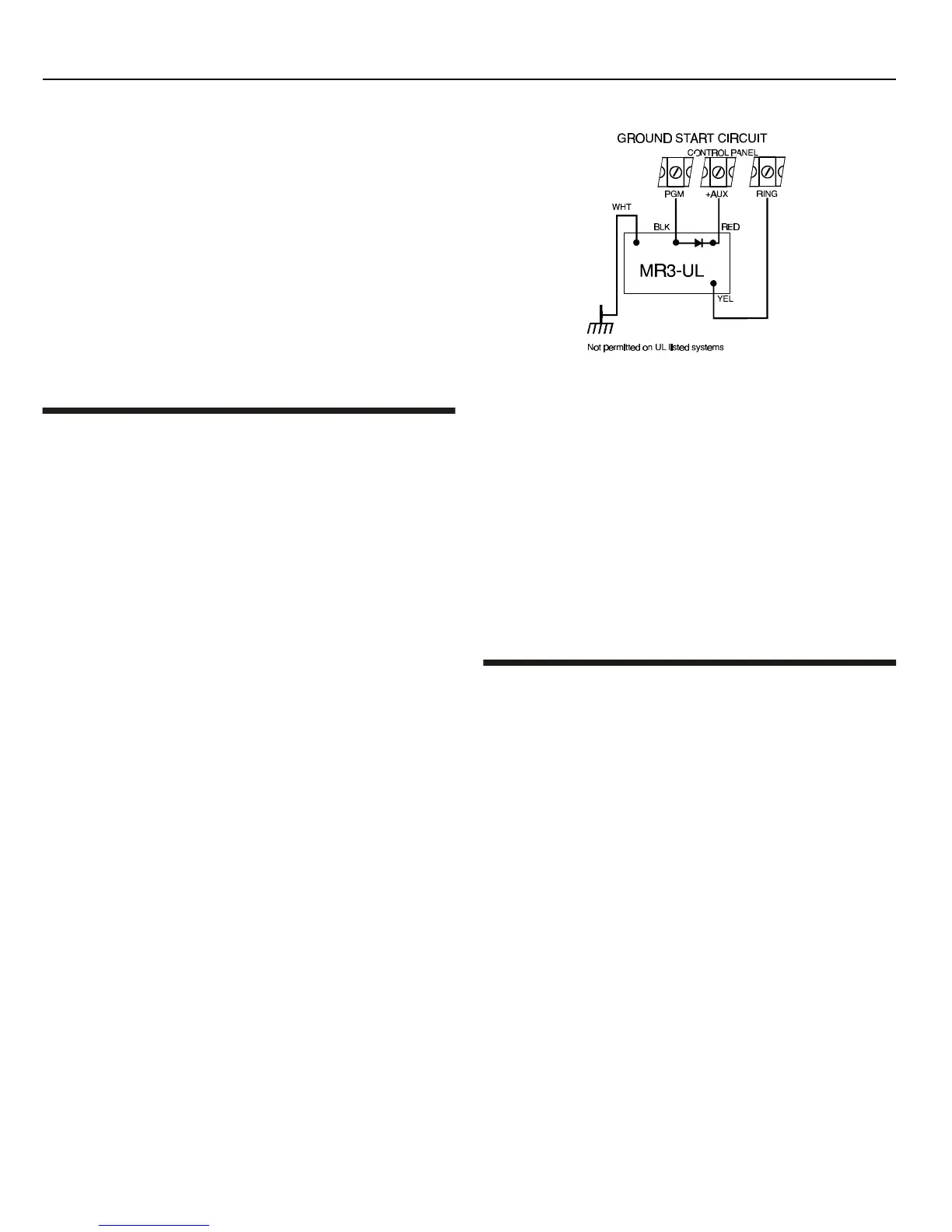
Ground Start: Just before the control panel attempts to dial an
outside line when using ground start telephone equipment, the
PGM will activate for the period defined by the PGM Delay (see
section 11.2.2). Please note that the PGM Deactivation Option
must be set to Timed (see section 11.2). Program First Digit = [4],
Second Digit = [1], then [6] on.
Figure 11-1: Ground Start Circuit
Kissoff: After receiving a handshake from the central station, the
control panel activates the PGM for the period defined by the PGM
Delay (see section 11.2.2). This can be used to latch the central
station connection to another device such as a microphone/
speaker module. Please note that the PGM Deactivation Option
must be set to Timed (see section 11.2). Program First Digit = [4],
Second Digit = [1], then [7] on.
Strobe: Activates the PGM whenever the system is in alarm. The
PGM will remain activated even after Bell Cut-off and will wait until
the alarm is cancelled before deactivating the PGM. Program First
Digit = [1], Second Digit = choose [PARTITION] (0 = all enabled
partitions, 8 = any enabled partition), then [5] on.
11.2 PGM DEACTIVATION OPTION
SECTION [502]: OPTIONS [1] TO [5]
Once the PGMs are activated (see section 11.1) they will
deactivate according to the options programmed in section [502].
Options [1] to [5] represent PGMs 1 to 5 respectively. Each PGM
can be set to Follow or Timed by turning the option representing
the PGM on or off:
For example, if option [1] is on in section [502], then PGM1 is set to
Timed.
FOLLOW
Option OFF
1) If the first digit of the PGM Activation Event is set at 1, 2, 3, 4,
5, 6, or 7, the PGM will remain activated until the PGM
Activation Event has ended. It will ignore the PGM
Deactivation Event.
2) If the first digit of the PGM Activation Event is set at 8, 9, A, B,
C, D, E, or F, the PGM will remain activated until the PGM
Deactivation Event occurs.
TIMED
Option ON
After activating the PGM, the control panel will start the PGM Delay
Timer (see section 11.2.2) and the PGM will deactivate only when
the PGM Delay Timer has elapsed and will ignore the PGM
Deactivation Event.



 To Next Page