DIGIPLEX CONTROL PANEL 7
3 INSTALLATION
3.1 LOCATION & MOUNTING
Before mounting the cabinet, push the five white nylon mounting
studs into the back of the cabinet. Pull all cables into the cabinet
and prepare them for connection before mounting the circuit board
into the back of the cabinet. Select an installation site that is not
easily accessible to intruders and leave at least 2" around the
panel box to permit adequate ventilation and heat dissipation. The
installation site should be dry and close to an AC source, ground
connection and telephone line connection.
3.2 EARTH GROUND
Connect the zone and dialer ground terminals from the control
panel to the cabinet and cold water pipe or grounding rod as per
local electrical codes.
For maximum lightning protection, use separate earth
grounds for the zone and dialer grounds as shown in
Figure 3-3 on page 8.
3.3 AC POWER
Use a 16.5VAC (50/60Hz) transformer with a minimum 20VA rating
to provide sufficient AC power. For increased power you can use a
transformer with a 40VA rating. For UL Listed systems, you can
use model #BE156240CAA. For CSA listed systems, use model
#BE116240AAA. Do not use any switch-controlled outlets to power
the transformer. Connect the transformer as shown in Figure 3-3
on page 8.
Do not connect the transformer or the backup battery
until all wiring is completed.
3.4 BACKUP BATTERY
In order to provide power during power loss, connect a 12VDC 4Ah
rechargeable acid/lead or gel cell backup battery (YUASA model
#NP7-12 recommended) as shown in Figure 3-3 on page 8.
Connect the backup battery after applying AC power. When
installing, verify proper polarity, as reversed connections will blow
the battery fuse. For information on how to set the Battery Charge
Current to either 350mA or 700mA, please refer to section 13.3 of
this manual
3.4.1 Battery Test
The control panel conducts a dynamic battery test under load every
64 seconds. If the battery is disconnected, if its capacity is too low
or if the battery voltage drops to 10.5 volts or less when there is no
AC, the “Battery Trouble” message will appear in the Trouble
Display. At 8.5 volts, the panel shuts down and all outputs close.
3.5 AUXILIARY POWER TERMINALS
You can use the auxiliary power supply to power the motion
detectors, keypads and other accessories in your security system.
A fuseless circuit protects the auxiliary output against current
overload and automatically shuts down if the current exceeds 1.1A.
Auxiliary power will resume once the overload condition has
restored. For details on available output power, please refer to
Figure 3-3 on page 8. For more information on how to calculate
system consumption, refer to Calculating Power Requirements on
page9.
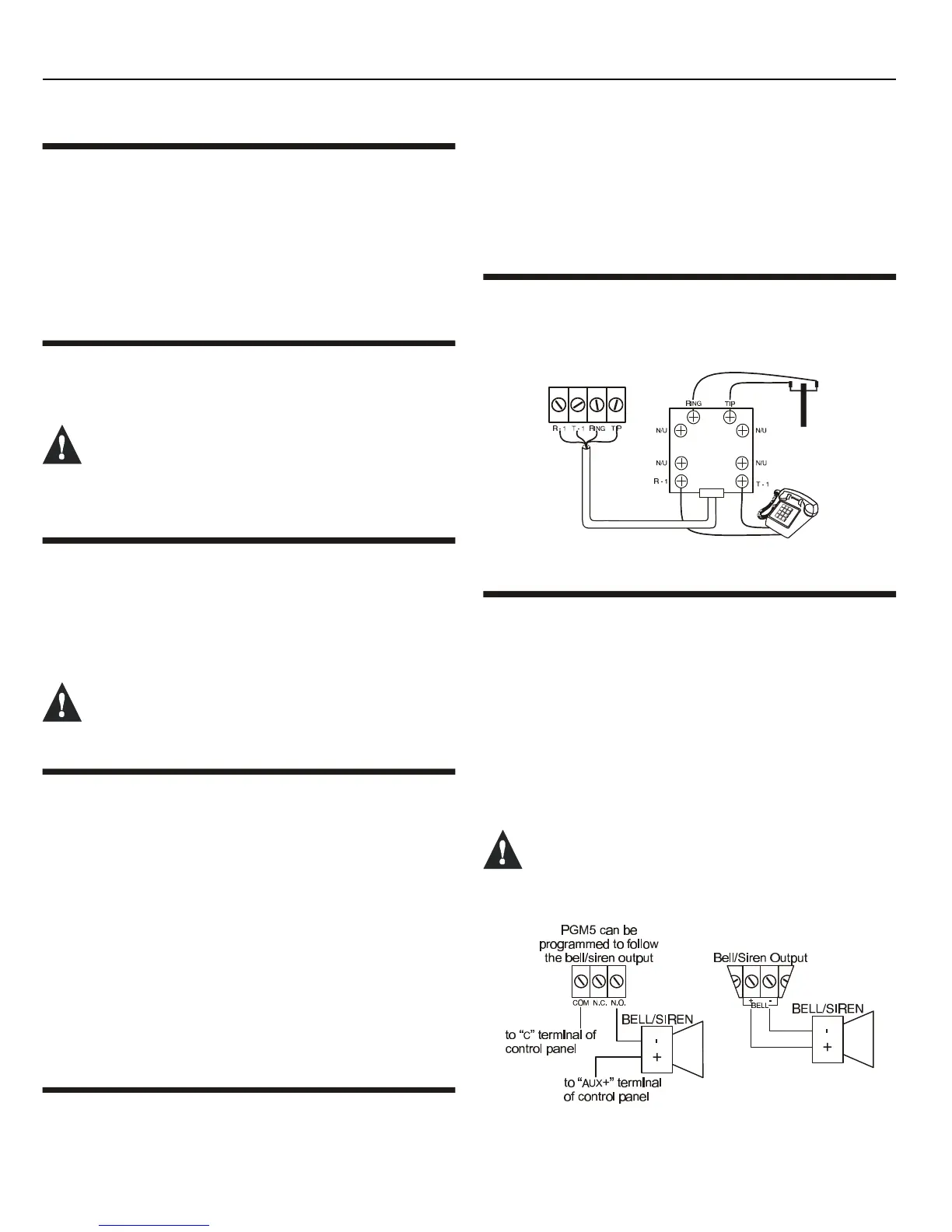
3.6 TELEPHONE LINE CONNECTION
Connect the incoming telephone company wires into the TIP and
RING connections of the control panel. Then run the wires from T1
and R1 to the telephone system as shown in Figure 3-1.
Figure 3-1: Telephone Line Connections
3.7 BELL/SIREN OUTPUT
The BELL+ and BELL- terminals power bells and/or other warning
devices that require a steady voltage output during an alarm. The
bell output supplies 12VDC upon alarm and can support two 20-
watt or two 30-watt sirens. The bell output uses a fuseless circuit
and will automatically shut down if the current exceeds 3A. If the
load on the BELL terminals returns to normal (≤3A), the control
panel will re-instate power to the BELL terminals. When connecting
sirens, please verify correct polarity as shown in Figure 3-2. Please
note that PGM5 is rated at 5A and can be used to power bells and/
or other warning devices (see Figure 3-2: Bell/Siren) by
programming it as a bell/siren output. Please refer to
Programmable Outputs in section 11.
When the bell/siren output is not used, the “Bell
Absent” message will appear in the Trouble Display.
To avoid this, connect a 1kΩΩ resistor across the bell
output.
Figure 3-2: Bell/Siren



 To Next Page