48 REFERENCE & INSTALLATION MANUAL
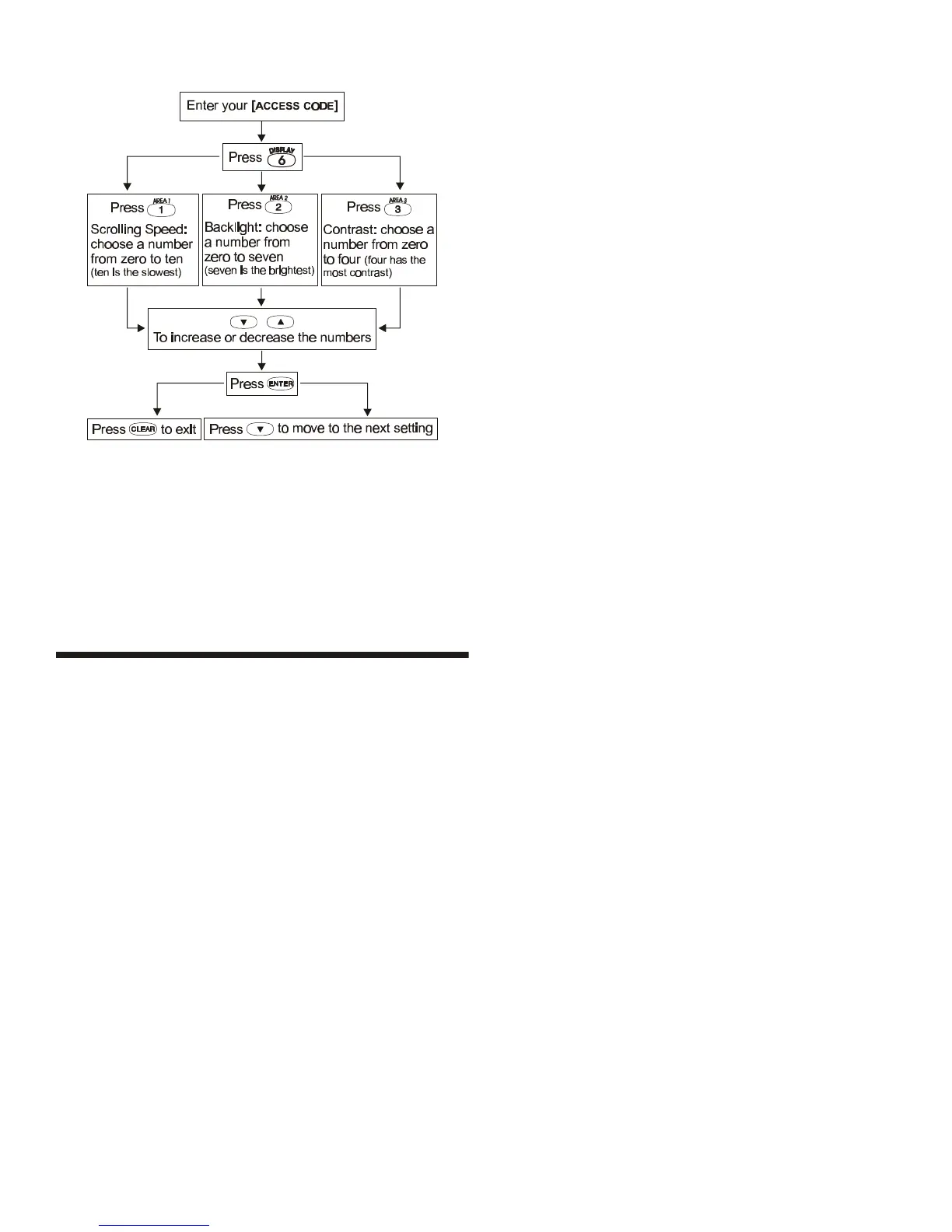
Figure 16-2: LCD Keypad Settings
For LED Keypads:
Modify Backlight only:
1) Enter [ACCESS CODE]
2) Press the [6] key
3) Use the [p] and [q] keys to increase or decrease the
illumination. The range is between zero and seven with seven
as the brightest. ([10] LED = zero)
16.7 TROUBLE DISPLAY
When the system experiences problems or is tampered with, the
Trouble Display will activate. In the LED Keypads, the [TRBL]
Symbol illuminates. In the LCD Keypads, the Trouble Display will
appear on the LCD screen. Keypads will only display troubles that
occur in their assigned area(s).
Potential troubles have been sorted into eight groups. The Group
headings are listed below with a brief explanation of the potential
troubles sorted within each group.
TO VIEW THE TROUBLE DISPLAY:
1) Press the [TRBL] key
2) For LEDs: Press the Numerical Symbol corresponding to the
Group heading to view the specific trouble.
For LCDs: Press the number representing the trouble and use
the [p] and [q] keys to view the specific trouble.
GROUP [1]: SYSTEM
Trouble [1]: AC Failure
The control panel has detected a power failure. This means that
the system is running on the backup battery.
Trouble [2]: Battery Trouble
The backup battery is disconnected, needs to be recharged, or
replaced.
Trouble [3]: AUX Current Limit
Devices connected to the control panel have exceeded current
limits (1.1A). The Auxiliary Output will shutdown until the trouble
has been rectified.
Trouble [4]: Bell Current Limit
The bell or siren connected to the control panel has exceeded
current limits (3A). The Bell/Siren Output will shutdown until the
trouble is rectified.
Trouble [5]: Bell Absent
The control panel has detected that the bell or siren is not
connected. When the bell output is not used, connect a 1kΩ
resistor across the bell output or this trouble will re-occur.
Trouble [6]: ROM Check Error
The control panel registers a memory error. Contact your
distributor for replacement.
GROUP [2]: COMMUNICATOR
Trouble [1]: TLM (Telephone Line Monitor)
The control panel is unable to access the telephone line.
Troubles [2] to [5]:
[2] Fail to Communicate 1
[3] Fail to Communicate 2
[4] Fail to Communicate 3
[5] Fail to Communicate 4
The control panel has tried all assigned telephone numbers and
has failed to communicate with the Security Company.
Trouble [6]: Fail to Communicate PC
The control panel is unable to communicate with the WinLoad
software.
GROUP [3]: MODULE TROUBLES
Trouble [1]: Module Tamper
The control panel registers that someone has triggered the tamper
switch on a module.
Trouble [2]: ROM Check Error
The control panel registers a memory error in a module. Contact
your distributor for replacement.
Trouble [3]: TLM Trouble
A module is unable to access the telephone line.
Trouble [4]: Fail to Communicate
A module has failed to communicate with the Security Company.
Trouble [5]: Printer Trouble
The control panel registers a problem with the printer connected to
the Printer Module. Check printer for problems (paper jam, no
paper, no power, etc.).
Trouble [6]: AC Failure
Module power failure.



 To Next Page