22 REFERENCE & INSTALLATION MANUAL
6.1 KEYSWITCH NUMBERING
SECTIONS [049] TO [056]
The Keyswitch Numbering feature allows you to assign any
hardwired input in the system to any of the 8 keyswitch zones in
the Digiplex Control Panel. This feature tells the control panel
where the keyswitch is connected and which of the 8 keyswitch
zones is assigned to that keyswitch. To assign a keyswitch
connected to a hardwired input terminal, program the module's
serial number and the number of the input where the keyswitch is
connected into the section corresponding to the desired keyswitch
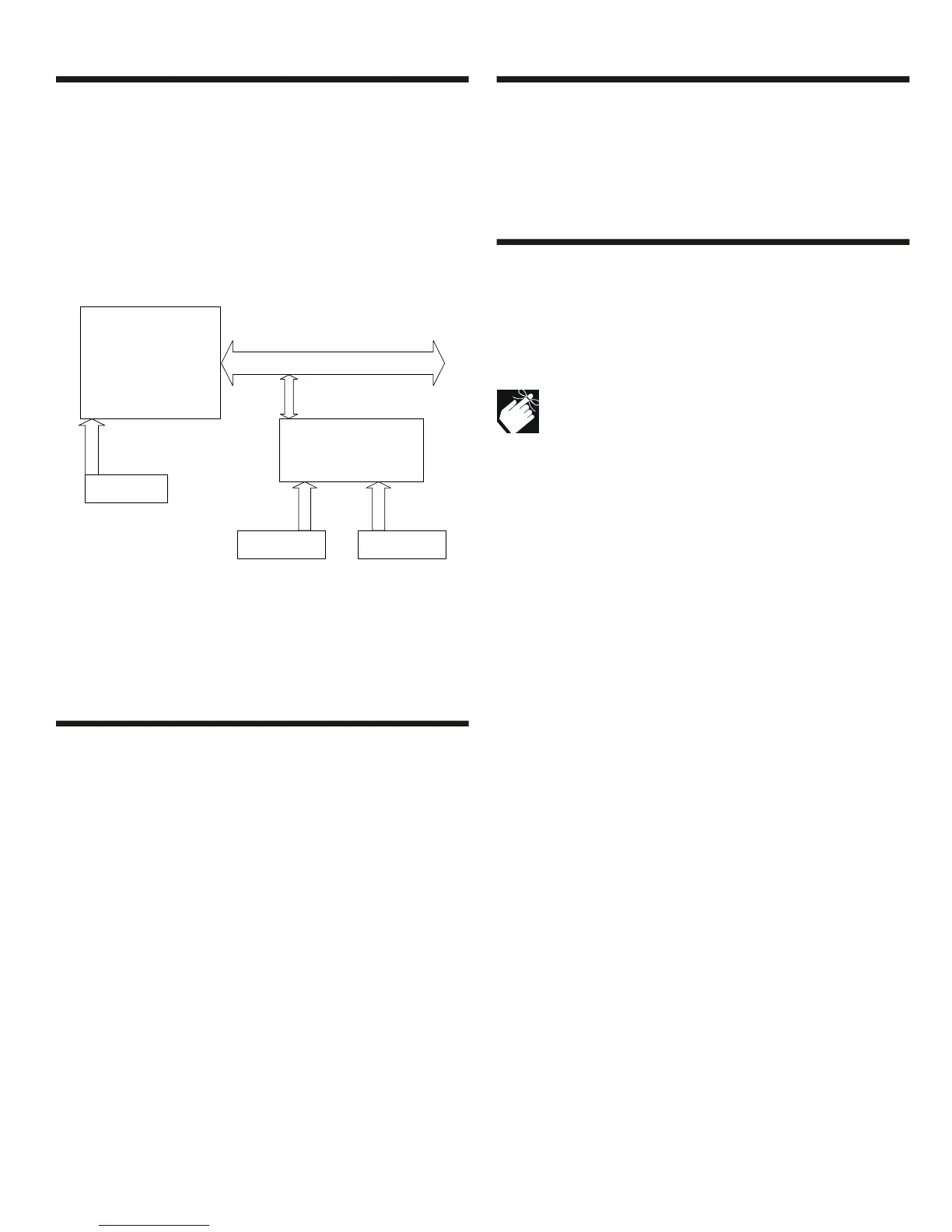
zone (see Figure 6.2).
Figure 6-2: Example of Keyswitch Numbering
6.2 KEYSWITCH DEFINITIONS
Select one of the keyswitch definitions (also see Figure 6-1 on
page 21):
6.2.1 Keyswitch Disabled
SECTIONS [149] TO [156]: FIRST DIGIT = 0
Disables keyswitch input.
6.2.2 Momentary Keyswitch
SECTIONS [149] TO [156]: FIRST DIGIT = 1
To arm a partition using the Momentary Keyswitch, turn on the
keyswitch for approximately three seconds then turn it off.
Repeating this sequence will disarm the system. The selected
Keyswitch Option (see section 6.4) determines the type of arming.
6.2.3 Maintained Keyswitch
SECTIONS [149] TO [156]: FIRST DIGIT = 2
To arm a partition using the Maintained Keyswitch, turn the switch
from the ON to the OFF position. To disarm a partition set the
keyswitch in the ON position. In the case of an Arm Only option, the
control panel will not perform any action when the switch is in the
ON position. The selected Keyswitch Option (see section 6.4)
determines the type of arming.
6.3 KEYSWITCH PARTITION ASSIGNMENT
SECTIONS [149] TO [156]: SECOND DIGIT = 1 TO 4
The control panel provides the option of partitioning the security
system into two, three, or four completely independent systems.
Therefore, each keyswitch must be assigned to one partition as
described in Figure 6-1 on page 21. For more information on
Partitioning, refer to section 13.5.
6.4 KEYSWITCH OPTIONS
Each keyswitch zone can be programmed with one or more of the
options (also see Figure 6-1 on page 21):
6.4.1 Arm/Disarm Option (Keyswitch)
SECTIONS [149] TO [156]:
Option [5] ON = Arm Only
Option [5] OFF = Arm & Disarm
Only one of the arming options (Stay, Force, Instant and
Regular) can be selected.
6.4.2 Stay Arming (Keyswitch)
SECTIONS [149] TO [156]: OPTION [6]
Activating the keyswitch will bypass any zones defined as Stay
Zones (see section 5.4.3) in the selected partition. All other zones
will remain activated. For more information on Stay Arming, refer to
section 16.1.2.
6.4.3 Force Arming (Keyswitch)
SECTIONS [149] TO [156]: OPTION [7]
Activating the keyswitch will arm the selected partition bypassing
any open zones defined as Force Zones (see section 5.4.4) at the
time of arming. For more information on Force Arming, refer to
section 16.1.6.
6.4.4 Instant Arming (Keyswitch)
SECTIONS [149] TO [156]: OPTION [8]
This option is identical to Stay Arming except that all armed zones
will become Instant Zones (see section 5.2.4). For more
information on Instant Arming, refer to section 16.1.4.
6.4.5 Regular Arming (Keyswitch)
SECTIONS [149] TO [156]: OPTION [6] TO [8]
When options [6] to [8] are off, the keyswitch arming option will
default to Regular Arming (see section 16.1.1).
Digiplex Control Panel
SN#: 000000A2
Keyswitch B Keyswitch C
Keyswitch
Zone # Section Serial# Input#
Keyswitch A: 1 = [049] 000000A2 001
Keyswitch B: 2 = [050] 30000041 002
Keyswitch C: 3 = [051] 30000041 006
Input 2
Input 6
Keyswitch A
Input 1
Input Terminals
1 2 3 4
B
US
Zone Expander Module
SN#: 30000041
Input Terminals
1 2 3 4 5 6 7 8



 To Next Page