Document No. CO 004844K
40
Unlocking a Test Unit Locked by Someone Else
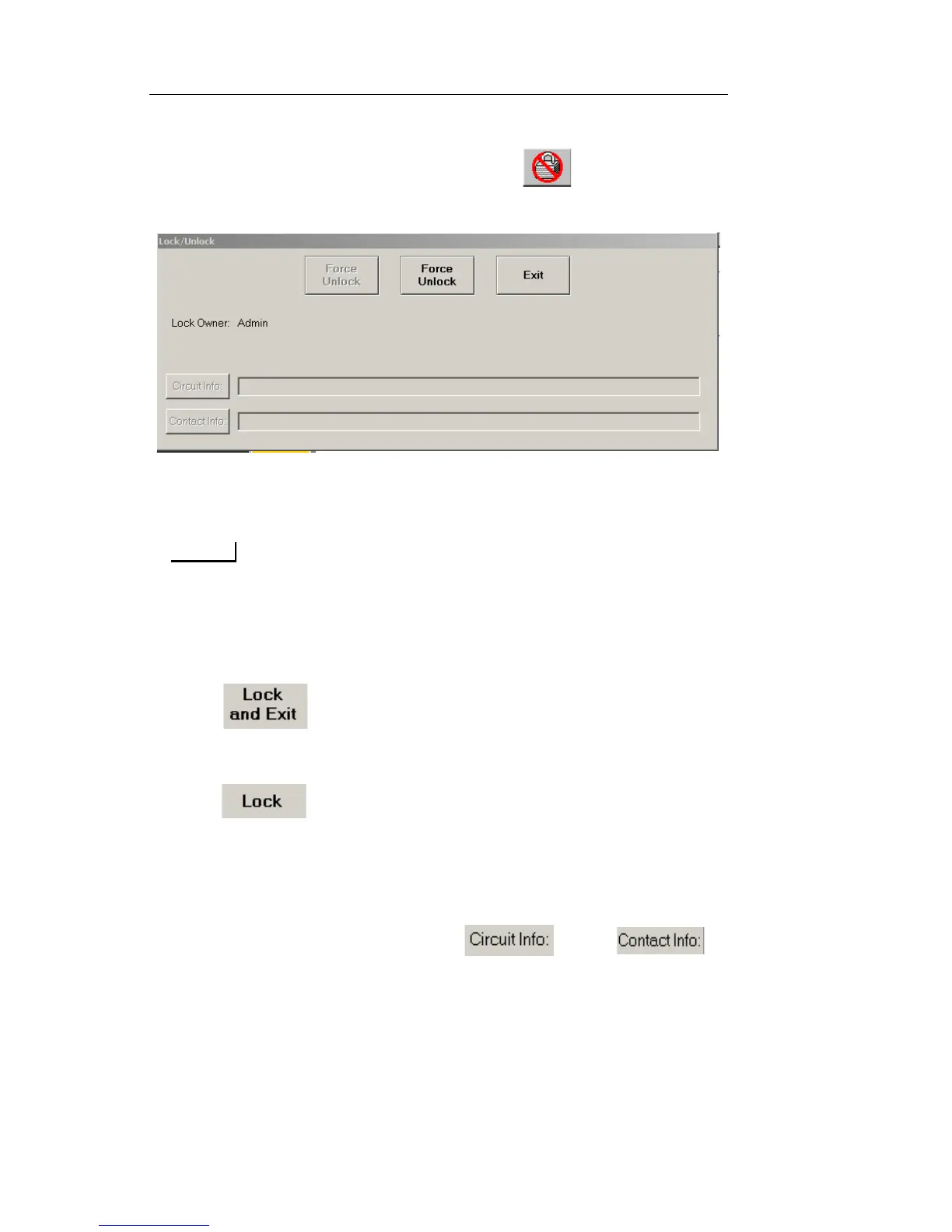
When a test set is locked by someone else the icon is displayed.
1. Select the Lock icon. The Lock/Unlock dialog box appears.
2. Select Force Unlock. The command buttons change to “Lock and
Exit” and “Lock”.
You must have Admin privileges to force the unlock.
3. Selecting one of the following causes the command buttons to
change to “Unlock and Exit” and “Unlock”, and the information
boxes become available.
– - Locks the unit and automatically closes the dialog
box. To enter notes after the dialog box closes, select the
locked icon to reopen the dialog box.
– - Allows you to enter note information in the Circuit
Info: and Contact Info: boxes before closing the dialog box.
The notes carry over to all protocol processors in the Test Unit.
When a different Test Unit is locked the user can enter notes
pertinent to it.
4. To enter note information, select and/or .
The Enter User String keyboard opens.
5. Type notes and select Enter. The notes appear in their associated
information box.
6. Select Exit to close the Lock/Unlock dialog box.


 To Next Page
 Loading...