EasyManua.ls Logo

Digitrax Zephyr - Operating Locomotives on Jump Port 1; Selecting and Confirming Locos on Jump Port 1

Digitrax Zephyr
60 pages
Print Icon
To Next Page IconTo Next Page
To Previous Page IconTo Previous Page
Loading...
To run a loco address on Jump Port 1:
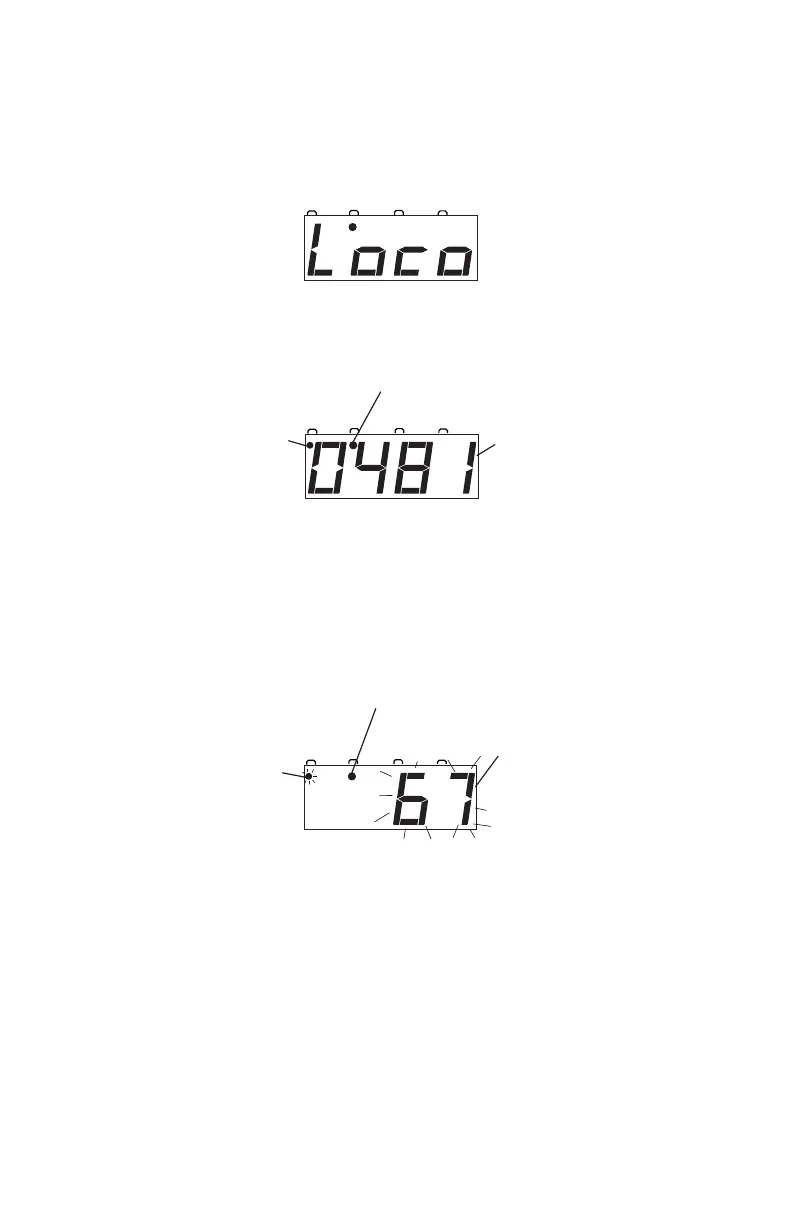
1. Press the JUMP Key until you have JUMP 1 in the display, you’ll
see the Jump Indicator Dot on steady and a screen like this if there is
nothing selected on Jump 1.
Or, you’ll see a screen similar to this if there is a locomotive address
selected on Jump 1
2. To select a loco on Jump 1 or to change the loco that is already there,
press the LOCO Key. The screen will begin flashing to let you
know that the loco selection is pending. It will look something like
this:
3. Use the NUMERIC KEYPAD to enter the loco address you want to
run on JUMP1 and press the LOCO Key again to select it on
JUMP 1. The display will be steady and you will be able to control
the loco you selected on the DC power pack attached to JUMP 1.
SWITCHMUJUMPFUNCTION
Steady Jump Indicator Dot means
Jump 1 is in the display.
Blinking 67 in the
display means Loco
address selection of
67 for Jump 1 is
pending. Press Loco
to complete selection
or enter a different
address and press
Loco to select
that address.
Blinking Function
Indicator Dot
means Loco
selection is pending.
SWITCHMUJUMPFUNCTION
Steady Jump Indicator Dot means
Jump 1 is in the display.
0481 in the display
means Loco address
0481 is currently
running on Jump 1.
Steady Function
Indicator Dot
means that the
DCS50 keypad
can be used to
control functions
on address 0481.
SWITCHMUJUMPFUNCTION
Steady Jump Indicator
Dot means that Jump 1
is in the display.
Loco in the display
means that no loco
is currently running
on Jump 1.
40

Table of Contents

Related product manuals