101
Settings in Common
DIGNOケータイ3
Reset Settings
Reset settings or erase all data (reset to factory default).
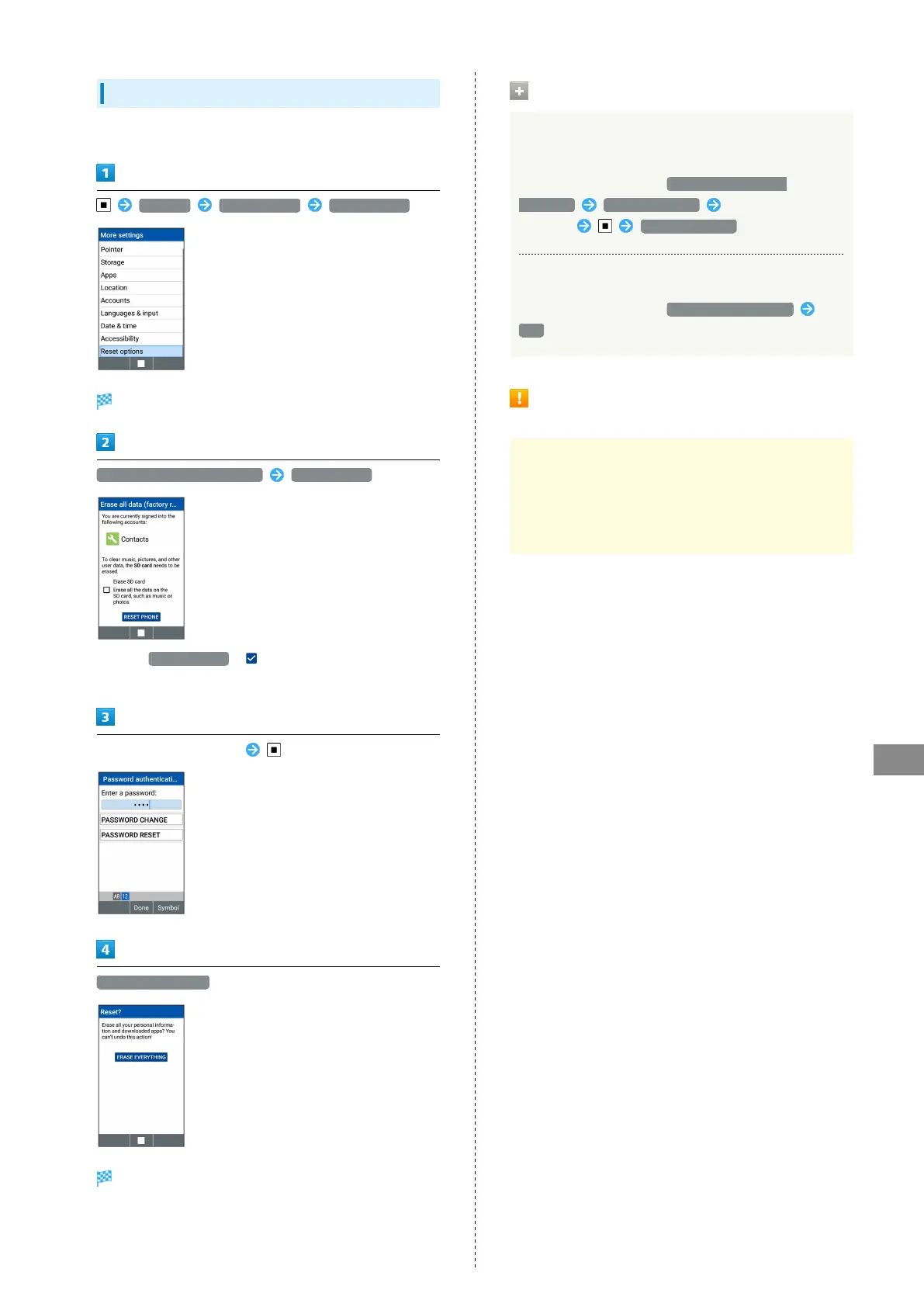
Settings More settings Reset options
Reset options window opens.
Erase all data (factory reset) RESET PHONE
・
Select Erase SD card ( ) to also erase data on an
installed SD Card.
Enter Operation Password
ERASE EVERYTHING
Handset reboots.
Operations on Using Reset Options
Resetting Network Settings for Wi-Fi, Mobile
Data, and Bluetooth
®
In Reset options window, Reset Wi-Fi, mobile &
Bluetooth RESET SETTINGS Enter Operation
Password RESET SETTINGS
Resetting App Settings
In Reset options window, Reset app preferences
Yes
Cautions on Erasing All Data (Factory
Reset)
Erasing all data (factory reset) erases all data saved
to handset memory. It is recommend that you back up
important data beforehand.
・Erased data cannot be restored. Resetting handset must
be carried out after sufficient confirmation.



 To Next Page