23
Getting Started
DIGNOケータイ3
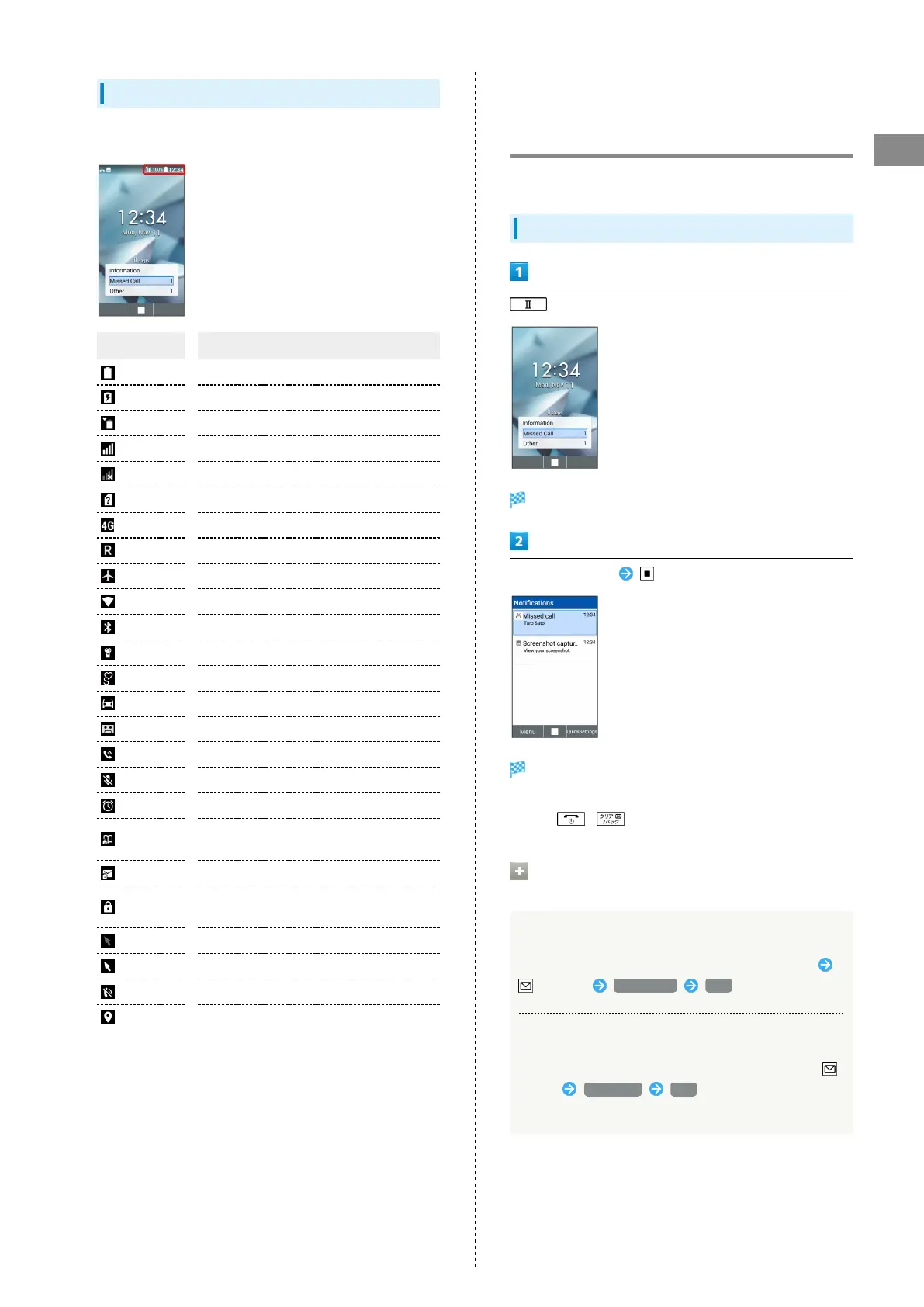
Status Indicators
Status Indicators appear on the right.
Indicator Description
Battery Strength
Charging
Battery Care Mode
Signal Strength
No Signal
No SIM Card
4G Data Connectable
Roaming
Airplane Mode
Wi-Fi Network Connected
Bluetooth
®
On
Manner Mode
Silent Mode
Drive Mode
Answer Phone Set
Call Set to Speaker
Call Mic Off
Alarm Set
Secret Phone Book Entry Temporarily
Viewable
Secret Mail Temporarily Viewable
Secret Phone Book Entry and Mail
Temporarily Viewable
Pointer Off
Pointer On
Ringtone Volume 0
Locationing
Checking Handset Status &
Notifications (Notifications &
Settings Window)
Open notifications and check handset status.
Using Notifications Window
(Long Press)
Notifications Window opens.
Select notification
Details appear.
・Follow onscreen prompts.
・
Press / to close Notifications Window.
Operations on Using Notifications
Window
Deleting One Notification
Select notification to delete on Notifications Window
(Menu) Delete one YES
Deleting All Notifications
Select notification to delete on Notifications Window
(Menu) Delete all YES
・Some notification cannot be deleted.



 To Next Page