58
Operations on Creating S! Mail
Converting S! Mail Draft to SMS
In window to create S! Mail, (Menu) Convert to
SMS
・If more than the sendable number of characters are
entered, a confirmation screen appears and part of data
is deleted.
Discarding Mail
In window to create S! Mail, (Menu) Discard
Yes
・
Alternatively, Yes .
Sending SMS
Sending SMS
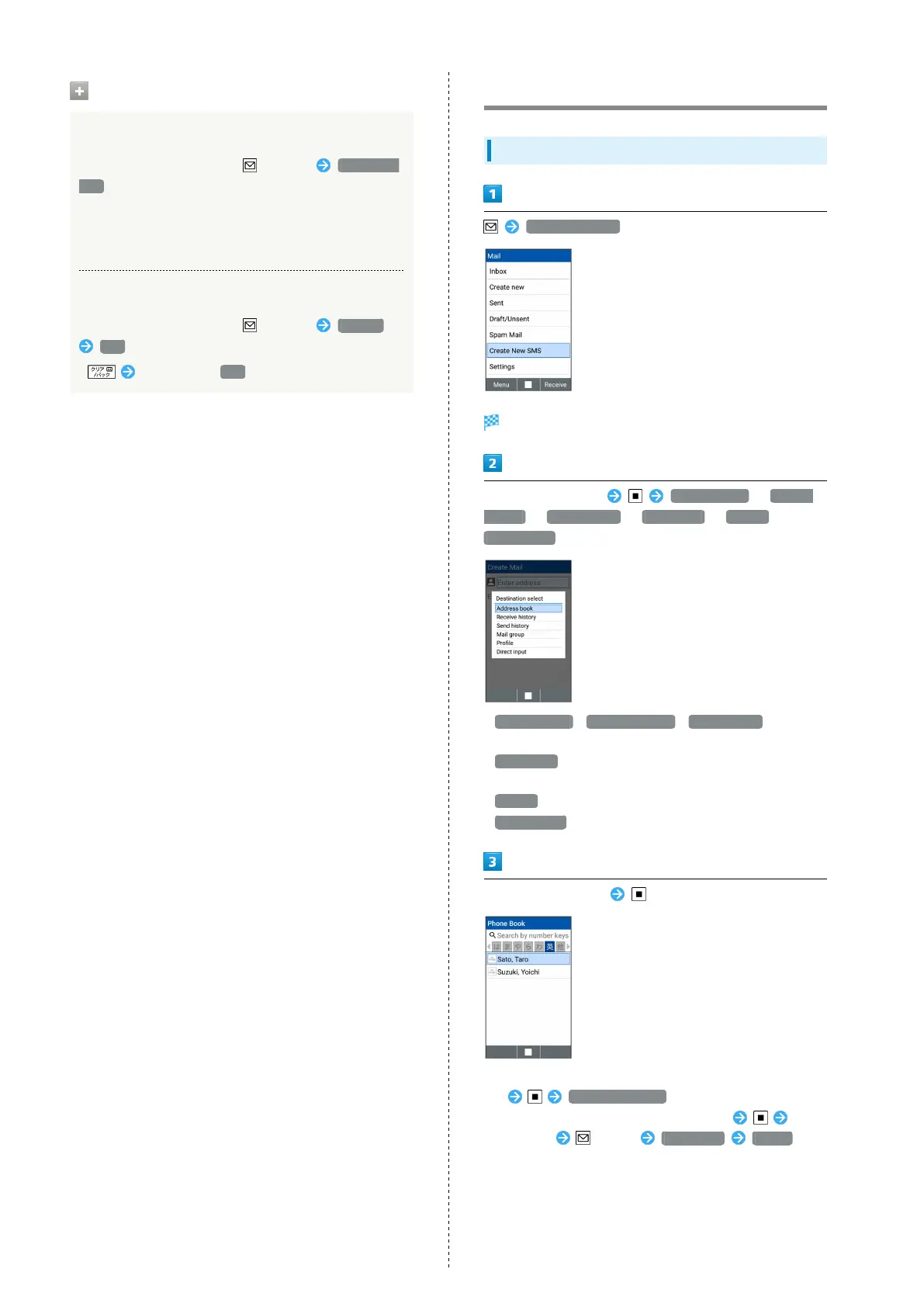
Create New SMS
Window for creating SMS opens.
Select Recipient field Address book / Receive
history / Send history / Mail group / Profile /
Direct input
・
Address book / Receive history / Send history to select
a recipient from Phone Book or receive and send histories.
・
Mail group to select a mail group and send to recipients in
the group.
・
Profile to select a recipient from the profile.
・
Direct input to enter address manually.
Select/enter recipient
・To add recipients, select Recipient field already filled
in Add destinations .
・
To delete a recipient, select Recipient field Select
a recipient (Menu) Delete one Delete .



 To Next Page