46
Auto Answering
(Menu) Answer memo when a call is arriving
・
Press to answer a call while playing back/recording
auto answering.
・Select whether to output recorded content from
Earpiece by pressing (ON/OFF) while recording auto
answering.
Forwarding Incoming Call
(Menu) Forwarding when a call is arriving
・Specify the destination beforehand. For details, see "Call
Forwarding."
Answering Calls with Earphone Mic (Sold
Separately)
Press the switch on earphone mic when a call is arriving.
・Press the switch on earphone mic again to end call.
・Handset is compatible only with USB Type-C analog
earphones/conversion cable.
Using VoLTE
VoLTE (Voice over LTE) is an LTE-based voice call system.
Compared to voice calls with conventional 3G networks,
higher-quality sound and shorter time until ringback tones
sound are benefits.
・VoLTE is available between compatible SoftBank/Y!mobile
handsets. Handset and other device must be in a SoftBank
4G LTE (FDD-LTE) service area and both "4G voice call" and
4G service in "Cellular networks" settings must be enabled.
・For details on the countries/regions where VoLTE
international roaming, see "Service Page (https://
www.softbank.jp/mobile/service/global/overseas/volte/)."
Setting Handset not to Use VoLTE
Phone Call Settings 4G voice call (
)
・
4G voice call to toggle on ( )/off( ).
VoLTE Cautions
VoLTE requires 4G service. VoLTE is not available when 4G
service is disabled. To enable 4G service:
Settings Wireless/Network Cellular
networks Select Network 4G/3G/GSM or
4G/3G
Placing International Calls
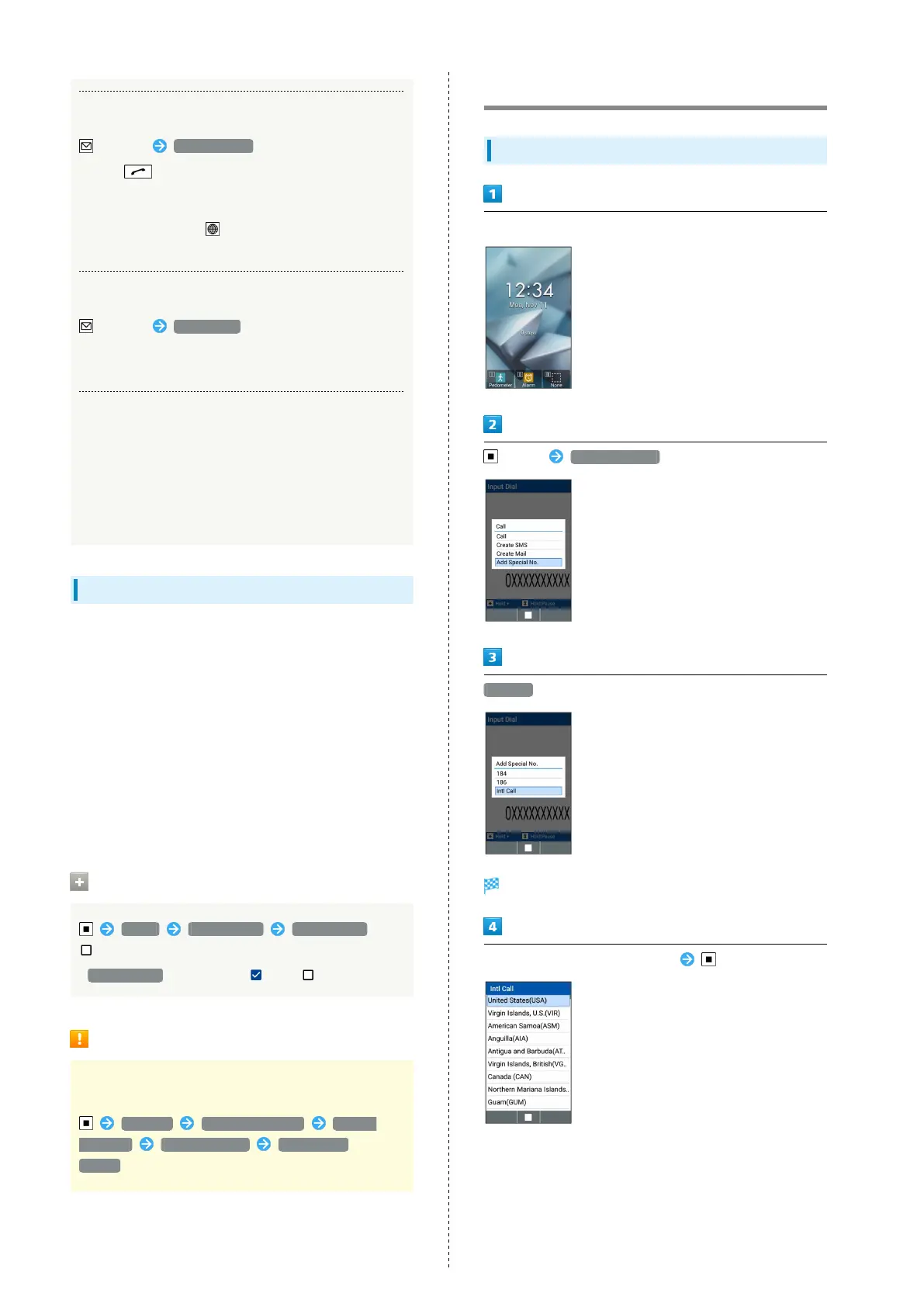
Calling to Countries Outside Japan
Dial number
(Call) Add Special No.
Intl Call
Country code list opens.
Select country code of other party



 To Next Page