41
Operations in Common
DIGNOケータイ3
Phone Book
Save phone numbers and email addresses.
In addition, save birthdays and other information.
Set ringtones for incoming calls/messages for each contact.
Phone Book Caution
Contacts may be altered/lost if handset is left uncharged
or without a Battery, or due to accidents malfunctions,
repairs, handset upgrade/replacement, mishandling, etc.
Back up important contacts and other data regularly.
SoftBank Corp. is not liable for any damages resulting from
loss/alteration of contacts.
Adding New Contacts
Saving a contact's name, number, email address (at least one
of which must be saved), and group is described.
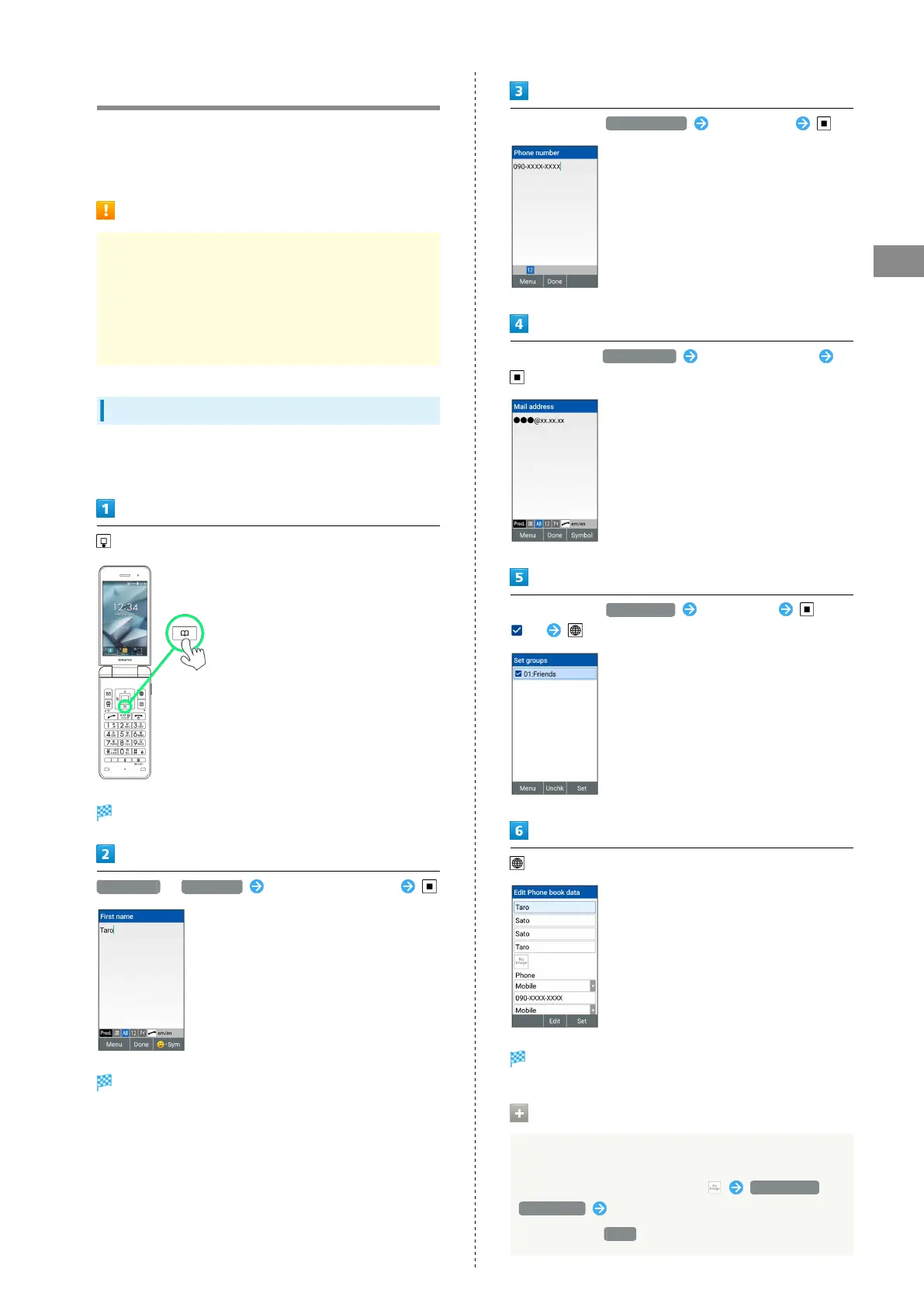
(Long Press)
Phone Book edit window opens.
First name / Last name Enter first/last names
Reading is entered automatically.
In Phone fields, Phone number Enter number
In Email fields, Mail address Enter email address
In Groups field, Group name Select group (
) (Set)
(Set)
Contact is saved.
Operations on Saving Contact
Saving photo
In Edit Phone book data window, Data Folder /
Take photo Follow onscreen prompts
・
If you select None , no pictures are saved.



 To Next Page