89
Settings in Common
DIGNOケータイ3
Data Communication Settings
Check your amount of cellular data usage (per month) and
restrict usage.
Data usage is only as tracked by handset, and may differ from
actual data usage statement.
Checking Data Usage
Check data usage.
Settings Wireless/Network
Wireless/Network window opens.
Data usage
Data usage window opens.
Set each item
Setting is complete.
・
Mobile data usage to open Mobile data usage window.
Operations on Using Data Usage
Setting Whether to Activate Mobile Data
In Data usage window, Mobile data OK
・
Mobile data to toggle check ( )/uncheck ( )
Setting Cycle to Reset Data Usage
In Data usage window, Data warning & limit App
data usage cycle Select the day (Set)
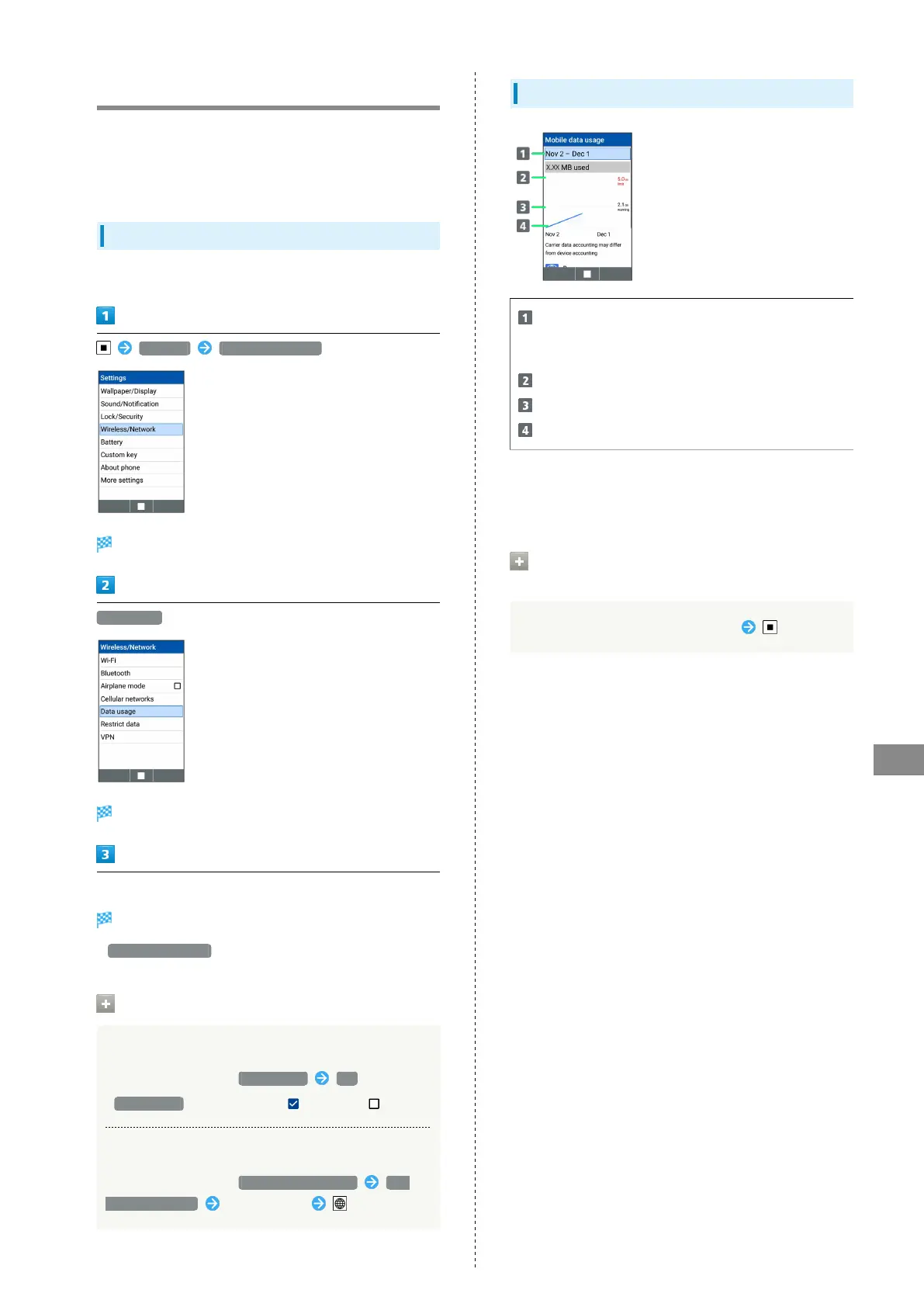
Data Usage Window Layout
Data usage cycle
Show cycle for checking data usage/set cycle reset
date
1
Data communication limit line
Data communication alert line
Data usage
1 Data usage cycle is reset on the same day of every month
(at time of purchase, day before first handset activation)
(Reset date settable).
Checking Data Usage for Individual
Applications
Select app in Mobile data usage window



 To Next Page