34
Using Manner Mode
Mute ringtones and other handset sounds to avoid disturbing
others around you.
Cautions on Activating Manner Mode
Ringtones, operation tones, etc. do not sound in Manner
mode. Place handset in Silent mode/Drive mode to also stop
handset from vibrating for new calls or mail.
・Camera shutter and video record start/stop beeps
continue to sound in Manner mode.
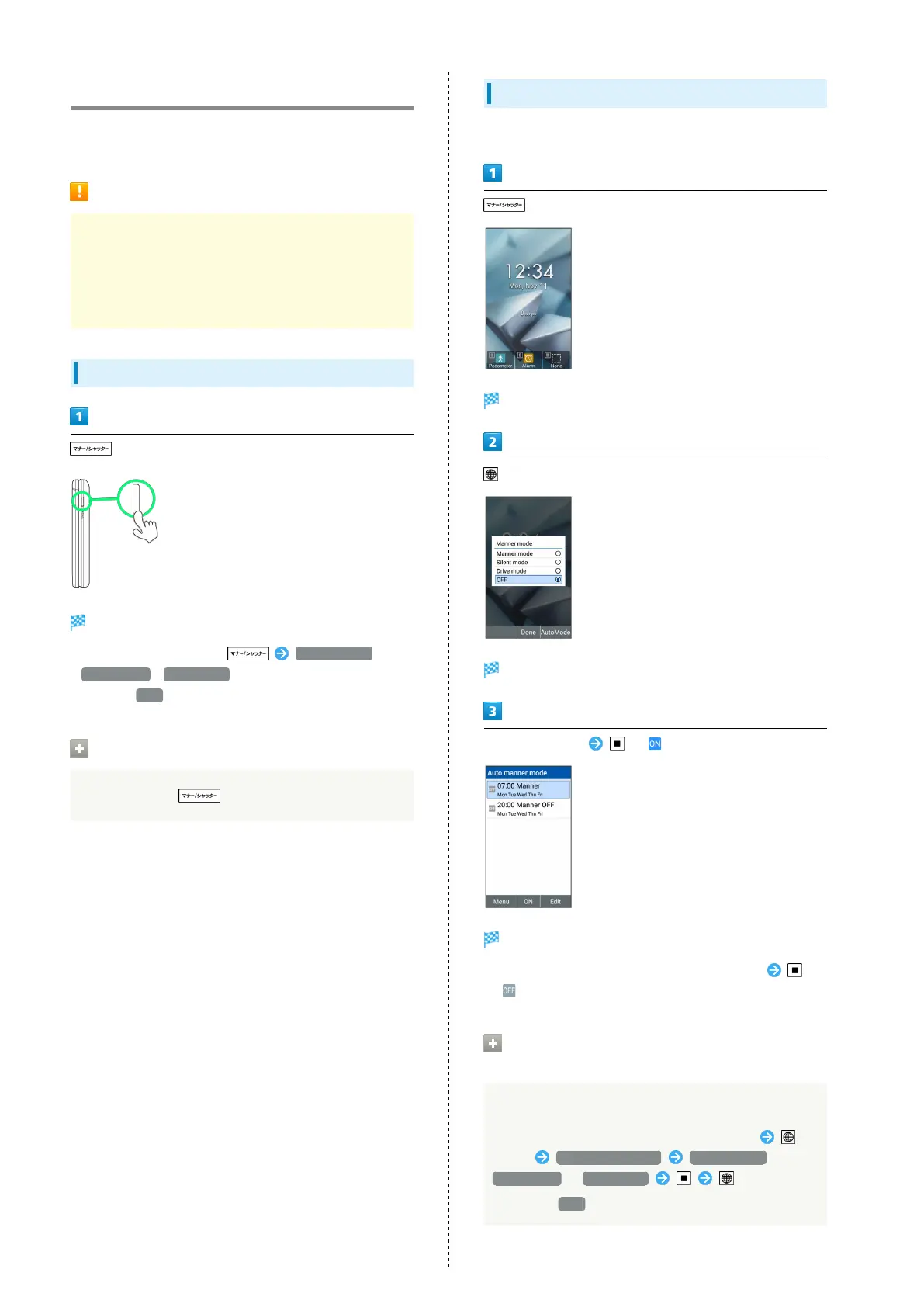
Activating Manner Mode
(Long Press)
Manner mode activates.
・
Alternatively, in Standby, Manner mode /
Silent mode / Drive mode .
・
If set to OFF , handset does not enter Manner mode.
Canceling Manner Mode
In Manner mode, (Long Press)
Setting Auto Manner Mode
Set Manner mode to change automatically at a set time.
Screen for selecting a Manner mode appears.
(AutoMode)
Auto manner mode screen opens.
Select time to set ( )
Settings are enabled.
・
To disable Auto manner mode, select the set time
( ).
Operations on Setting Auto Manner
Mode
Selecting manner mode
Select time to set in auto manner mode screen,
(Edit) Manner mode type Manner mode /
Silent mode / Drive mode (Done)
・
Selecting OFF disables manner mode at the set time.



 To Next Page