10
Removing USIM Card
Always power off beforehand.
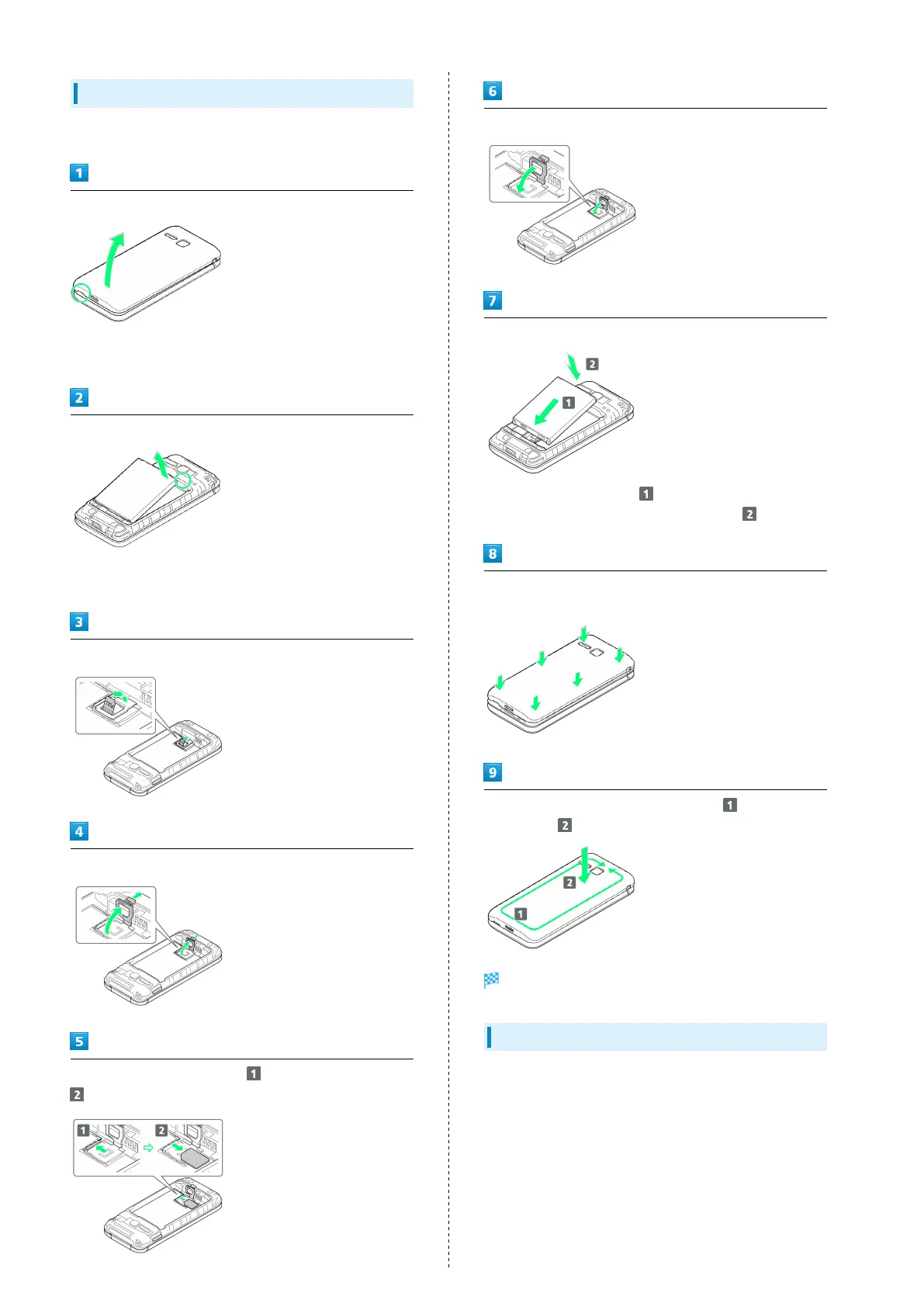
Remove Back Cover
・Gently lift Back Cover by notch in direction shown with
finger.
Remove battery
・Put fingertip on Battery from the notch of handset and
gently lift Battery by upper part in direction shown.
Lift the tab in direction shown
Pull up the tab and lift the stopper in direction shown
Push USIM Card until it clicks ( ) and pull it straight (
)
Push down the stopper until it clicks locked
Insert Battery
・
Slide Battery in direction onto metal terminals in
handset, and press into handset in direction .
Fit Back Cover on handset, and press Back Cover in directions
shown
Work way around Back Cover in directions holding down
in direction to install completely
USIM Card is removed.
SIM Unlocking
Handset supports SIM unlocking. After SIM-unlocking handset,
other companies' SIM cards can also be used on handset.
・Services and applications may have limitations with use
of an other-company SIM card. SoftBank Corp. makes no
guarantees whatsoever regarding the proper operation of
handset.
・For details on SIM unlocking, see SoftBank Website.



 To Next Page